

Chapter 2: Where the cloud came from
For most of computing history, if you needed a computer, you bought one.
For most of computing history, if you needed a computer, you bought one. If you needed more capacity, you ordered more hardware. That process took weeks. Sometimes months. This was fine when software moved slowly. It stopped being fine when the internet arrived and suddenly you needed ten times the capacity on Black Friday and almost none of it in January.
So people started asking a different question.
What if computation was more like electricity? You don't own a power plant. You don't buy a generator every time you want to charge your phone. You plug in, you draw what you need, you pay for what you used. When demand goes up, more power flows. When it drops, you stop paying.
The idea of treating compute the same way — utility computing — had been floating around since the 1960s. John McCarthy said in 1961 that computing would someday be organized as a public utility. But the infrastructure to actually do it didn't exist.
Three things had to come together first.
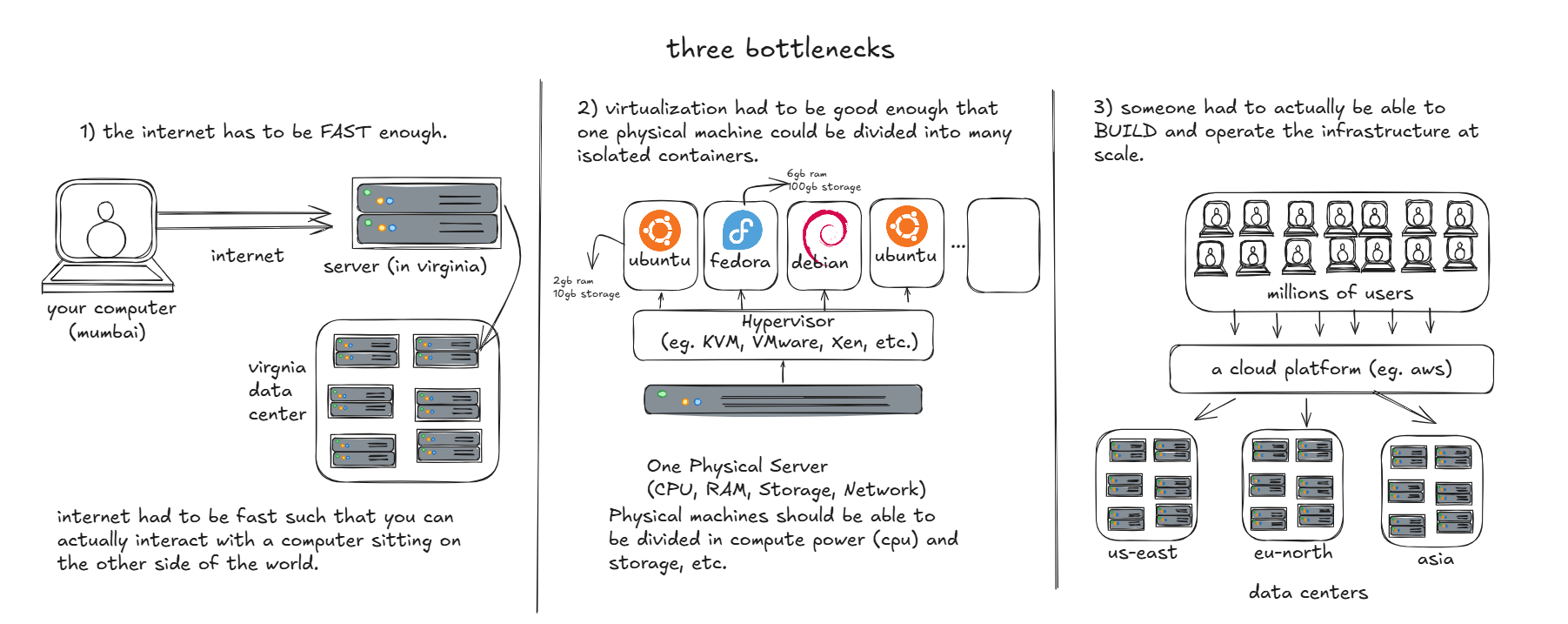
Amazon did that last part — not because they set out to build a cloud, but because they had to solve their own problem first. They were growing fast. New teams needed servers. Getting hardware took too long. So they built an internal system that let teams provision compute on demand, through an API, without waiting for physical hardware.
Then they realized other companies had the same problem. EC2 launched in 2006. S3 launched in 2006. The cloud, as a commercial product, was born.
But we skipped over something important.
Virtualization. What does that actually mean?
Here's the physical reality. You have a server — a piece of metal with a CPU, some RAM, some disk. That CPU can execute billions of instructions per second. It can only do one thing at a time, but it switches between tasks so fast that everything feels simultaneous. (CPU's each core does not multitask. A single process is given to a single CPU core. There can be multiple cores for parallel processing.)
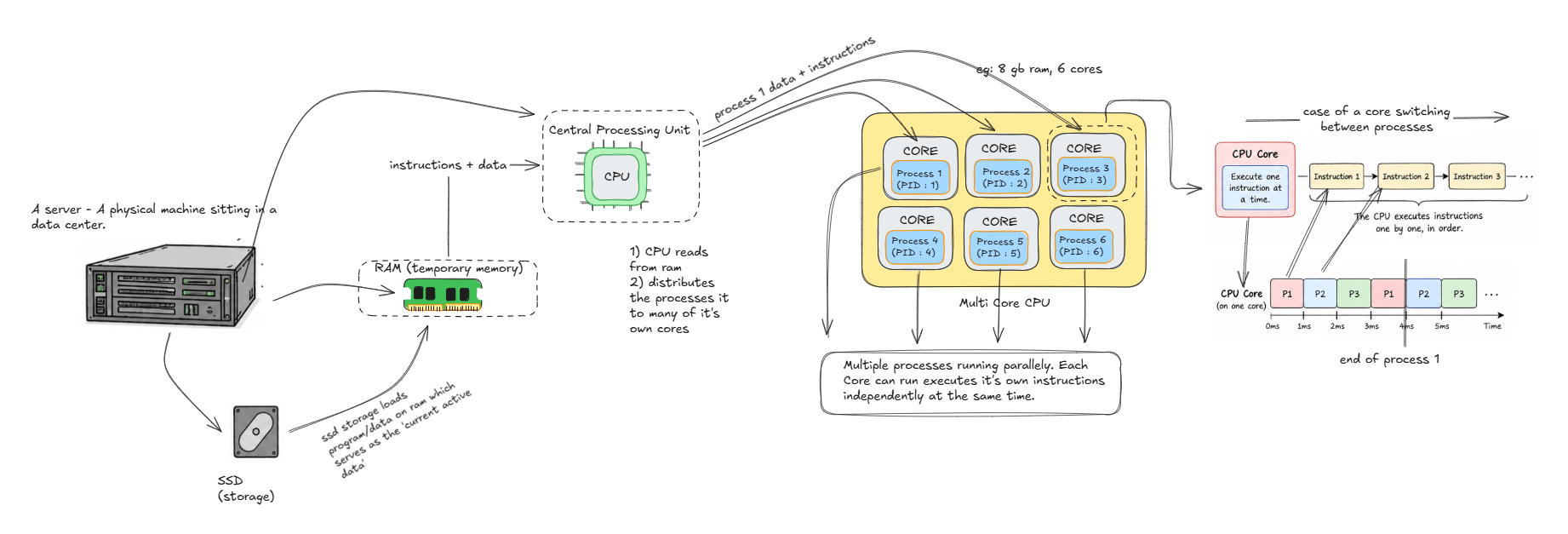
Now, a hypervisor is a piece of software that sits between that physical hardware and the software running on top of it. Its job is to create the illusion of multiple independent computers — each with their own CPU, their own memory, their own disk — running on that one physical machine.
Each illusion is a virtual machine.
The virtual machine thinks it owns real hardware. It boots an operating system. It runs processes. It reads and writes to what it thinks is its own disk. It has no idea it's sharing a physical server with twenty other virtual machines doing the exact same thing.
The hypervisor enforces the illusion. It makes sure each VM's memory is invisible to the others. It schedules each VM's access to the real CPU. It translates each VM's disk writes into the right location on the real disk.
When you launch an EC2 instance, you're getting one of these illusions. A virtual machine, carved out of a physical server in an AWS data center, with its own fake CPU and fake memory and fake disk — all backed by real hardware that AWS owns and operates.
Introduction to Tiny AWS' own hypervisor:
You don't know which physical server. You don't know which data center building. You don't need to. That's the whole point.
AWS does all of this with custom hardware — a system called Nitro — that offloads the hypervisor work onto dedicated chips so it doesn't eat into the CPU you're paying for. One VM genuinely cannot see another VM's memory, even if they're running on the same physical server.
That's the production version.
tiny-aws does something simpler. Instead of hardware VMs, it uses Linux's built-in isolation primitives — namespaces and cgroups — to create containers that behave like isolated machines. It's not as strong as a hardware hypervisor. But it uses the same underlying ideas, and you can read every line of how it works.
Which means before we open tiny-aws's code, we need to understand those Linux primitives.
That's next.