

Chapter 28: iptables and netfilter
A packet arrives at your machine. The kernel receives it. Before delivering it to a process — or forwarding it somewhere else — the kernel runs it through a...
A packet arrives at your machine. The kernel receives it. Before delivering it to a process — or forwarding it somewhere else — the kernel runs it through a set of rules. Those rules can accept it, drop it, modify it, or redirect it.
That rule system is netfilter. The tool for configuring it is iptables.
Netfilter hooks
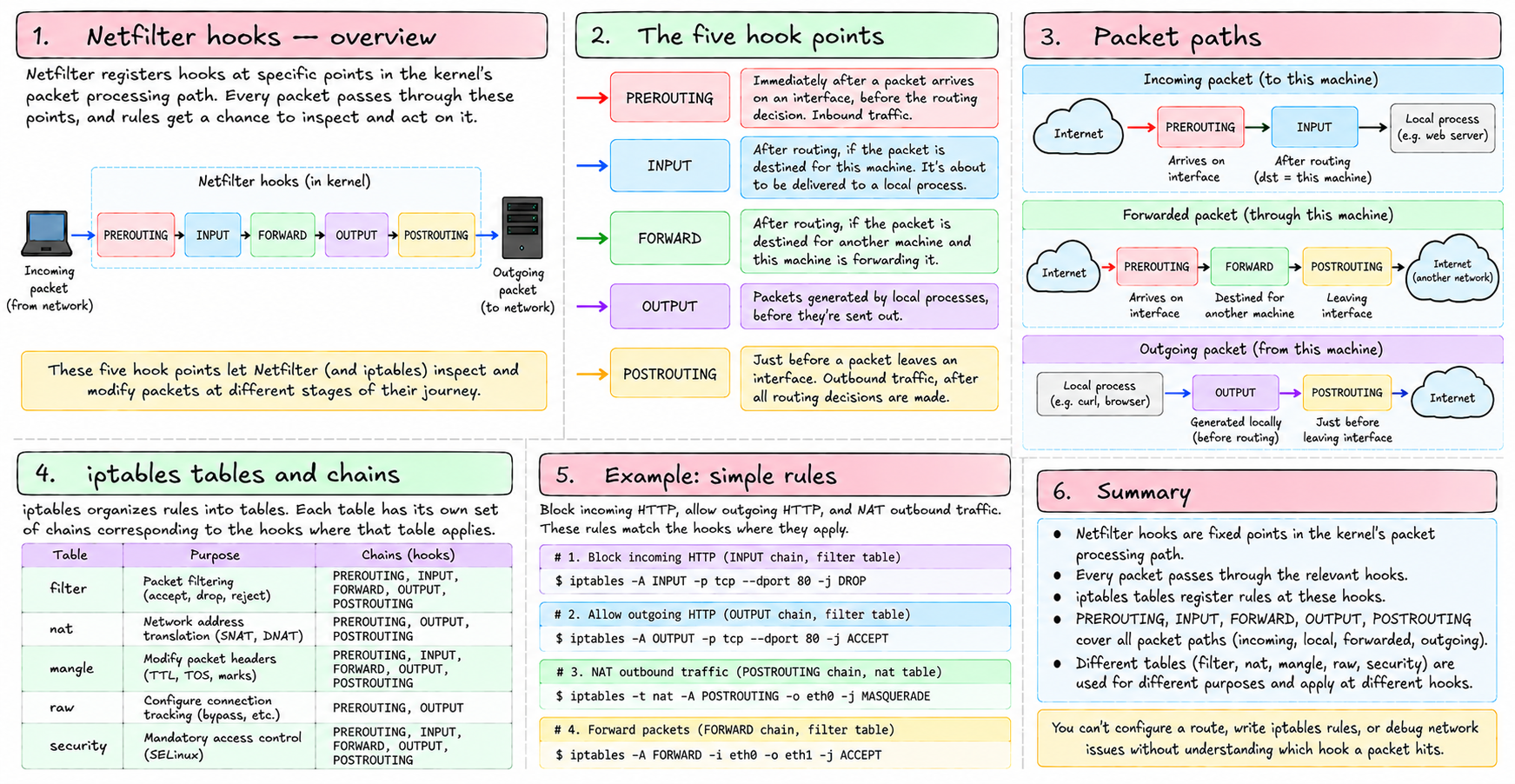
Netfilter works by registering hooks at specific points in the kernel's packet processing path. Every packet passes through these points, and at each one, registered rules get to inspect and act on the packet.
The five hook points:
- PREROUTING — immediately after a packet arrives on an interface, before the routing decision. Inbound traffic, before the kernel decides where it goes.
- INPUT — after routing, if the packet is destined for this machine. It's about to be delivered to a local process.
- FORWARD — after routing, if the packet is destined for another machine and this machine is configured to forward it. The packet is passing through.
- OUTPUT — packets generated by local processes, before they're sent out.
- POSTROUTING — just before a packet leaves an interface. Outbound traffic, after all routing decisions are made.
iptables organizes rules into tables. Each table has its own set of chains corresponding to the hooks where that table applies.
Tables
There are four main tables:
filter — the default table. Decides whether packets are allowed or dropped. Chains: INPUT, FORWARD, OUTPUT.
nat — Network Address Translation. Rewrites source or destination IP addresses and ports. Chains: PREROUTING (for destination NAT — redirecting inbound traffic), OUTPUT, POSTROUTING (for source NAT — masquerading outbound traffic).
mangle — modifies packet headers. Rarely needed for basic setups. Used for things like setting TTL or marking packets for QoS.
raw — runs before connection tracking. Used to exempt packets from being tracked.
Rules and chains
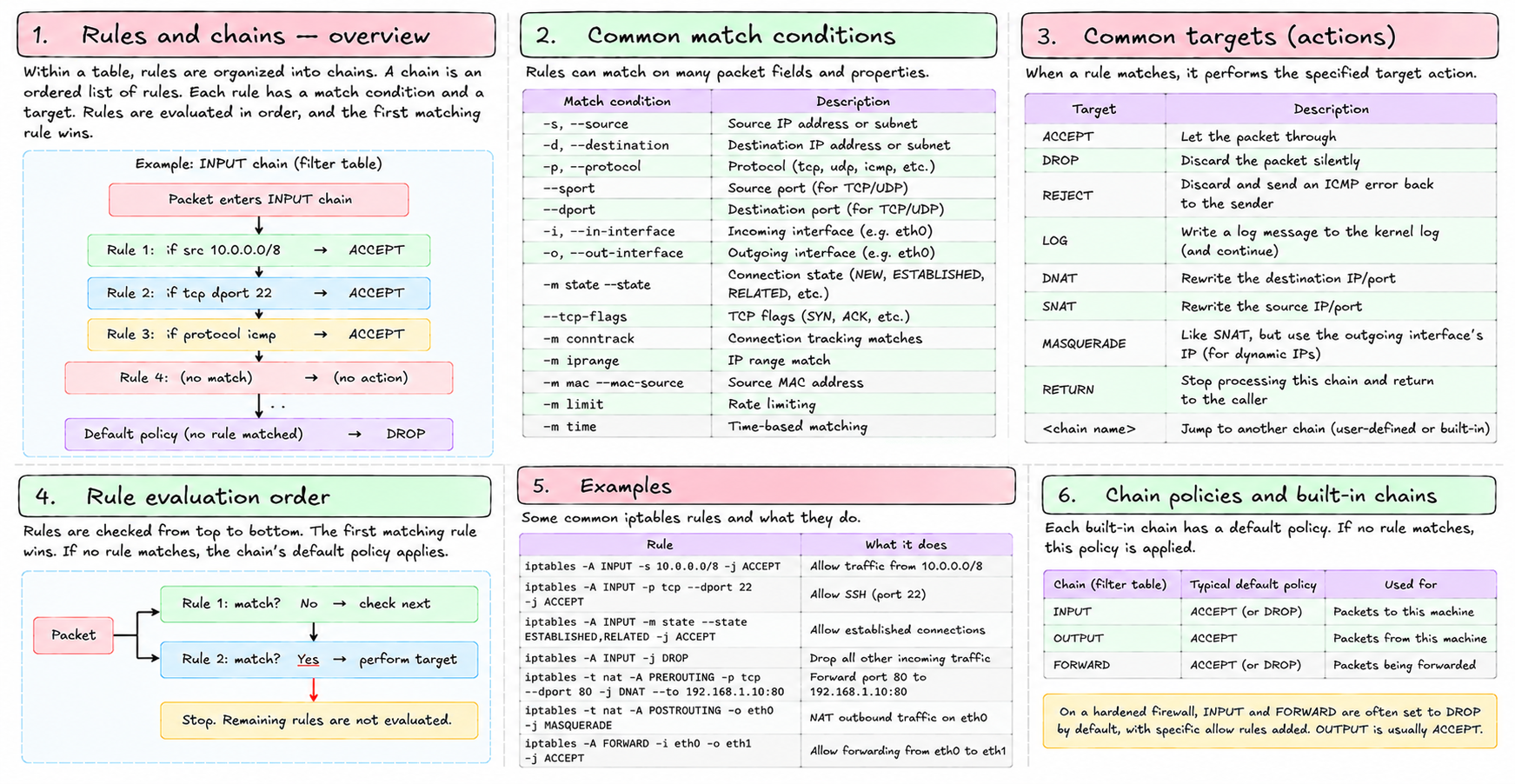
Within a table, rules are organized into chains. A chain is an ordered list of rules. Each rule has a match condition and a target.
Match conditions: source IP, destination IP, protocol, source port, destination port, incoming interface, outgoing interface, connection state, and many more.
Targets: ACCEPT (let it through), DROP (discard silently), REJECT (discard with an ICMP error back to sender), LOG (write to kernel log and continue), DNAT (rewrite destination), SNAT/MASQUERADE (rewrite source), RETURN (stop processing this chain), or another chain name (jump to it).
Rules are evaluated in order. The first matching rule wins. If no rule matches, the chain's policy applies — typically ACCEPT for most chains by default, or DROP for a hardened firewall.
Listing rules
iptables -L -n -v-L lists all rules. -n skips DNS lookups. -v shows packet and byte counters plus interface information.
iptables -t nat -L -n -vShows the nat table specifically. Each table must be queried separately.
A concrete example: blocking a port
iptables -A INPUT -p tcp --dport 22 -j DROP-A INPUT — append to the INPUT chain of the filter table (default).
-p tcp — match TCP protocol.
--dport 22 — match destination port 22.
-j DROP — drop the packet.
Now SSH connections from outside are silently dropped. The sender gets no response — the connection just times out.
To reject instead of drop (sends an ICMP unreachable back):
iptables -A INPUT -p tcp --dport 22 -j REJECT --reject-with tcp-resetNAT and MASQUERADE
This is the piece that gives containers internet access.
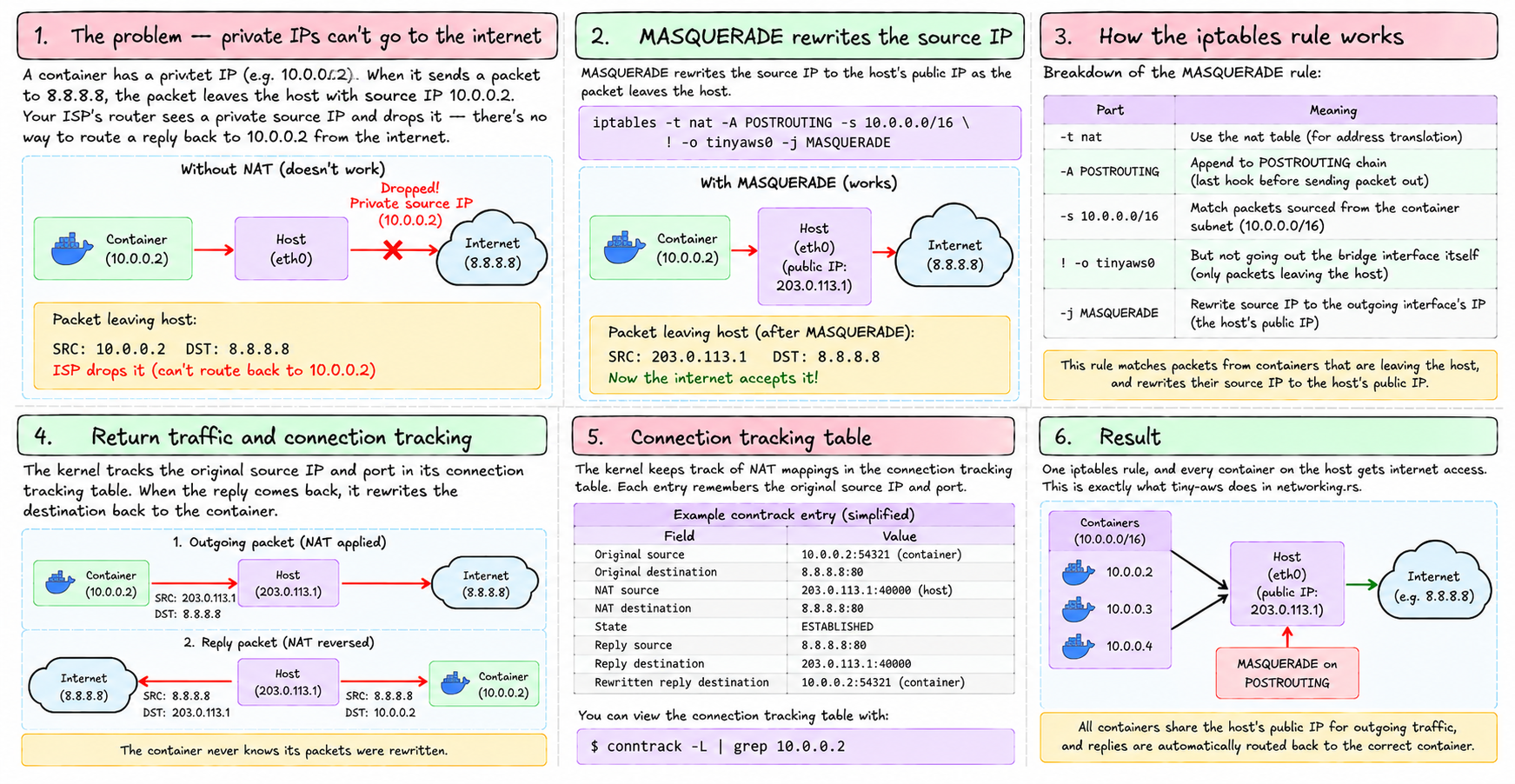
A container has a private IP — 10.0.0.2. When it sends a packet to 8.8.8.8, the packet leaves the host's eth0 with source IP 10.0.0.2. Your ISP's router sees a private source IP and drops it — there's no way to route a reply back to 10.0.0.2 from the internet.
MASQUERADE rewrites the source IP to the host's public IP as the packet leaves:
iptables -t nat -A POSTROUTING -s 10.0.0.0/16 ! -o tinyaws0 -j MASQUERADEBreaking this down:
-t nat— the nat table-A POSTROUTING— append to POSTROUTING chain (last hook before sending)-s 10.0.0.0/16— match packets sourced from the container subnet! -o tinyaws0— but not going out the bridge itself (only packets leaving the host)-j MASQUERADE— rewrite source IP to the outgoing interface's IP
The kernel tracks the original source IP and port in its connection tracking table. When the reply comes back addressed to the host's public IP, the kernel rewrites the destination back to 10.0.0.2 and sends it to the container. The container never knows its packets were rewritten.
This is exactly what tiny-aws does in networking.rs. One iptables rule, and every container on the host gets internet access.
Connection tracking
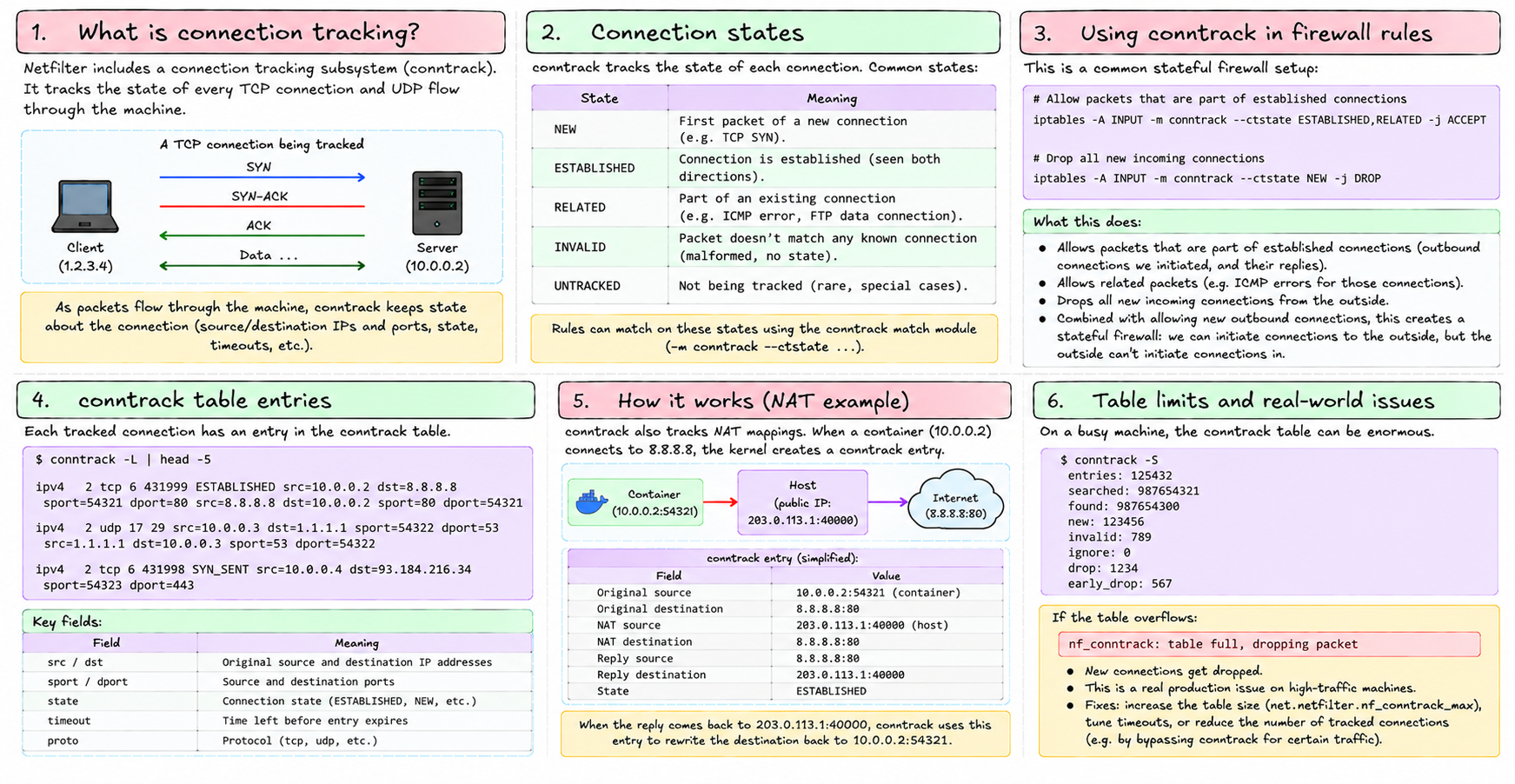
Netfilter includes a connection tracking subsystem — conntrack. It tracks the state of every TCP connection and UDP flow through the machine.
Rules can match on connection state:
iptables -A INPUT -m conntrack --ctstate ESTABLISHED,RELATED -j ACCEPT
iptables -A INPUT -m conntrack --ctstate NEW -j DROP
This drops all new incoming connections but allows packets that are part of established ones. Combined with allowing new outbound connections, this is a simple stateful firewall: the machine can initiate connections to the outside, but the outside can't initiate connections in.
conntrack -L lists all tracked connections. On a busy machine this list can be enormous. If it overflows (nf_conntrack: table full), new connections get dropped — a real production issue.
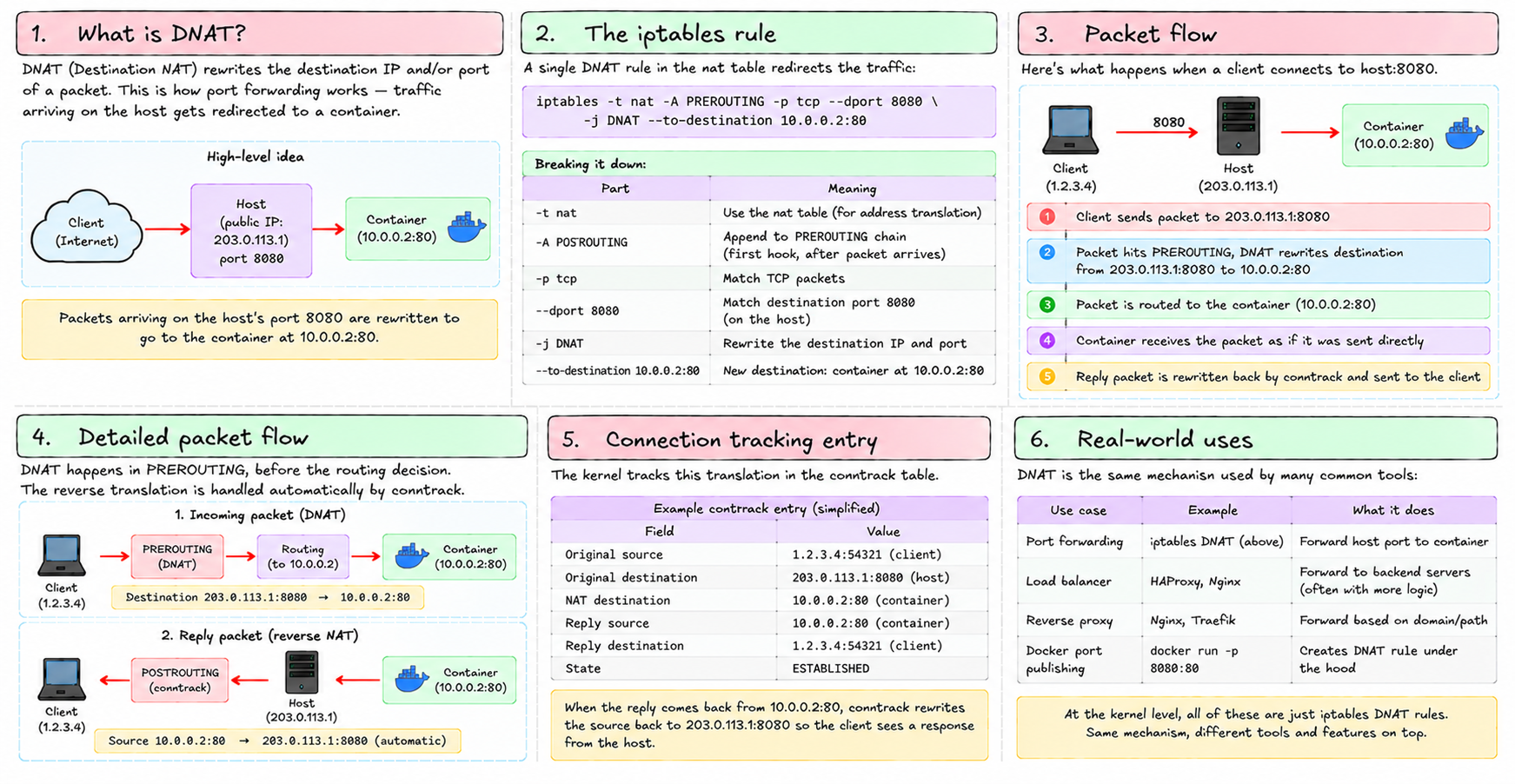
DNAT — destination NAT
MASQUERADE rewrites the source. DNAT rewrites the destination. This is how port forwarding works.
iptables -t nat -A PREROUTING -p tcp --dport 8080 -j DNAT --to-destination 10.0.0.2:80Traffic arriving on port 8080 gets redirected to the container at 10.0.0.2:80. The container receives it as if it came directly. Replies are rewritten back by conntrack.
This is the mechanism behind load balancers, reverse proxies, and Docker's port publishing (-p 8080:80). At the kernel level, it's one iptables rule.
tiny-aws's network agent
tiny-aws's network agent (data-plane/networking/network-agent/) polls the control plane for security group rules and translates them to iptables rules. A security group rule like "allow TCP port 443 from 0.0.0.0/0" becomes:
iptables -A INPUT -p tcp --dport 443 -j ACCEPTA rule like "allow TCP port 5432 from 10.0.0.0/16 only" becomes:
iptables -A INPUT -p tcp -s 10.0.0.0/16 --dport 5432 -j ACCEPT
iptables -A INPUT -p tcp --dport 5432 -j DROP
The agent only adds rules, never removes them — acknowledged as a gap in MISSING.md. A production network agent would diff the current rules against the desired state and reconcile — removing rules that shouldn't exist, adding ones that should.
nftables
iptables is the old interface. The modern replacement is nftables, with the nft command. nftables has a cleaner syntax, better performance, and supports sets (matching against a list of IPs or ports without multiple rules). Most modern Linux distributions default to nftables, with an iptables-nft compatibility layer that translates iptables commands to nftables under the hood.
tiny-aws uses iptables commands. They work through the compatibility layer on nftables systems.
iptables is the piece that makes container networking real: it's what gives containers internet access, what enforces security group rules, and what makes port forwarding possible. Everything in chapter 20 — the veth pairs and bridges — is the plumbing. iptables is the valve that controls what flows where.
Next: virtual networking — how Linux creates software-only network infrastructure that containers treat as real hardware.