

Chapter 7: Processes and the kernel
A process is not a program.
A process is not a program.
A program is a file on disk — a compiled binary, a Python script, a shell script. It's static. It sits there whether anyone is running it or not.
A process is what happens when you run it. It's the program in motion — loaded into memory, with a CPU executing its instructions, with state that changes over time. The same program can become many processes simultaneously. Each one is independent.
The kernel's job is to manage all the processes running on a machine — scheduling their access to the CPU, managing their memory, handling their requests to do things they can't do themselves.
When a process wants to read a file, it can't just reach out and do it. Reading a file means talking to a storage driver, which means kernel code. The process has to ask.
The way it asks is a syscall — a system call.
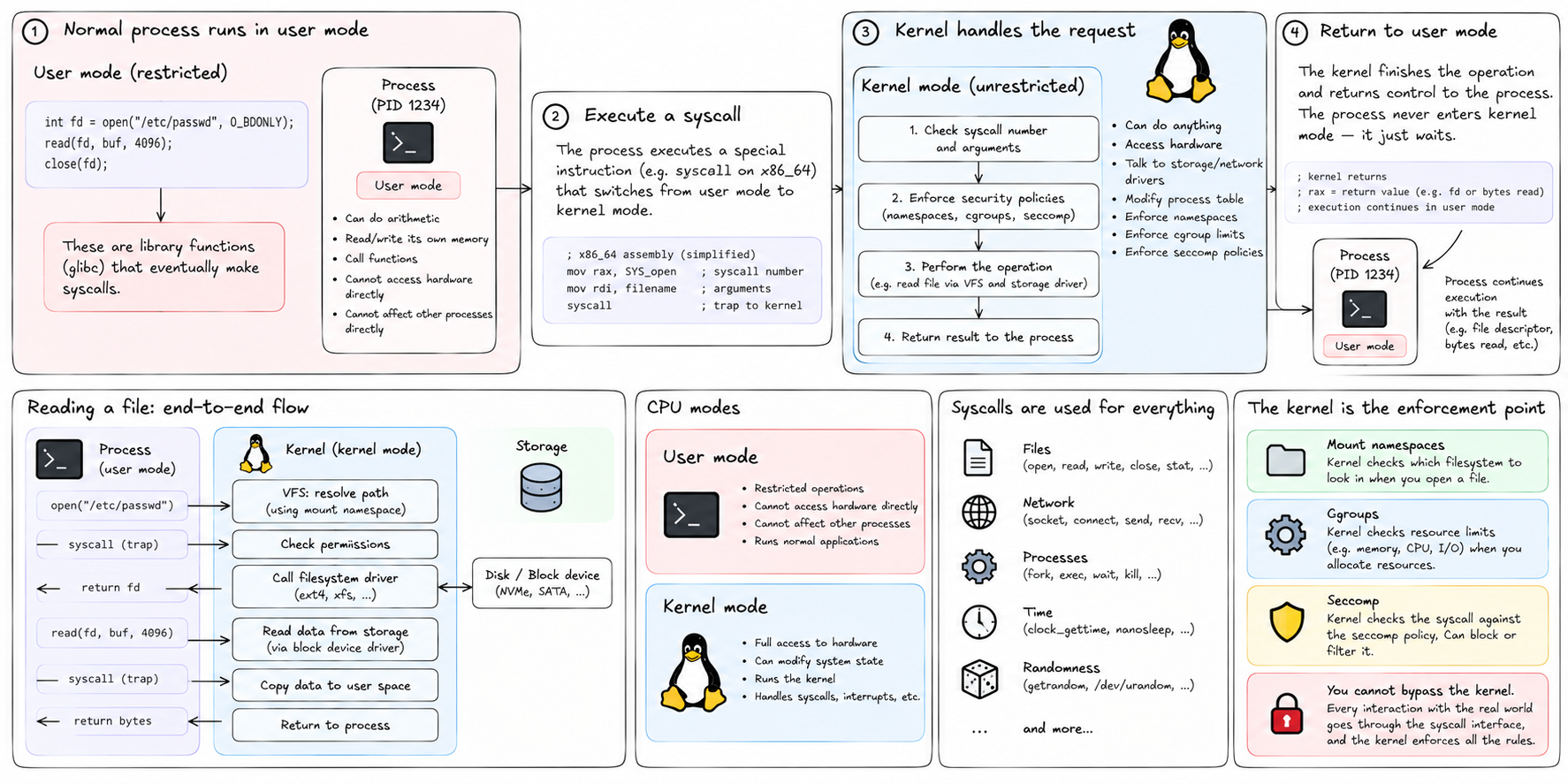
The CPU has two modes of operation. In user mode, code can only do things that don't affect other processes or the hardware directly — arithmetic, memory reads and writes within its own allocation, function calls. In kernel mode, code can do anything — talk to hardware, modify the process table, allocate memory, send signals.
Normal processes run in user mode. The kernel runs in kernel mode.
When a process needs to do something that requires kernel mode — read a file, write to the network, create another process — it executes a special instruction that transfers control to the kernel. The kernel runs the requested operation, then returns control to the process. The process never enters kernel mode. It just waits.
Every interaction between a process and the outside world — files, network, time, randomness, other processes — goes through this boundary. The kernel is the gatekeeper.
This boundary is also the enforcement point for namespaces, cgroups, and seccomp. When a process tries to open a file, the kernel checks its mount namespace to determine what filesystem to look in. When a process tries to allocate memory, the kernel checks its cgroup limit. When a process makes a syscall, the kernel checks its seccomp policy. The process can't bypass any of this — it can't avoid the kernel, because the kernel is the only way to do anything real.
Every process has a small set of properties the kernel tracks:
PID — process identifier. A number, unique across the running system. PID 1 is init. Your shell might be PID 4382. The kernel uses PIDs to identify processes in syscalls (kill(4382, SIGTERM)) and in /proc.
PPID — parent process ID. Every process except PID 1 was created by another process. The PPID records who created it. You can trace the ancestry of any process up to PID 1.
UID / GID — user and group identifiers. Numbers that determine what the process is allowed to do. UID 0 is root — a process with UID 0 has elevated privileges. File permissions are checked against the process's UID and GID.
File descriptors — the process's open files, sockets, and pipes, numbered from 0. File descriptor 0 is standard input. 1 is standard output. 2 is standard error. Everything else is assigned by the kernel when you open something.
Memory mappings — a record of what ranges of virtual address space the process has claimed, and what each range maps to: anonymous memory, a file on disk, shared memory.
Namespace memberships — which namespaces the process belongs to, for each namespace type.
Cgroup memberships — which cgroup the process belongs to, for each controller.
All of this is visible in /proc/<pid>/. The status file has the PID, PPID, UID, GID. The maps file has the memory mappings. The fd directory has symlinks for each open file descriptor. The ns directory has symlinks to the namespaces the process belongs to.
How does a new process come into existence?
There are two syscalls involved: fork and exec.
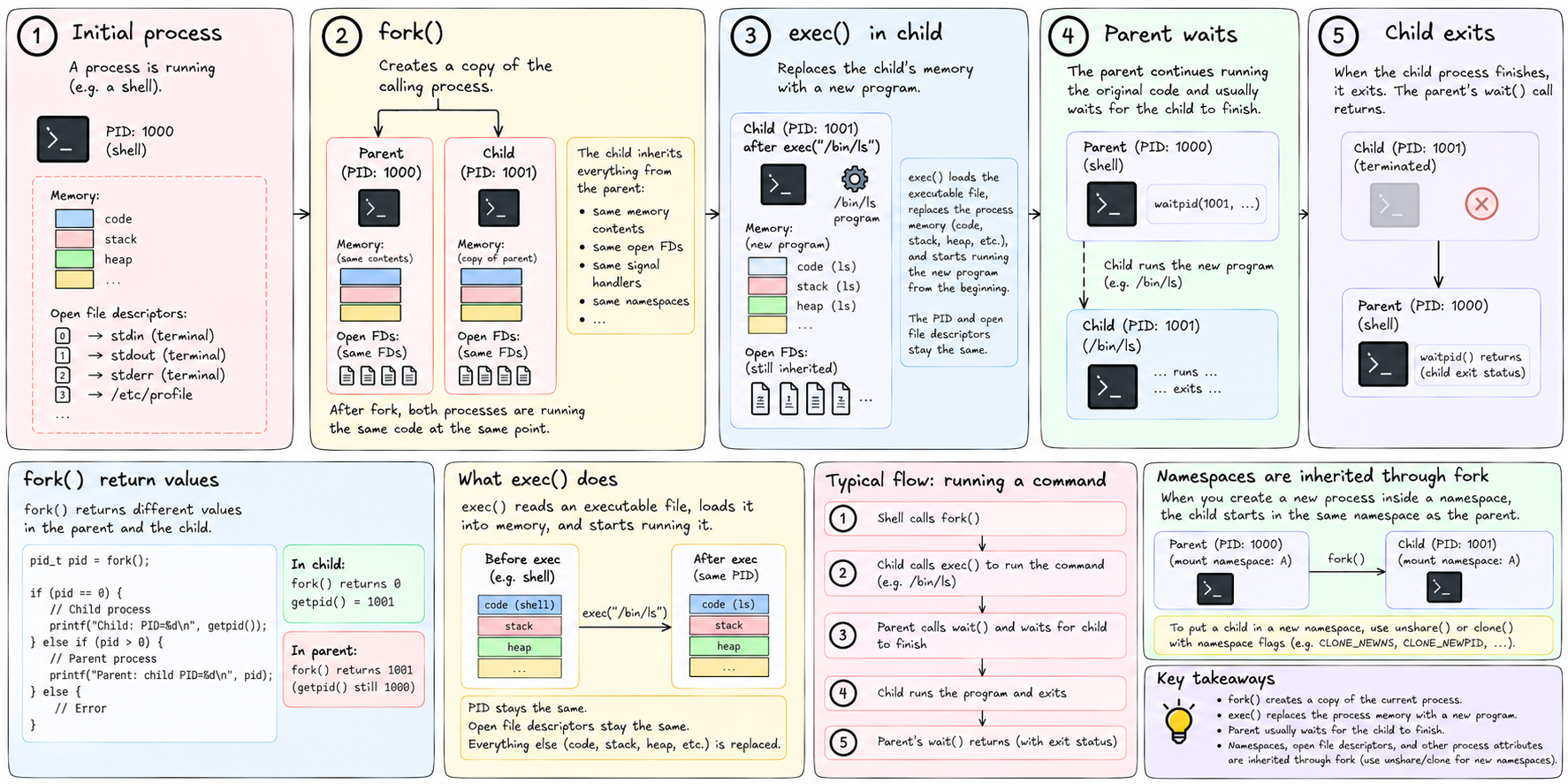
fork creates a copy of the calling process. The copy gets a new PID. It inherits everything from the parent — the same memory contents, the same open file descriptors, the same signal handlers. After fork, two processes are running the same code at the same point. The only difference is what fork returns: 0 to the child, the child's PID to the parent.
exec replaces the calling process's memory with a new program. It reads an executable file, loads it into memory, and starts running it from the beginning. The process keeps its PID and its open file descriptors, but everything else — the code, the stack, the heap — is replaced.
The normal pattern for starting a new program is: fork to create a copy of the current process, then exec in the child to replace it with the program you want to run. The parent waits for the child to finish. This is the foundation of how shells work — every command you type causes a fork and an exec.
This also means that namespaces are inherited through fork. When you create a new process inside a namespace, the child starts in the same namespace as the parent. To put a child in a new namespace, you call unshare or pass flags to clone (the lower-level syscall that fork is built on).
PID 1 is special in one critical way beyond being first.
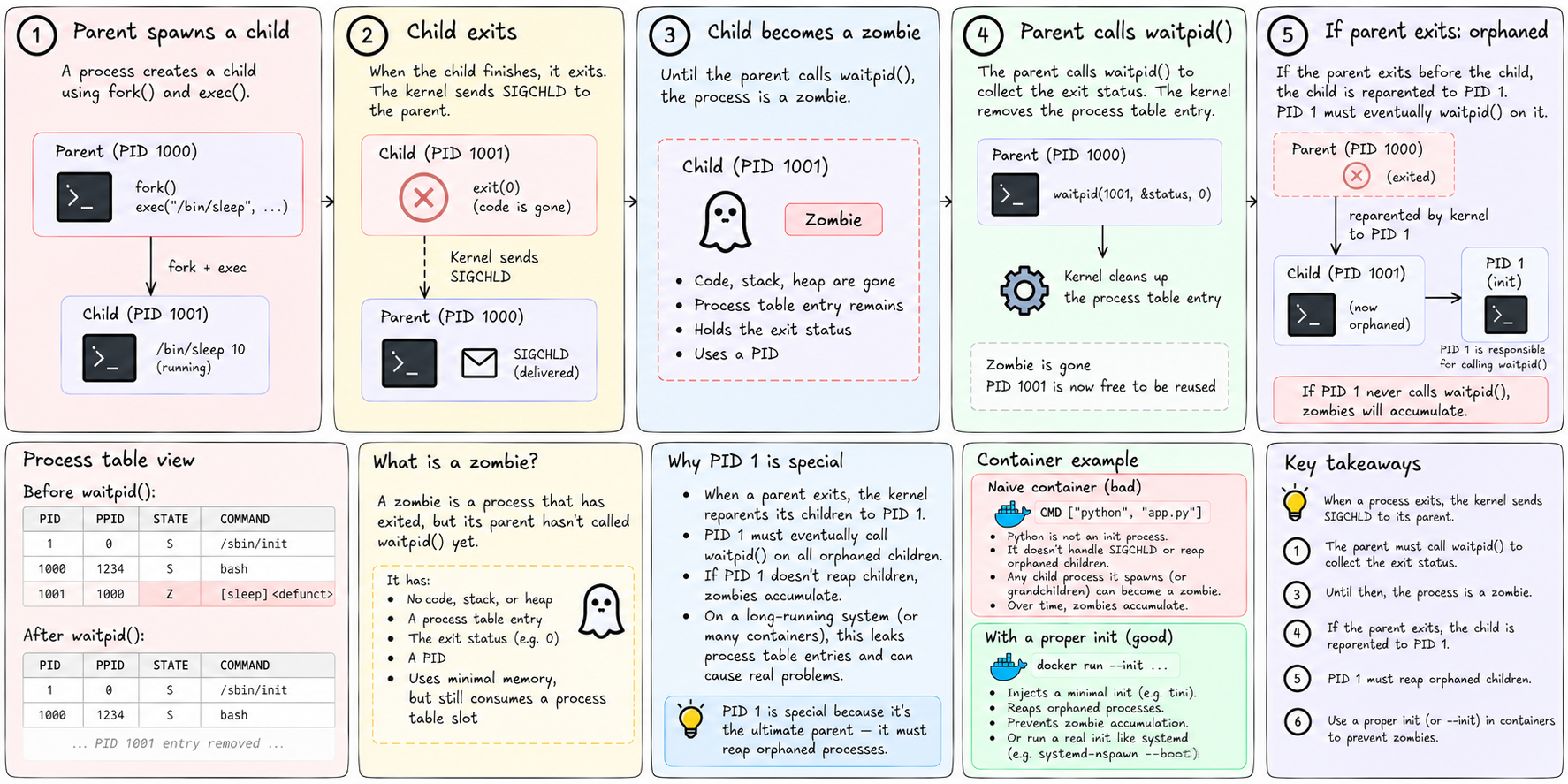
When a process exits, the kernel sends SIGCHLD to its parent. The parent is expected to call waitpid to collect the exit status. This cleans up the kernel's process table entry. Until the parent calls waitpid, the process is a zombie — its code is gone, but its entry in the process table remains, holding its exit status.
If the parent exits before the child, the child is orphaned. The kernel automatically reparents it to PID 1. PID 1 is now responsible for eventually calling waitpid on it.
If PID 1 never calls waitpid — if it's not written to handle this — zombie processes accumulate. On a long-running system, this leaks process table entries. On a machine with many containers, this becomes a real problem.
This is why running a container with a naive CMD ["python", "app.py"] and no real init process can cause zombie accumulation. Python isn't written to be an init process. It doesn't reap orphans. Any child process it spawns — or any grandchild that outlives its parent — turns into a zombie.
The fix is either to use a proper init as PID 1, or to use --init flags that inject a minimal reaper. tiny-aws sidesteps this for simple jobs by running them directly and tracking the top-level PID. For full instances using systemd-nspawn --boot, systemd runs as PID 1 inside the container and handles this correctly.
One more thing: signals.
Signals are the kernel's mechanism for sending notifications to processes. SIGTERM asks a process to terminate gracefully. SIGKILL forces immediate termination — the process cannot catch or ignore it. SIGCHLD notifies a parent that a child has exited. SIGHUP traditionally told a process its terminal had closed; it's now commonly used to ask servers to reload their configuration.
PID 1 has unusual signal behavior. The kernel will not deliver SIGTERM to PID 1 unless PID 1 has explicitly registered a handler for it. This protects init from being accidentally killed. Inside a container, the same rule applies to the container's PID 1. If your application is PID 1 and doesn't handle SIGTERM, sending it SIGTERM does nothing. Only SIGKILL works — and that doesn't give the application a chance to clean up.
tiny-aws deals with this in jobs.rs by setting a new process group for each spawned job and killing the entire group on stop:
libc::setpgid(0, 0);
// later:
libc::kill(-(pgid), libc::SIGTERM);
The negative PID in kill means "kill the whole process group." Every process in the group gets the signal, regardless of which one is PID 1 in a namespace.
Now we have the full picture of what a process is and how it relates to the kernel. The kernel is the gatekeeper. Syscalls are the only door. Namespaces are checked at that door. Cgroups are enforced at that door. Seccomp filters are applied at that door.
Everything that makes containers work is enforced at the syscall boundary.
Next we look at namespaces properly — what each one actually isolates, and how unshare creates them.