

Chapter 21: What a network actually is
Two computers need to talk. How?
Two computers need to talk. How?
At some level, the answer is obvious — you connect them with a wire. But "connect with a wire" leaves everything important unsaid. What travels down the wire? In what format? How does the receiving end know when a message starts and ends? How does it know the message was meant for it and not some other machine on the same wire?
These questions have answers that were worked out over decades. The answers are the foundation of every network — including the one your containers will run on.
The wire
A network cable carries electrical signals. Voltage high or low, changing at a fixed rate — billions of times per second on a modern ethernet cable. Those highs and lows are bits. Groups of bits are bytes. Groups of bytes are frames.
A frame is the basic unit of transmission on a local network. It has a fixed structure: a preamble that signals the start, a destination address, a source address, a type field, the actual data payload, and a checksum at the end that lets the receiver detect if the data was corrupted in transit.
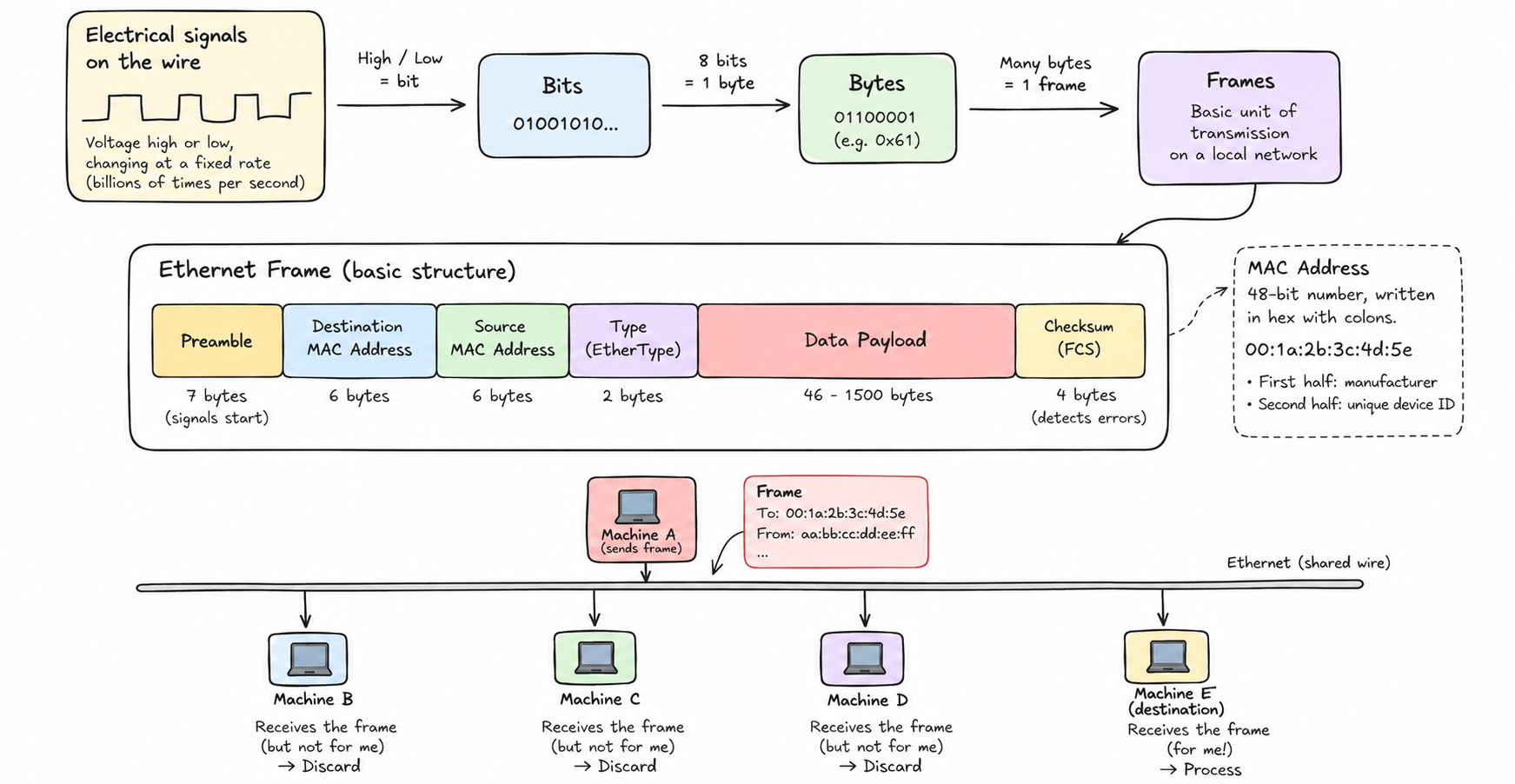
The addresses in an ethernet frame are MAC addresses — Media Access Control addresses. Every network interface that has ever been manufactured has one. It's a 48-bit number, written in hex with colons: 00:1a:2b:3c:4d:5e. The first half identifies the manufacturer; the second half is unique to the device.
When a machine puts a frame on the wire, every other machine on the same network segment receives it. Ethernet is a broadcast medium — the wire is shared. Each machine looks at the destination MAC address and decides: is this for me? If yes, process it. If no, discard it.
Collision and coordination
Early ethernet was literal: one shared wire, all machines connected to it. If two machines transmitted at the same time, their signals collided and became garbage. The protocol included collision detection — machines would notice the collision, back off for a random amount of time, and try again.
This worked, but it was inefficient. Bandwidth was shared not just in principle but in practice — the more machines on a segment, the more collisions, the worse it got.
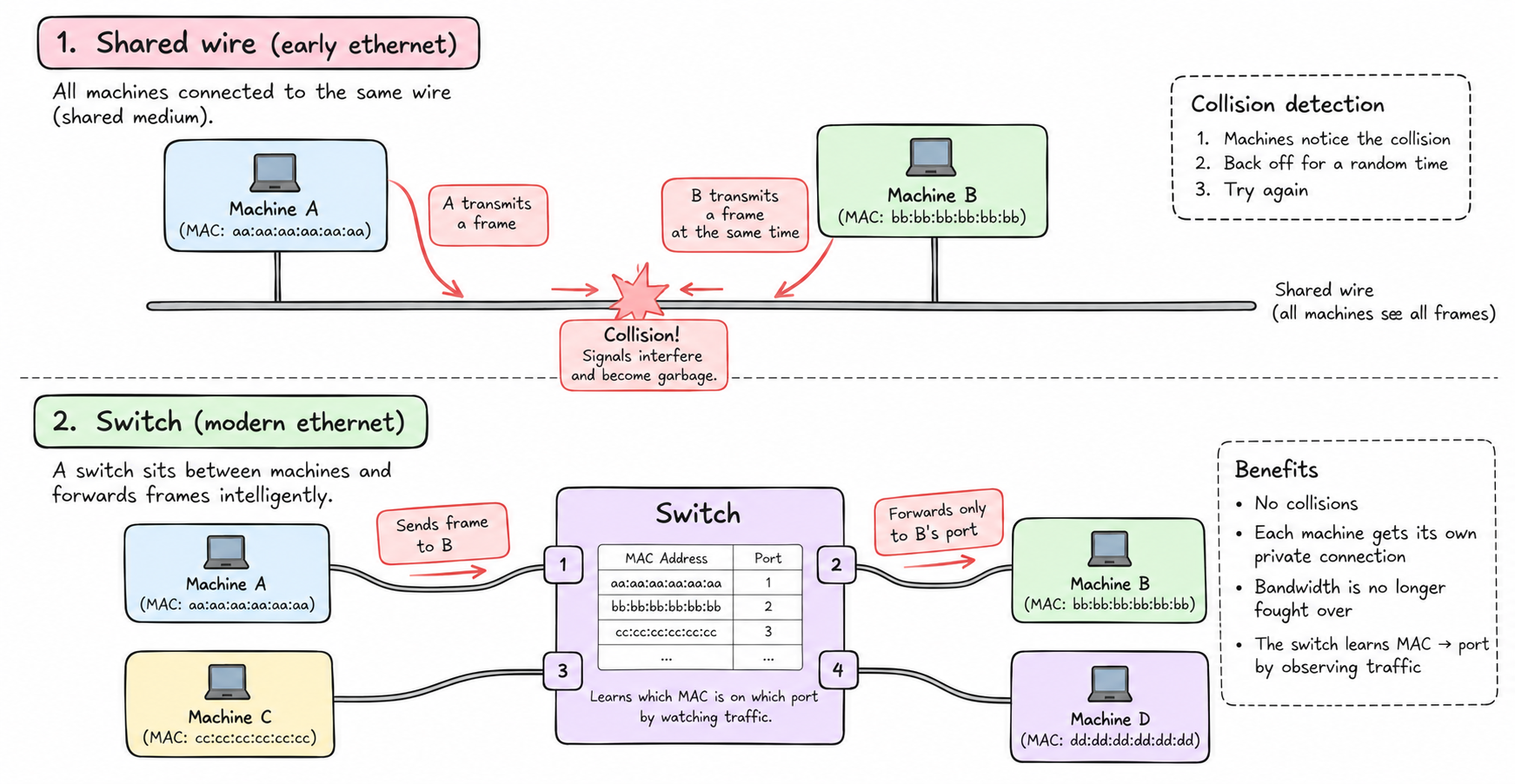
Switches solved this. A switch is a device that sits between machines and forwards frames intelligently. It learns which MAC address is reachable through which port by watching traffic. When machine A sends a frame to machine B, the switch forwards it only to B's port — not to everyone. Collisions disappear. Each machine gets its own private connection to the switch. Bandwidth is no longer fought over.
Modern ethernet is all switched. When you plug into a router at home, you're plugging into a switch. The shared-wire model is mostly historical, but the frame format, the MAC addresses, and the broadcast model that the rest of networking is built on top of — those remain.
The problem with MAC addresses
MAC addresses work fine for a local network. But the internet isn't a local network. It's tens of thousands of separate networks, connected to each other.
You can't route a packet from London to Tokyo using MAC addresses. A MAC address identifies a specific physical device. Routers in the middle of the path have no idea where that device is located — they'd have to maintain a table of every MAC address on earth and which direction to send frames to reach it. That table would be unmanageably large and constantly changing as devices move.
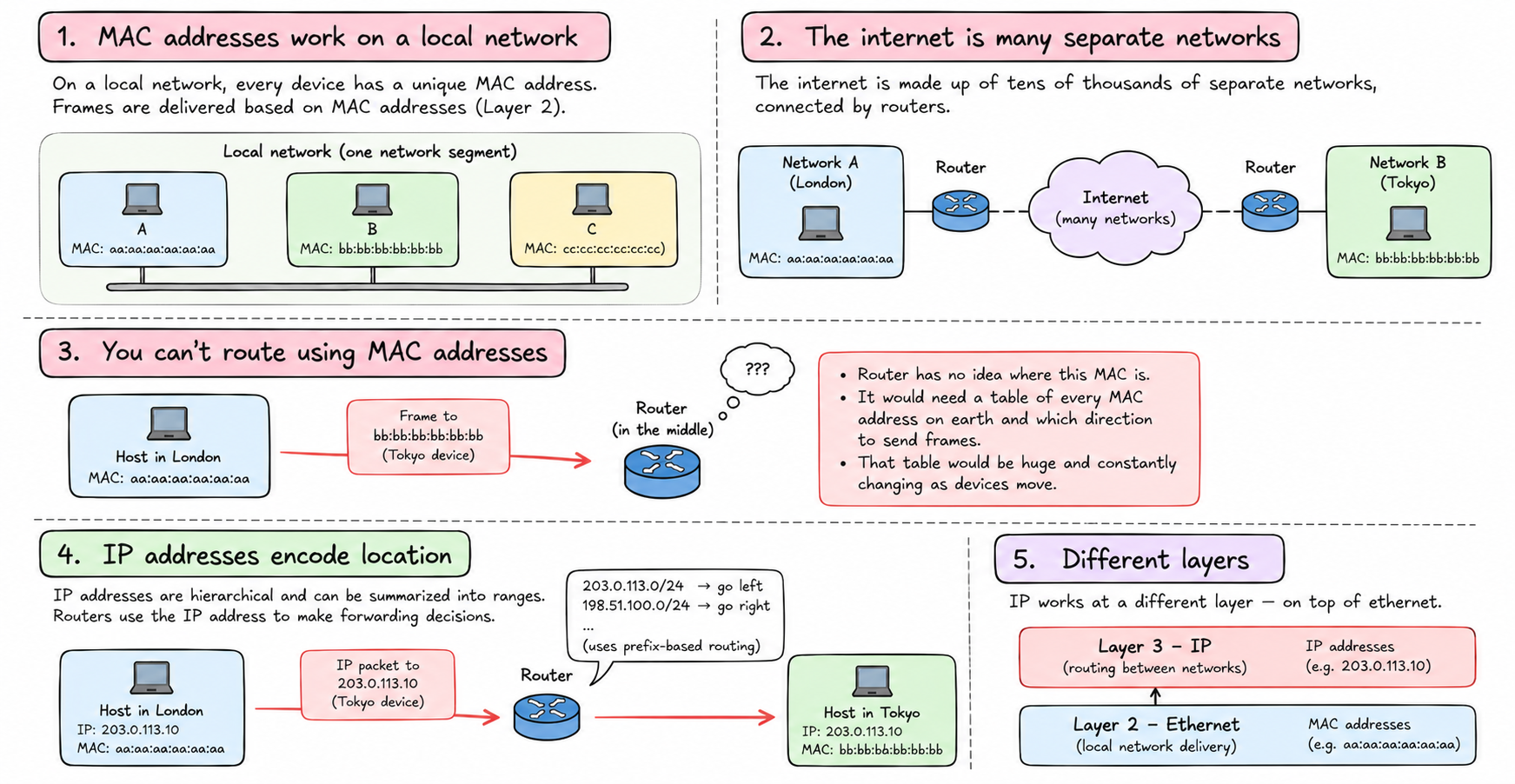
The internet needs a different kind of address — one that encodes location, not just identity. One that can be summarized: "everything in this range goes left, everything in that range goes right." An address that lets routers make forwarding decisions based on structure, not memory.
That's what IP addresses are. But they operate at a different layer — on top of ethernet, not instead of it.
Layers
Networking is described in layers. Each layer solves a specific problem and provides a service to the layer above, using the layer below.
The ethernet layer handles getting a frame from one machine to another on the same local network. It uses MAC addresses. It knows nothing about the internet.
The IP layer handles getting a packet from any machine anywhere to any other machine anywhere. It uses IP addresses. It knows nothing about whether the underlying network is ethernet or wifi or fiber.
The transport layer (TCP, UDP) handles conversations between processes on those machines. It uses port numbers. It knows nothing about IP.
The application layer (HTTP, DNS, SSH) handles the actual work. It knows nothing about TCP.
Each layer wraps the one above it. An HTTP request becomes a TCP segment. The TCP segment becomes an IP packet. The IP packet becomes the payload of an ethernet frame. At the receiving end, each layer unwraps and hands up.
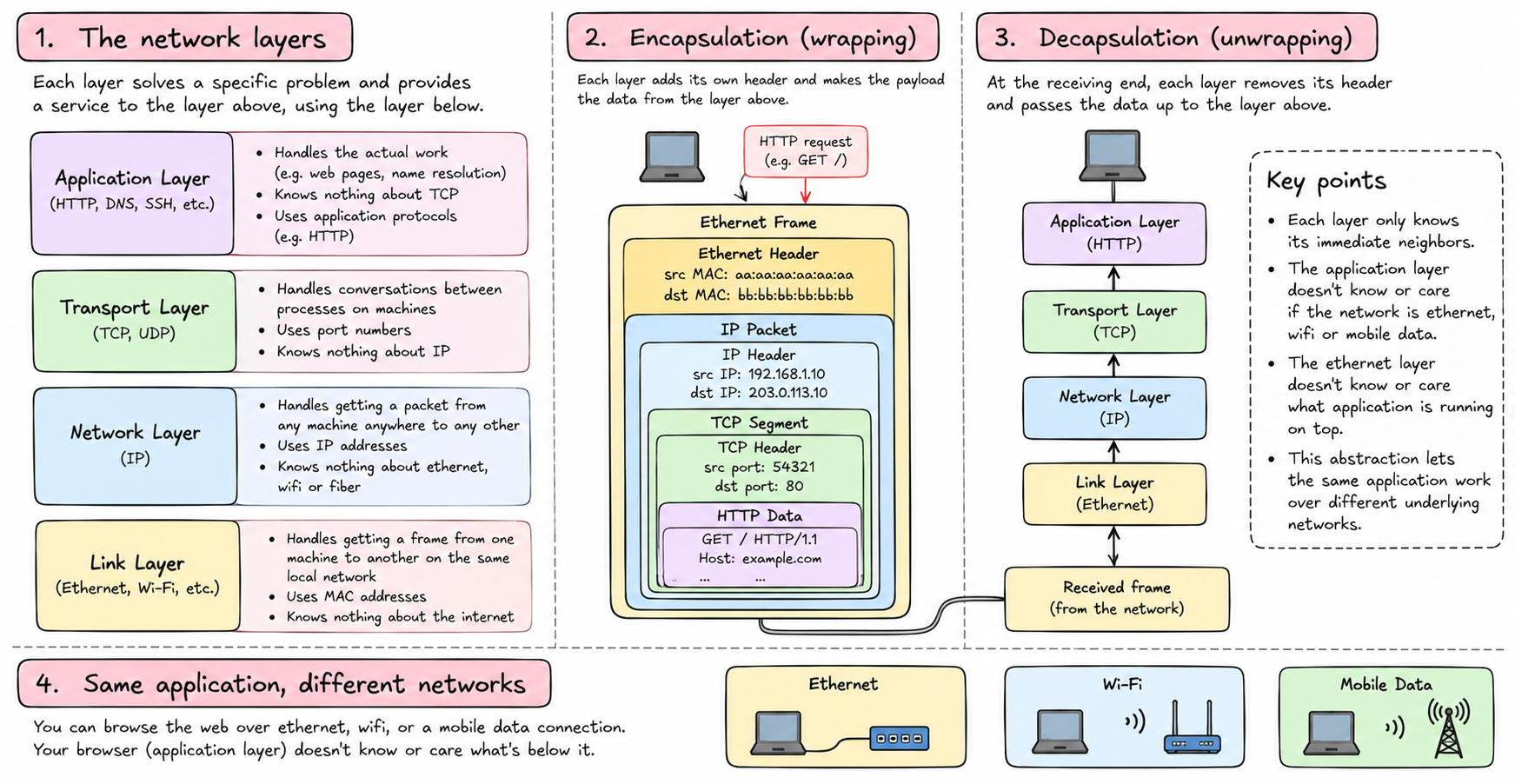
This is why you can browse the web over wifi, ethernet, or a mobile data connection and your browser doesn't know or care. The application layer doesn't know what's below it. The ethernet layer doesn't know what's above it. They only know their immediate neighbors.
What actually happens when you load a webpage
Your browser wants to connect to a server. It has a domain name — example.com. It asks DNS to resolve that to an IP address: 93.184.216.34.
Now it has an IP address. It wants to send a TCP packet to port 443 on that machine. It wraps the TCP data in an IP packet destined for 93.184.216.34.
But how does that IP packet actually travel? The machine looks at its routing table: to reach 93.184.216.34, send it to my default gateway — my router. The router has a MAC address. The machine wraps the IP packet in an ethernet frame addressed to the router's MAC address and puts it on the wire.
The router receives the frame, unwraps it, looks at the IP destination, consults its own routing table, wraps it in a new ethernet frame addressed to the next hop, and sends it out. This repeats at every router along the path. Each hop: new ethernet frame, same IP packet inside.
Eventually the packet arrives at a router adjacent to the destination machine. That router knows the destination's MAC address. It wraps the IP packet in a final ethernet frame and delivers it.
The destination machine unwraps the ethernet frame, finds the IP packet, unwraps it, finds the TCP segment, hands it to the process listening on port 443.
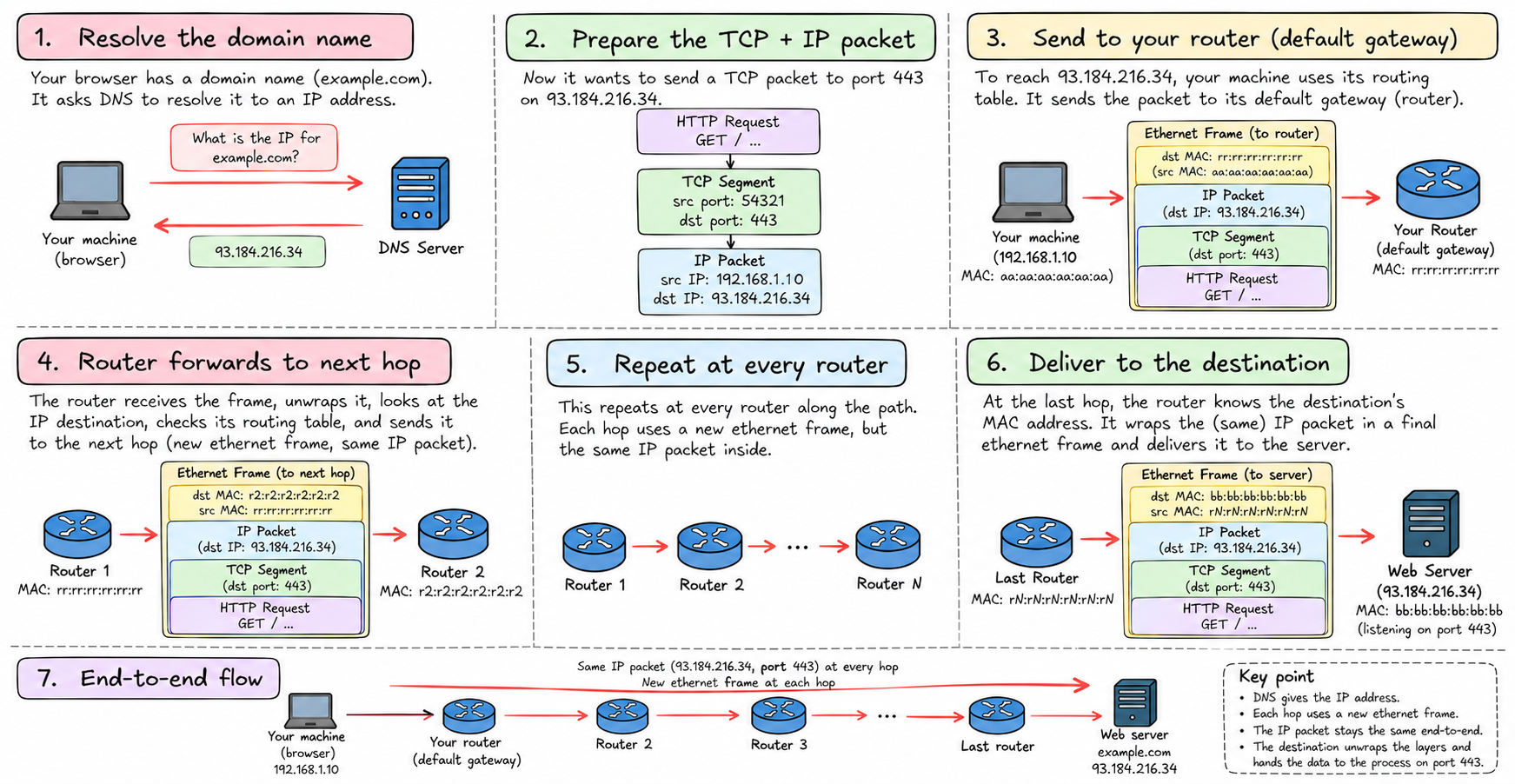
This is all happening for every byte of every request you make. Tens of layers of wrapping and unwrapping, across dozens of hops, in milliseconds.
Understanding these layers — and that they're genuinely separate, each ignorant of the others — is the key to understanding everything that comes later. Virtual networks, container networking, NAT, iptables — all of it is manipulation of one or more of these layers.
Next: IP addresses in detail, and how they encode location well enough for the internet to route between them.