

Chapter 16: Dynamic linking and shared libraries
You compiled a binary. You copied it into a container. It fails immediately with 'No such file or directory' — but the file clearly exists. Here's why.
You compiled a binary. You copied it into a container. You ran it. It fails immediately with:
./myapp: error while loading shared libraries: libc.so.6: cannot open shared object fileThe binary exists. The error has nothing to do with the binary. It's about what the binary depends on.
This failure teaches you something fundamental about how programs actually run — and it explains why a container can't be just your binary sitting in an empty directory.
Programs don't contain everything they use
When a C program calls printf, it isn't calling code that was compiled into the binary. printf lives in libc — the C standard library. The binary contains a reference to it: "I need a function called printf from a library called libc." When the binary runs, something has to resolve that reference.
That something is the dynamic linker.
There are two ways a program can include the code it depends on:
Static linking — every library the program uses is copied into the binary at compile time. The resulting binary is self-contained. You can copy it anywhere and run it. It's larger (all that library code is inside), but it has no external dependencies.
Dynamic linking — library code is not copied in. Instead, references are left unresolved. At runtime, the dynamic linker finds the libraries, loads them into memory, and resolves the references. Multiple programs can share one copy of a library in memory. Binaries are smaller. But the libraries must be present on the system where the binary runs.
Almost all binaries on a Linux system are dynamically linked by default. It's the compiler's default. The libraries are expected to be in standard locations on every Linux system.
What the dynamic linker does
The dynamic linker is itself a program — on Linux it's /lib/x86_64-linux-gnu/ld-linux-x86-64.so.2 or similar. It's actually the first thing that runs when you exec a dynamically linked binary.
The kernel reads the binary's ELF header (more on ELF in a moment), sees that it needs the dynamic linker, and loads both the binary and the linker into memory. The linker runs first:
- Reads the binary's list of required libraries (the
DT_NEEDEDentries) - Looks for each library in standard locations:
/lib,/usr/lib,/lib/x86_64-linux-gnu, and any paths inLD_LIBRARY_PATH - Loads each library into the process's address space
- Resolves all symbol references — patches in the actual addresses of
printf,malloc,open, etc. - Jumps to the binary's entry point
If any required library is missing, step 2 fails and you get the "cannot open shared object file" error. The binary never runs.
The ELF format
ELF — Executable and Linkable Format — is the binary format for executables, shared libraries, and object files on Linux.
Every ELF file starts with a header. The header contains:
- A magic number identifying it as ELF
- Architecture (x86-64, ARM64, etc.)
- Type: executable, shared object, or object file
- The entry point address — where execution starts
- Locations of section and program headers
The program headers describe segments — regions of the file that get loaded into memory. Among them is the PT_INTERP segment, which names the dynamic linker to use. That's the path the kernel reads to find ld-linux.so.
Another part of the ELF describes DT_NEEDED entries — the shared libraries this binary requires, by name (like libc.so.6, libm.so.6, libssl.so.3).
# see the ELF header
readelf -h /bin/ls

# see what libraries a binary needs
readelf -d /bin/ls | grep NEEDED
ldd — list shared library dependencies
ldd is the practical tool. It prints every shared library a binary needs and where the dynamic linker will find it:
ldd /bin/ls
#     linux-vdso.so.1 (0x00007ffd12345000)
#     libselinux.so.1 => /lib/x86_64-linux-gnu/libselinux.so.1
#     libc.so.6 => /lib/x86_64-linux-gnu/libc.so.6
#     /lib64/ld-linux-x86-64.so.2 (0x00007f1234567890)

ldd /usr/bin/python3 | head -10
#     linux-vdso.so.1
#     libm.so.6 => /lib/x86_64-linux-gnu/libm.so.6
#     libz.so.1 => /lib/x86_64-linux-gnu/libz.so.1
#     libc.so.6 => /lib/x86_64-linux-gnu/libc.so.6
#     ...
The arrows show where each library was found. If a library shows not found, the binary won't run.
libc.so — the library everything uses
Almost every program on Linux depends on libc.so.6 — the C standard library. It contains: malloc, free, printf, fopen, fread, fwrite, socket, connect, read, write, all the POSIX functions, and the wrappers that turn them into kernel syscalls.
Even Python, Ruby, and Node.js are themselves C programs that link against libc. Their managed code runs on top of a C runtime that links against libc. There is almost no escape from libc.
There are two major implementations:
- glibc (GNU libc) — the standard on Debian, Ubuntu, Fedora, and most Linux distributions
- musl libc — a smaller, stricter implementation used by Alpine Linux
A binary compiled against glibc will not run on Alpine — the libc.so.6 it looks for is glibc, but Alpine ships musl. A binary compiled against musl will not run on Ubuntu without the musl library installed. The ABI is incompatible.
This is why "works on my machine" failures happen when copying binaries across Linux distributions. The binary is fine. The library it depends on isn't there, or is a different implementation.
Why a container needs a full userland
Now the "just copy the binary" failure makes sense.
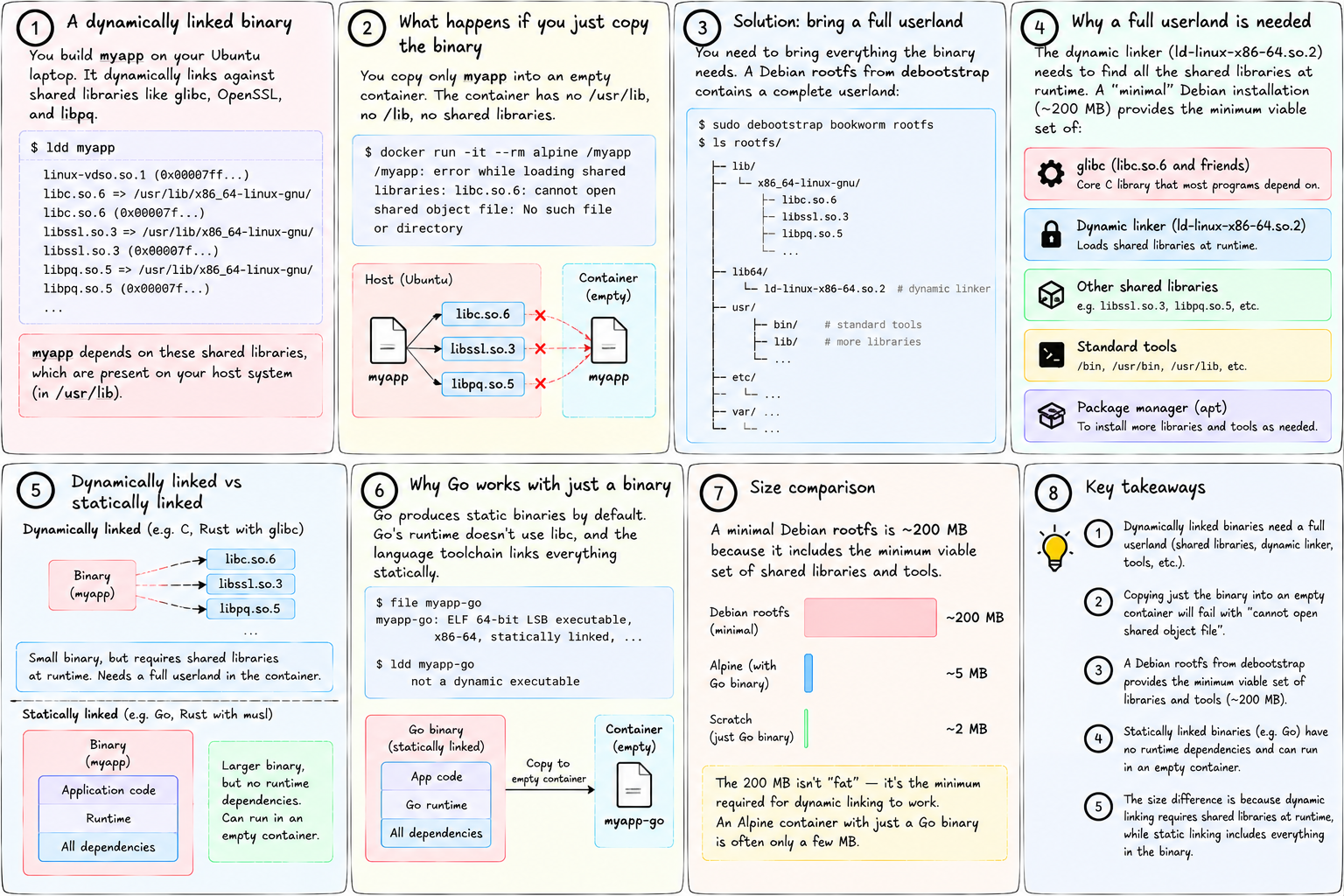
You built myapp on your Ubuntu laptop. It dynamically links against libc.so.6 (glibc 2.35), libssl.so.3 (OpenSSL 3), libpq.so.5 (PostgreSQL client). All of these are on your laptop in /usr/lib.
You copy just myapp into an empty container. The container has nothing — no /usr/lib, no /lib. The dynamic linker can't find anything. Instant failure.
The solution: bring everything the binary needs. A Debian rootfs from debootstrap contains:
/lib/x86_64-linux-gnu/libc.so.6and friends/lib64/ld-linux-x86-64.so.2(the dynamic linker itself)- All the shared libraries that standard tools depend on
- A package manager (
apt) to install more as needed
That's why a "minimal" Debian installation is 200 MB. It's not fat — it's the minimum viable set of shared libraries and tools for dynamic linking to work.
Statically linked binaries are the alternative: compile everything in, have no runtime dependencies. This is why Go produces static binaries by default — Go's runtime doesn't use libc, and the language toolchain links statically. A Go binary really can be copied into an empty container and run. An Alpine container with just a Go binary is often only a few MB.
tiny-aws: why debootstrap and why packages go in the rootfs
builder.rs runs debootstrap bookworm /target to create the base rootfs. It then runs apt-get install inside a chroot to install requested packages.
// builder.rs (condensed)
Command::new("debootstrap")
    .args(["--variant=minbase", "bookworm", target_dir])
    .status()?;

// for each package in tinyaws.build "packages:" field:
Command::new("chroot")
    .args([target_dir, "apt-get", "install", "-y", package])
    .status()?;
The chroot runs apt-get inside the new rootfs so that libraries are installed into the rootfs, not the host. When the container later runs inside that rootfs via pivot_root, libc.so.6 is at the right path, the dynamic linker is at the right path, and everything resolves.
If you put packages: python3 in your tinyaws.build, Python's libpython3.so, libc.so.6, and all transitive dependencies end up in the container's rootfs. Your Python script runs.
If you forgot to list a dependency, the binary runs, hits a missing library, and fails with that familiar error. The fix is always the same: install the library in the rootfs.
Next: the filesystem doesn't have to be a real disk. It can be another path on the same disk, or nothing at all — just memory.