

Chapter 15: Environment variables
Every process carries a flat list of key-value pairs from the moment it starts. This list is its environment — invisible to the outside, inherited by every child.
Every process carries a flat list of key-value pairs from the moment it starts. This list is its environment — invisible to the outside, inherited by every child.
You've used environment variables. export DATABASE_URL=postgres://localhost/mydb. NODE_ENV=production npm start. They feel like a shell feature. They're not — they're a kernel feature, part of the process itself, and understanding how they work is essential for understanding how containers are configured.
What the process environment is
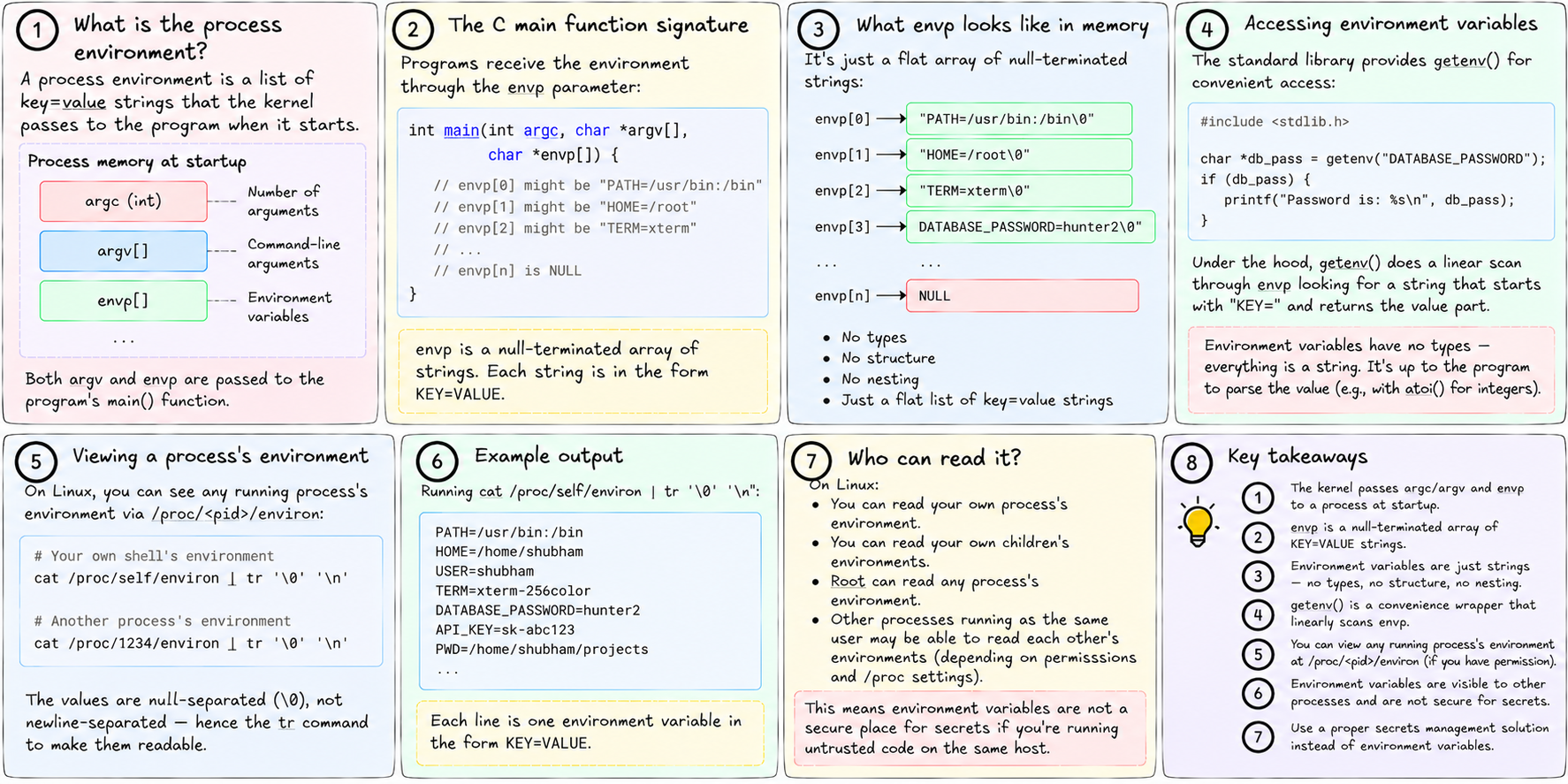
When the kernel starts a process, it passes two things into the program's memory: argc/argv (the command-line arguments) and envp (the environment).
envp is a null-terminated array of strings. Each string is KEY=VALUE. That's it. No types, no structure, no nesting. A flat list.
// The C main function signature that receives them
int main(int argc, char *argv[], char *envp[]) {
    // envp[0] might be "PATH=/usr/bin:/bin"
    // envp[1] might be "HOME=/root"
    // envp[2] might be "TERM=xterm"
    // ...
    // envp[n] is NULL
}
The standard library wraps this in getenv("KEY") for convenient access. But underneath, it's a linear scan of that array looking for a matching prefix.
On Linux, you can see any running process's environment:
cat /proc/self/environ | tr '\0' '\n'    # your own shell's environment
cat /proc/1234/environ | tr '\0' '\n'    # another process's environment
The values are null-separated (not newline-separated) — hence the tr to make them readable.
Inheritance through fork and exec
The environment travels through fork and exec in different ways.
Fork copies the parent's environment exactly. The child gets an identical copy of the envp array. From that point, parent and child have independent copies — changes in one don't affect the other.
Exec lets the caller control what environment the new program sees. The standard execve(path, argv, envp) takes an explicit envp argument. The shell uses this to set up the environment before running your command.
When you write:
export DATABASE_URL=postgres://localhost/db
python3 app.py
The shell adds DATABASE_URL to its own environment. When it forks and execs python3, it passes the modified environment. Python inherits it.
When you write:
DATABASE_URL=postgres://localhost/db python3 app.pyThe shell temporarily sets the variable only for that exec — it doesn't modify its own environment. Python gets it; your shell's subsequent commands don't.
The variables that actually matter
A handful of environment variables control fundamental behavior:
PATH — a colon-separated list of directories to search for executables. When you type python3, the shell looks in each PATH directory in order until it finds a python3 binary. If it's not there, you get "command not found." Inside containers, PATH must be set correctly or nothing works.
HOME — the current user's home directory. Many programs write config files and caches here. Inside a container running as root, this is typically /root.
LD_LIBRARY_PATH — a colon-separated list of additional directories to search for shared libraries. The dynamic linker checks this before the standard library paths. Useful for development; dangerous in production (see the next chapter).
LANG and LC_* — locale settings. Control how programs interpret text, dates, and numbers. Inside containers, often set to en_US.UTF-8 or C.UTF-8 to avoid locale-related failures.
TMPDIR — where programs should put temporary files. Defaults to /tmp. Some environments override this.
Security note: environments are visible
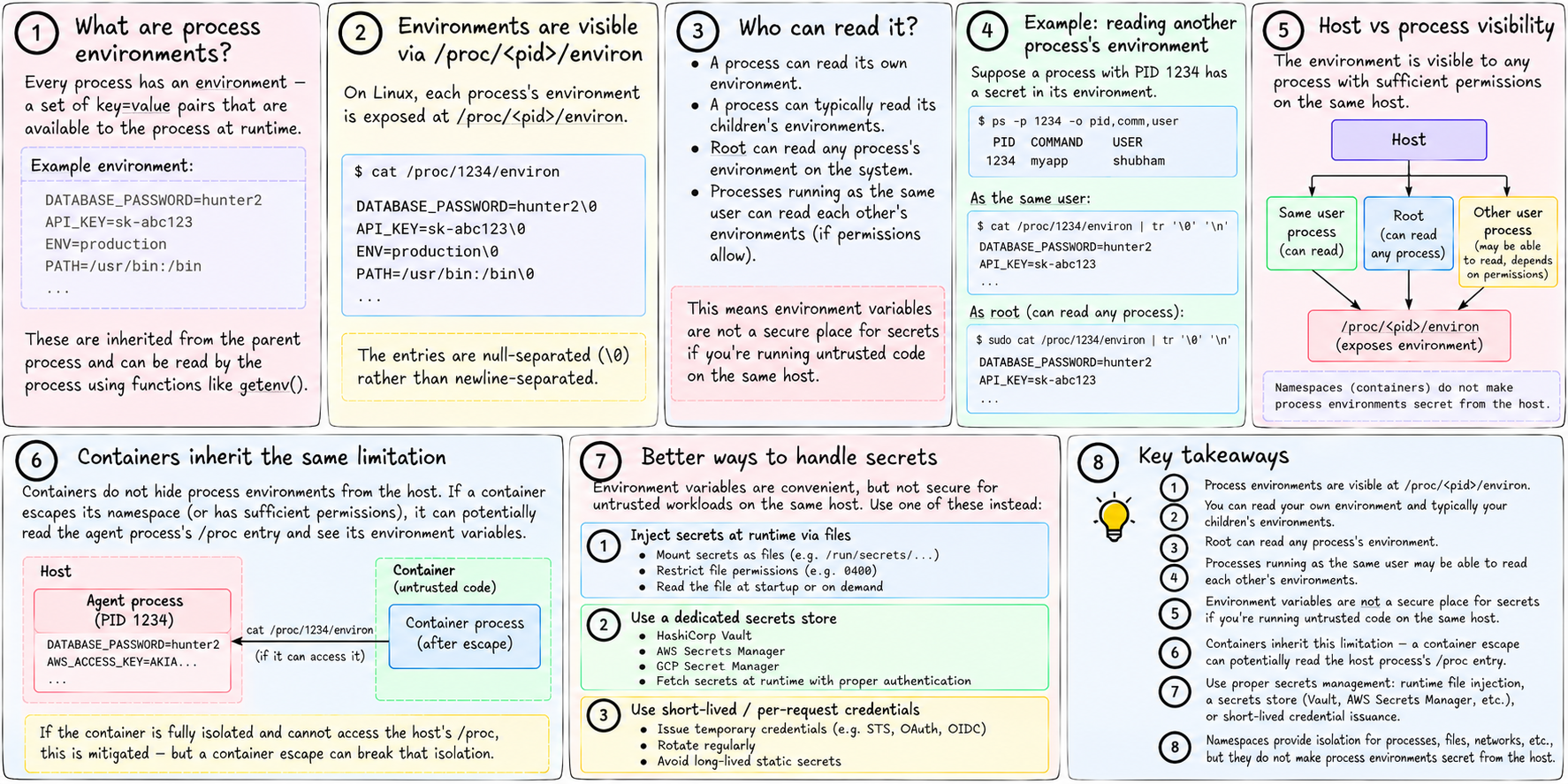
Any process on the same machine with enough permission can read /proc/<pid>/environ. On Linux, you can read your own process's environment and your own children's environments. Root can read any process's environment.
This means environment variables are not a secure place for secrets if you're running untrusted code on the same host. Your DATABASE_PASSWORD=hunter2 in your process's environment is readable by root and by processes running as the same user.
Containers inherit this limitation. If an agent process carries secrets in its environment, a container that escapes its namespace can potentially read the agent's /proc entry.
The real solution is secrets management: inject secrets at runtime via files (not environment), use a secrets store (Vault, AWS Secrets Manager), or use per-request credential issuance.
tiny-aws: how --env reaches your process
When you run tinyaws deploy ./my-app --service --port 3000 --env DATABASE_URL=postgres://..., the CLI includes the key-value pairs in the job request.
In the scheduler, the Job struct carries them:
// scheduler/main.go
type Job struct {
    // ...
    EnvVars map[string]string `json:"env_vars,omitempty"`
}
The agent picks up the job and, before executing the command, sets each variable in the child process's environment:
// jobs.rs
let mut cmd = Command::new(&prog);
for (key, value) in &job.env_vars {
    cmd.env(key, value);
}
cmd.spawn()?;
Command::env in Rust adds a variable to the environment that will be passed to the child via execve. The service process wakes up with DATABASE_URL already in its environment. It reads it with std::env::var("DATABASE_URL") or process.env.DATABASE_URL in Node. It never knew or cared about the mechanism.
This is the standard pattern for container configuration: the orchestrator sets environment variables, the application reads them. Twelve-Factor App methodology formalized it. Every container runtime implements it the same way — because there's only one way to do it.
Next: what's inside a binary and why a container can't just run a single executable without everything around it.