

Chapter 20: systemd-nspawn — containers without Docker
systemd ships a container runtime. It uses every primitive we've covered — namespaces, cgroups, overlayfs, pivot_root, seccomp — assembled and ready to use.
systemd ships a container runtime.
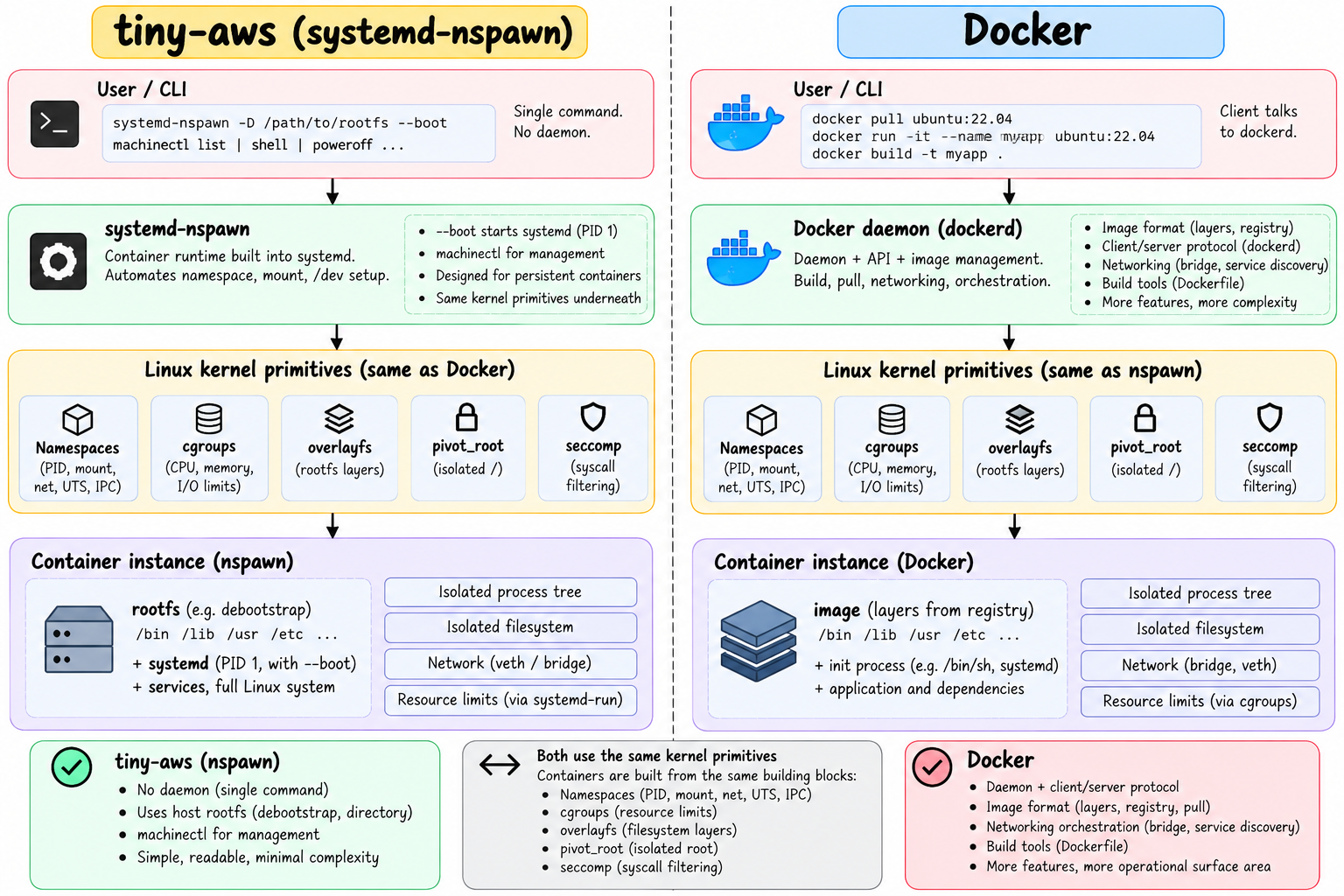
It's called systemd-nspawn. It uses every primitive we've covered in this series — PID namespaces, mount namespaces, network namespaces, cgroups, overlayfs, pivot_root, seccomp — assembled and ready to use without Docker, without containerd, without a daemon running in the background.
You point it at a rootfs directory and it creates a container. That's it.
This is how tiny-aws runs instances.
Basic usage
Given a rootfs directory created by debootstrap:
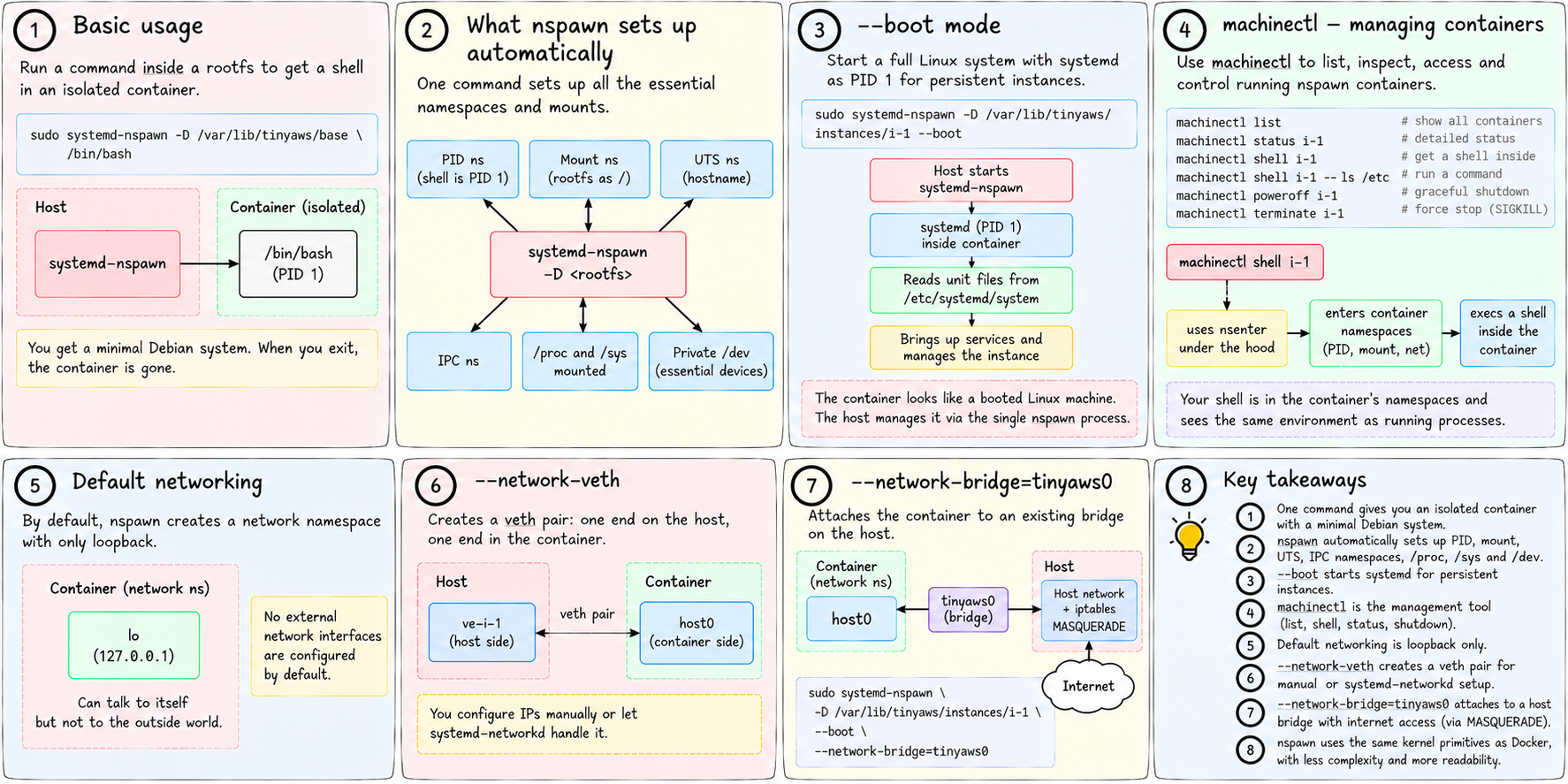
sudo systemd-nspawn -D /var/lib/tinyaws/base /bin/bashThis drops you into a shell inside the container. The process tree is isolated (PID namespace). The filesystem is isolated (the rootfs is your /). You see a minimal Debian system. When you exit the shell, the container is gone.
What nspawn sets up automatically:
- New PID namespace (the shell is PID 1 inside)
- New mount namespace with the specified directory as
/ - New UTS namespace with a default hostname
- New IPC namespace
/procand/sysmounted inside the container- A private
/devwith only the essential device files
All of this from one command.
--boot mode
Running a single command is useful for one-off tasks. For persistent instances — services that run until explicitly stopped — you want a full Linux system with its own init.
--boot tells nspawn to start systemd as PID 1 inside the container:
sudo systemd-nspawn -D /var/lib/tinyaws/instances/i-1 --bootNow inside the container: systemd starts, reads its unit files from /etc/systemd/system inside the rootfs, brings up services, and manages the instance's full lifecycle. The container looks like a booted Linux machine. From inside, it is one.
The host started one process — systemd-nspawn. That process manages everything inside the container.
machinectl — managing containers
machinectl is the companion tool for managing running nspawn containers:
machinectl list                    # show all running containers
machinectl status i-1              # detailed status (PID, load, memory)
machinectl shell i-1               # get a shell inside the container
machinectl shell i-1 -- ls /etc    # run a specific command inside
machinectl poweroff i-1            # gracefully shut down the container
machinectl terminate i-1           # forcefully stop (SIGKILL)
machinectl shell i-1 is how tinyaws instance shell i-1 works. It finds the running nspawn container named i-1 and opens an interactive shell inside its namespaces.
Under the hood, machinectl shell uses nsenter to enter the container's namespaces and then execs a shell. You're in the container's PID namespace, mount namespace, and network namespace — the container looks exactly like it does to the processes already running inside it.
Network in nspawn
By default, nspawn creates a network namespace for the container but doesn't configure any network interfaces except loopback. The container can talk to itself but not to the outside world.
Two common modes for network connectivity:
--network-veth — creates a veth pair. One end stays on the host (named ve-<name>), the other goes into the container (named host0). You configure IPs manually or let systemd-networkd handle it.
--network-bridge=tinyaws0 — attaches the container's veth to an existing bridge on the host. The container gets a real IP on the bridge's network and can talk to other containers and the host through the bridge.
sudo systemd-nspawn \
    -D /var/lib/tinyaws/instances/i-1 \
    --boot \
    --network-bridge=tinyaws0
The host's tinyaws0 bridge is already up (created by networking.rs when the agent starts). The container gets a veth end attached to that bridge, and the host's iptables MASQUERADE rule gives it internet access through the host.
This is exactly the network topology from chapter 8 (network namespaces) and chapter 29 of the networking series (bridges and veth pairs) — assembled by nspawn automatically.
Resource limits via systemd-run
Running nspawn through systemd-run applies cgroup limits to the whole container:
sudo systemd-run \
    --unit="tinyaws-i-1" \
    --property=CPUQuota=200% \
    --property=MemoryMax=1G \
    -- \
    systemd-nspawn \
        -M i-1 \
        -D /var/lib/tinyaws/instances/i-1 \
        --boot \
        --network-bridge=tinyaws0
The --property flags create the cgroup for tinyaws-i-1 with those limits. Every process inside the container — the container's init, all its services, everything it spawns — runs inside that cgroup. The aggregate limit applies to the whole container.
CPUQuota=200% means 2 full CPU cores. MemoryMax=1G means the OOM killer fires if the container collectively exceeds 1 GB of memory. Instance type medium is exactly this.
nspawn vs Docker vs raw unshare
It helps to know how these relate.
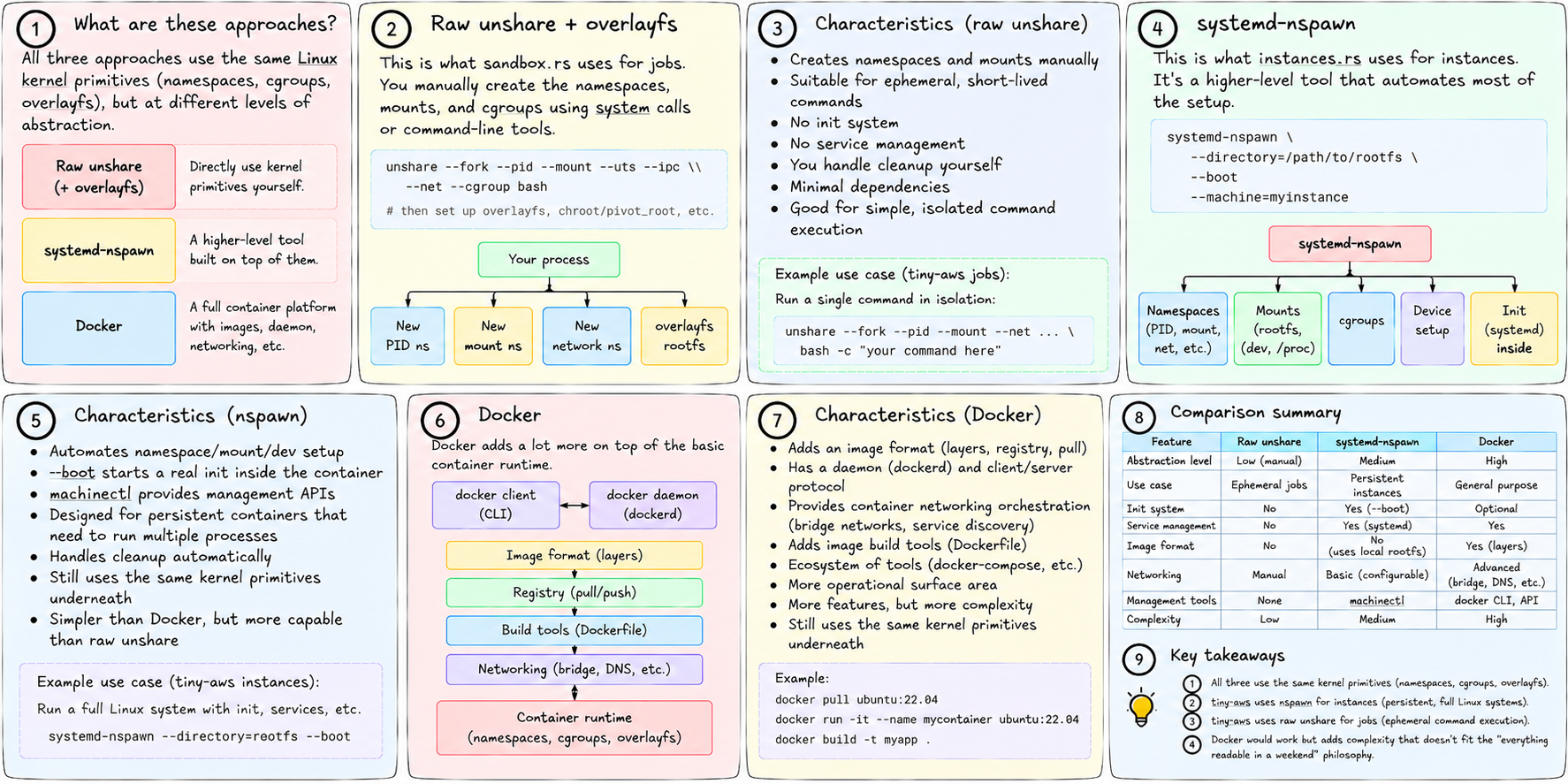
Raw unshare + overlayfs (what sandbox.rs does for jobs):
- Creates namespaces and mounts manually
- Suitable for ephemeral, short-lived commands
- No init, no service management
- No automatic cleanup of complex state
systemd-nspawn (what instances.rs does for instances):
- Automates the namespace/mount/dev setup
--bootstarts a real init inside the containermachinectlprovides management APIs- Designed for persistent containers that need to run multiple processes
- Still uses the same kernel primitives underneath
Docker:
- Adds an image format (layers, registry, pull)
- Adds a daemon (
dockerd) and client/server protocol - Adds container networking orchestration (bridge networks, service discovery)
- Adds image build tools (Dockerfile)
- Same kernel primitives underneath (namespaces, cgroups, overlayfs)
- More operational surface area, more features
tiny-aws uses nspawn for instances (persistent, full Linux systems) and raw unshare for jobs (ephemeral command execution). Docker would work but adds complexity that doesn't fit the "everything readable in a weekend" philosophy.
What this looks like in tiny-aws
In instances.rs, the agent constructs the nspawn command when provisioning an instance:
// instances.rs (condensed)
let mut cmd = Command::new("systemd-run");
cmd.args([
    &format!("--unit=tinyaws-{}", instance.id),
    &format!("--property=CPUQuota={}", instance.cpu_limit),
    &format!("--property=MemoryMax={}M", instance.mem_limit_mb),
    "--",
    "systemd-nspawn",
    &format!("--machine={}", instance.id),
    &format!("-D /var/lib/tinyaws/instances/{}", instance.id),
    "--boot",
    "--network-bridge=tinyaws0",
]);

for volume in &spec.volumes {
    cmd.arg(format!("--bind={}", volume));
}

cmd.spawn()?;
The instance directory was already populated by debootstrap and cp -a. systemd-run creates the cgroup. systemd-nspawn sets up the namespaces, mounts, and network, then boots the container's init. The agent patches the instance status to running once the container's health check responds.
When tinyaws instance terminate i-1 is called, the registry marks it terminated, and the agent calls machinectl poweroff i-1 — which sends SIGTERM to the container's PID 1 (systemd), which shuts down everything inside gracefully.
The full picture
You now have every layer. From the very bottom:
Hardware
└── Linux kernel
    ├── Processes (chapter 7) — fork, exec, PID 1
    ├── Users and permissions (chapter 12) — UID, capabilities
    ├── File descriptors (chapter 13) — everything is a fd
    ├── Signals (chapter 14) — SIGTERM, SIGKILL, process groups
    ├── Environment (chapter 15) — key=value inherited by children
    ├── Dynamic linking (chapter 16) — why a rootfs needs a full userland
    ├── Virtual memory (chapter 18) — pages, COW fork, OOM killer
    ├── VFS (chapter 4) — files, /proc, /sys as kernel interfaces
    ├── Namespaces (chapter 8) — PID, mount, net, UTS, IPC, user
    ├── Cgroups (chapter 9) — CPU, memory, I/O limits
    ├── overlayfs + pivot_root (chapter 10) — private rootfs per container
    ├── Bind mounts + tmpfs (chapter 17) — volumes, shared dirs, memory FS
    ├── seccomp (chapter 11) — syscall filtering
    └── systemd (chapter 19) — service management, the real PID 1
        └── systemd-nspawn — assembles all of the above into a container
            └── Container: the tinyaws instance
                └── Your application
Every line in that stack is a chapter in this series. Every mechanism is real kernel code you can read. Nothing is magic.
Next: Chapter 21 — how packets move between the containers we just built.