

Chapter 5: How a machine boots
Press the power button. Something happens. A few seconds later there's a login prompt, or a desktop, or a blinking cursor. What actually happened in between?
Press the power button. Something happens. A few seconds later there's a login prompt, or a desktop, or a blinking cursor. What actually happened in between?
The answer matters because containers are, in some ways, a shortcut through this process. To understand the shortcut, you need to know the full journey.
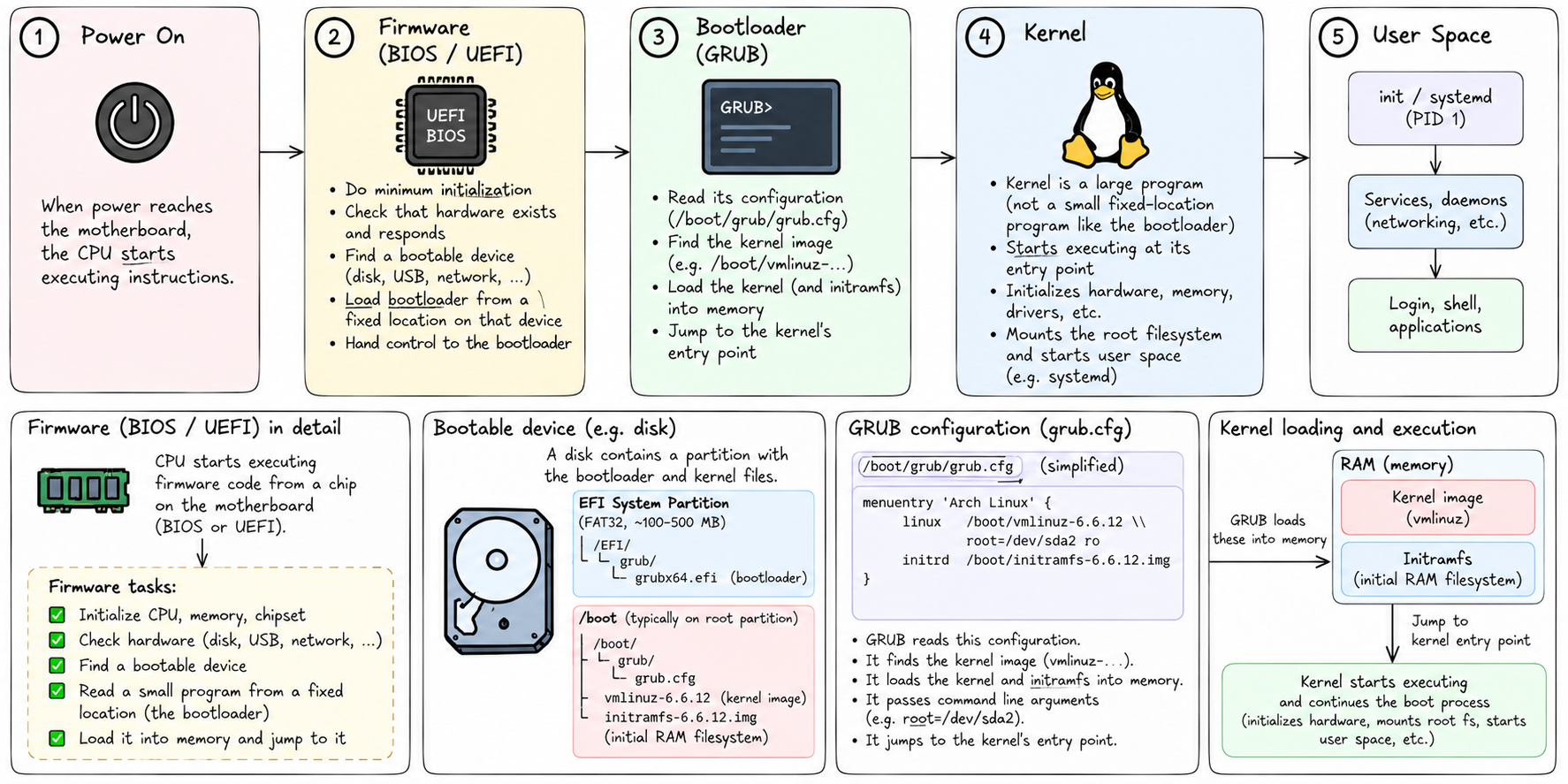
When power reaches the motherboard, the CPU starts executing instructions. But which instructions? It has to start somewhere. That somewhere is firmware — a small program burned into a chip on the motherboard. On older machines this is the BIOS. On modern machines it's UEFI. Either way, the job is the same: do the minimum to get the machine into a state where it can load something larger.
The firmware checks that hardware exists and responds. It finds a bootable device — a disk, a USB drive, a network interface. It loads a small program from a fixed location on that device — the bootloader — and hands control to it.
The bootloader's job is to load the kernel.
The kernel is not a small program. It can't just sit in a fixed location on disk like the bootloader can. The bootloader needs to find it, read it into memory, and jump to its entry point. On Linux systems, the bootloader is almost always GRUB. It reads its configuration, finds the kernel image (usually at /boot/vmlinuz-...), loads it, and starts it.
The kernel starts.
First thing it does: figure out what hardware exists. It initializes drivers for the CPU, memory, buses, storage controllers. It mounts an initial root filesystem — more on that in a moment — just enough to get going. It starts the scheduler so it can manage multiple processes. It starts the memory manager.
Then it does exactly one thing to kick off userspace: it starts a single process.
PID 1.
On modern Linux systems, PID 1 is almost always systemd. On minimal systems it might be a simple init script. It doesn't matter which — the point is that everything in userspace descends from this one process. PID 1 is the ancestor of every process on the machine.
PID 1 has a special responsibility beyond just being first. It is the reaper. When any process on the system exits, its parent is supposed to call wait() to collect the exit status and clean up the process table entry. If a process's parent dies before it does, the orphaned process gets reparented to PID 1. If PID 1 doesn't call wait() on it, the process becomes a zombie — technically dead, but still occupying a slot in the process table.
A good init process reaps orphans constantly. This is not optional. It's one of PID 1's core duties.
Back to the initial root filesystem.
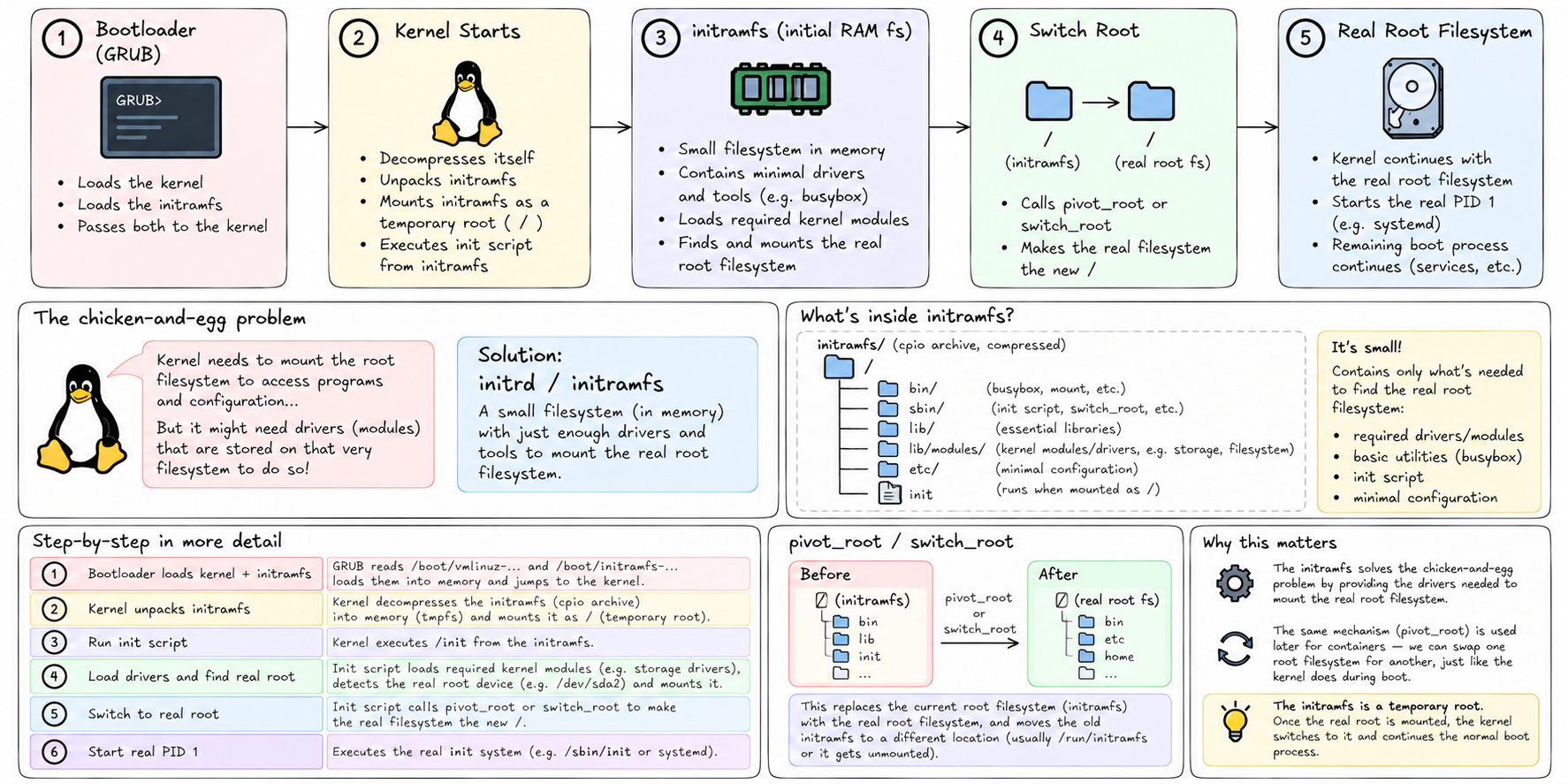
There's a chicken-and-egg problem when booting. The kernel needs to mount a root filesystem to access the programs and configuration that tell it what to do next. But to mount a root filesystem, it might need drivers that aren't compiled into the kernel — they might be in separate module files that live on that very filesystem it's trying to mount.
The solution is the initrd — initial ramdisk. Or in modern Linux, the initramfs — initial RAM filesystem.
The bootloader loads this alongside the kernel. It's a small compressed archive containing a minimal filesystem: just enough drivers and tools to mount the real root filesystem. The kernel unpacks it into memory, mounts it as a temporary /, runs an init script from it, and that script does the work of loading the right driver, finding the real disk, and mounting the real root filesystem.
Once the real root is mounted, the initramfs calls pivot_root or switch_root to make the real filesystem the new /, and then starts the real PID 1.
This will come back. When we talk about containers and pivot_root, we're using the same mechanism the kernel itself uses during boot — swapping one root filesystem for another.
So by the time the login prompt appears, here's what happened:
Firmware ran. Found a disk. Loaded the bootloader. The bootloader loaded the kernel and an initramfs. The kernel initialized hardware, unpacked the initramfs, used it to find and mount the real root filesystem, pivoted to it, and started PID 1. PID 1 read its configuration and started every other service: the network, the display manager, the SSH daemon, the log daemon, whatever the system is configured to run.
Every process you see is a descendant of PID 1. Every file you access goes through the VFS to the root filesystem that was mounted during boot.
When systemd-nspawn starts a container with --boot, it re-runs a compressed version of this process. It gives the container its own root filesystem directory. It starts a new PID 1 inside it — usually systemd, from the container's own copy. That inner systemd thinks it's booting a machine. It reads its unit files, starts services, manages the lifecycle of everything inside the container.
From inside, it looks exactly like a booted Linux machine. From outside, it's a process tree rooted at one process on the host.
The boot sequence you just learned is happening twice — once for the host, and once, in miniature, for the container.
But to make that work, the container needs its own root filesystem. A full directory tree that looks like a Linux installation — /bin, /etc, /lib, all of it.
That's what we look at next.