

Chapter 25: TCP, UDP, and HTTP — how applications talk
IP gets a packet from A to B. That's all it does. It makes no promises about whether it arrives, whether it arrives in order, or whether it arrives at all.
IP gets a packet from A to B. That's all it does. It makes no promises about whether it arrives, whether it arrives in order, or whether it arrives at all.
Most applications need more than that. They need conversations — a request followed by a response, a stream of data that arrives complete and in order. Building that on top of a best-effort packet system requires work. That work lives in the transport layer.
There are two transport protocols. They make opposite tradeoffs.
TCP — when you need everything to arrive
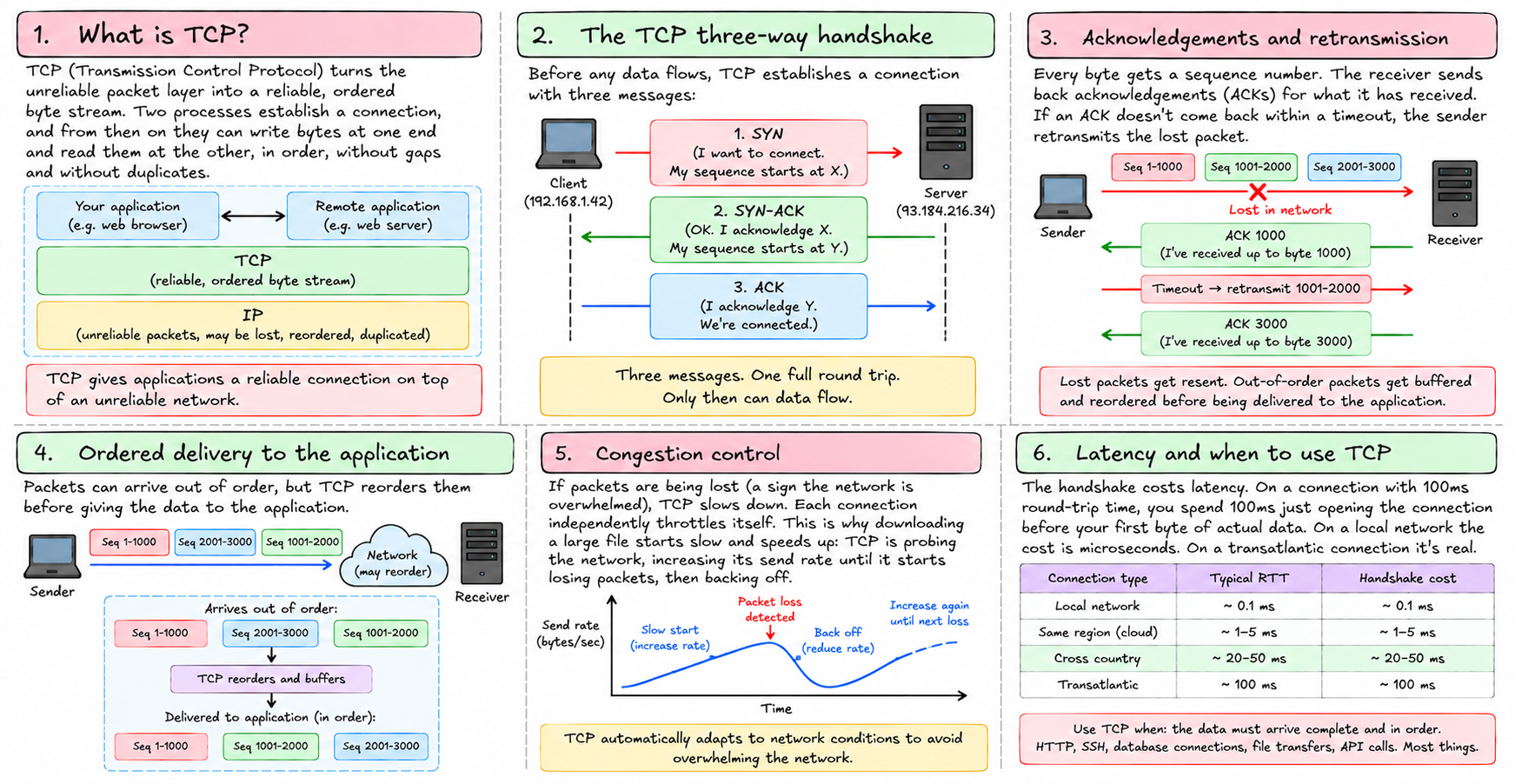
TCP — Transmission Control Protocol — turns the unreliable packet layer into a reliable, ordered byte stream. Two processes establish a connection, and from then on they can write bytes into one end and read them out the other, in order, without gaps, without duplicates.
The mechanism is acknowledgements and retransmission. Every byte gets a sequence number. The receiver sends back acknowledgements: "I've received everything up to byte 4,200." The sender tracks what's been acknowledged. If an acknowledgement doesn't come back within a timeout, it retransmits. Lost packets get resent. Out-of-order packets get buffered and reordered before being delivered to the application.
Before any data flows, TCP runs a handshake:
Client → Server:  SYN   (I want to connect. My sequence starts at X.)
Server → Client:  SYN-ACK  (OK. I acknowledge X. My sequence starts at Y.)
Client → Server:  ACK   (I acknowledge Y. We're connected.)
Three messages. One full round trip. Only then can data flow.
This costs latency. On a connection with 100ms round-trip time, you spend 100ms just opening it before your first byte of actual data. On a local network the cost is microseconds. On a transatlantic connection it's real.
TCP also does congestion control. If packets are being lost — a sign the network is overwhelmed — TCP slows down. Each connection independently throttles itself. This is why downloading a large file starts slow and speeds up: TCP is probing the network, increasing its send rate until it starts losing packets, then backing off.
Use TCP when: the data must arrive complete and in order. HTTP, SSH, database connections, file transfers, API calls. Most things.
UDP — when speed matters more than completeness
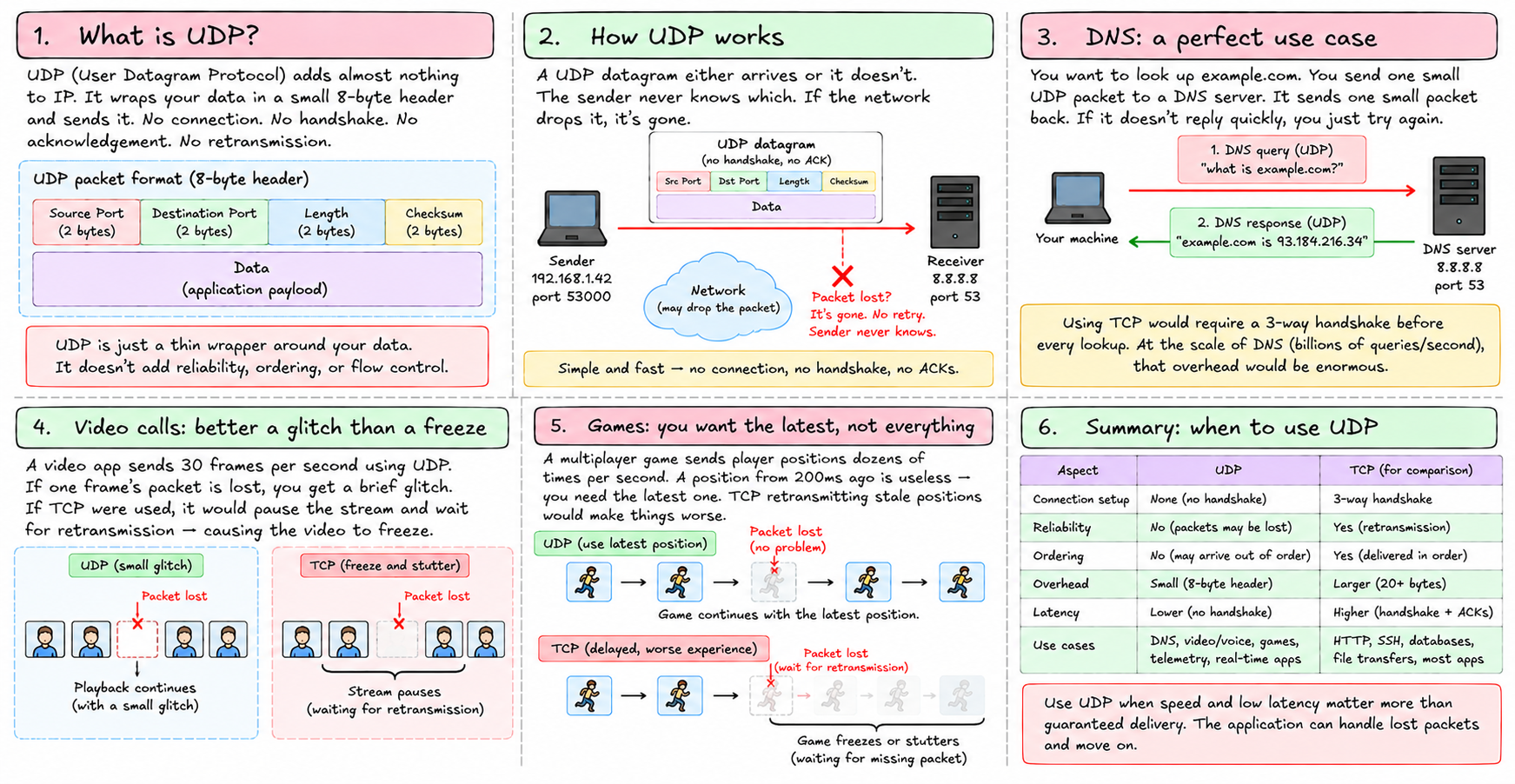
UDP — User Datagram Protocol — adds almost nothing to IP. It wraps your data in an eight-byte header with source port, destination port, length, and checksum. Then it sends. No connection. No handshake. No acknowledgement. No retransmission.
A UDP datagram either arrives or it doesn't. The sender never knows which. If the network drops it, it's gone.
This sounds bad. It's actually exactly what you want in certain situations.
DNS. You want to look up example.com. You send one small UDP packet to a DNS server. It sends one small packet back. If it doesn't reply in a hundred milliseconds, you try again. The retry logic is simple, the packets are tiny, and you don't need a connection for a single question-and-answer. Using TCP would cost a handshake before every single DNS lookup. At the scale of DNS — billions of queries a second across the internet — that overhead would be enormous.
Video calls. Your video app sends 30 frames per second. If one frame's packet is lost, you get a brief glitch. If TCP were used, it would pause the stream and wait for that frame to be retransmitted — causing the video to freeze and stutter. The glitch is better than the freeze. The application accepts loss and moves on to the next frame. Latency matters more than completeness.
Games. A multiplayer game sends player positions dozens of times per second. A position from 200ms ago is useless — you need the latest one. TCP retransmitting stale positions would make things worse. UDP lets stale packets just disappear.
Use UDP when: speed and low latency matter more than guaranteed delivery. DNS, video/voice, games, telemetry.
The cost you pay with each
| TCP | UDP | |
|---|---|---|
| Connection setup | 1 round trip (handshake) | None |
| Delivery guarantee | Yes, with retransmission | No |
| Ordering | Yes | No |
| Per-packet overhead | ~20 byte header + state | ~8 byte header, no state |
| Head-of-line blocking | Yes | No |
| Good for | HTTP, SSH, databases | DNS, video, games |
Head-of-line blocking is worth explaining. If a TCP stream has 10 packets and packet 5 is lost, packets 6–10 sit in a buffer waiting — even though they've already arrived. Nothing moves until packet 5 is retransmitted and received. All later packets are blocked behind the gap.
With UDP, there's no buffer. Packets are delivered as they arrive. If packet 5 is lost, the application just gets 1, 2, 3, 4, 6, 7, 8... and deals with it however it chooses.
HTTP — the application layer on top
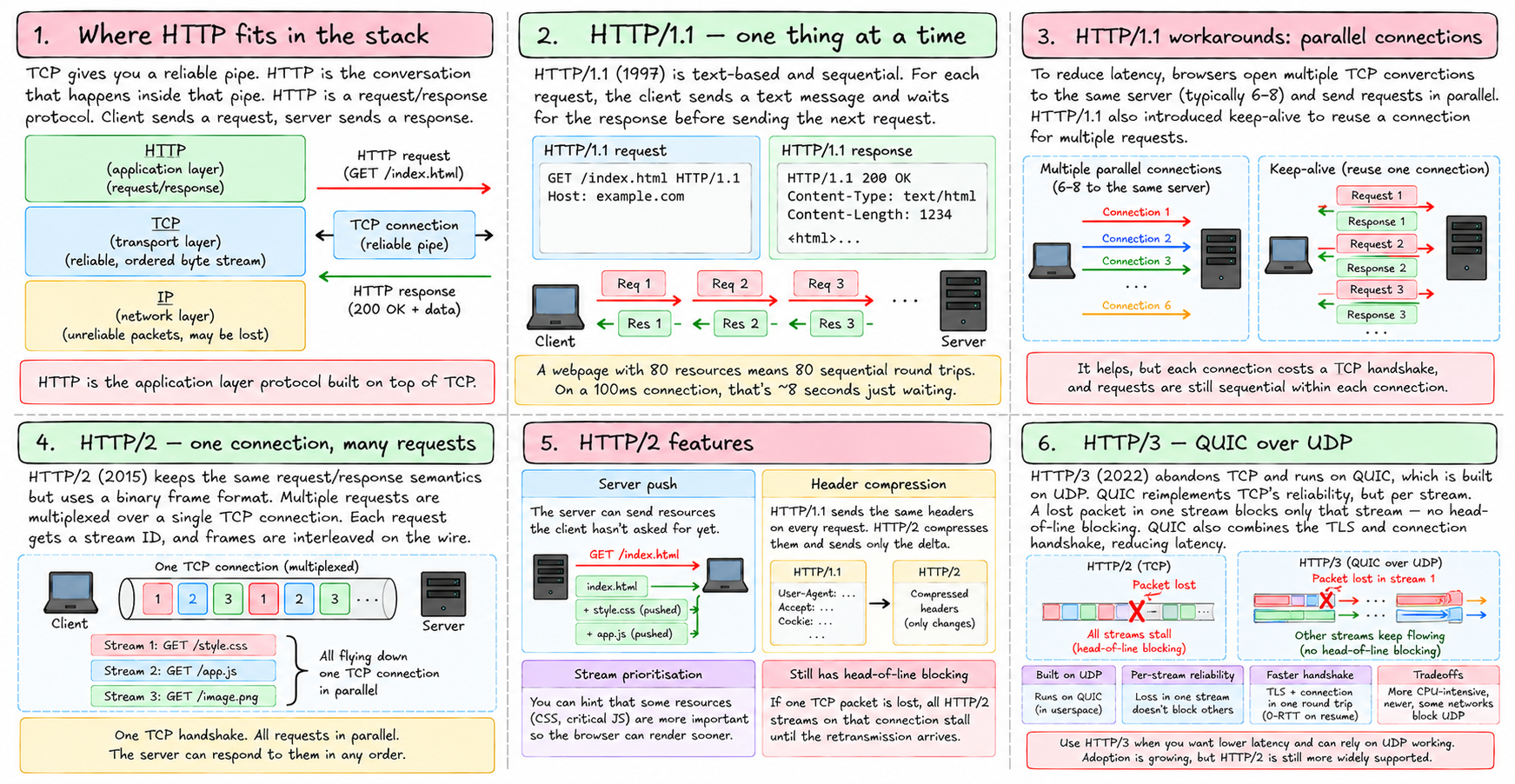
TCP gives you a reliable pipe. HTTP is the conversation that happens inside that pipe.
HTTP is a request/response protocol. Client sends a request. Server sends a response. That's it.
But the way that conversation happens has changed significantly over time — specifically to work around TCP's costs.
HTTP/1.1 — one thing at a time
HTTP/1.1 (1997) is simple. For each request, the client sends a text-formatted message:
GET /index.html HTTP/1.1
Host: example.com
The server responds:
HTTP/1.1 200 OK
Content-Type: text/html
Content-Length: 1234

<html>...
The problem: by default, HTTP/1.1 is sequential. Send request, wait for response, send next request, wait, repeat. A webpage with 80 resources — HTML, CSS, JS, images — means 80 sequential round trips. On a 100ms connection, that's 8 seconds just waiting.
The workaround: open multiple TCP connections. Browsers open 6 to 8 parallel connections to the same server. Each one handles one request at a time, but they run simultaneously. It helps, but each connection costs a handshake, and you're still making many separate connections to the same server.
HTTP/1.1 also added keep-alive — reuse the same TCP connection for multiple requests instead of opening a new one each time. Better, but still sequential within a connection.
HTTP/2 — one connection, many requests
HTTP/2 (2015) keeps the same semantics — requests and responses — but changes the wire format completely.
Instead of plain text, HTTP/2 sends binary frames. Multiple requests are multiplexed over a single TCP connection simultaneously. Each request gets a stream ID. Frames from different streams are interleaved on the wire and reassembled at the other end.
Stream 1: GET /style.css   ──┐
Stream 2: GET /app.js      ──┤── all flying down one TCP connection
Stream 3: GET /image.png   ──┘
One TCP handshake. All requests in parallel. The server can respond to them in any order.
HTTP/2 also adds:
Server push — the server can send resources the client hasn't asked for yet. It knows you'll need style.css when you request index.html, so it sends both without waiting for the second request.
Header compression — HTTP/1.1 sends the same headers (User-Agent, Accept, Cookie) on every single request. HTTP/2 compresses them and sends only the delta.
Stream prioritisation — you can hint that CSS is more important than images so the browser can render sooner.
The remaining problem: TCP's head-of-line blocking. If one packet is lost somewhere in the stream, all HTTP/2 streams on that connection stall until the retransmission arrives. You've moved head-of-line blocking from the HTTP layer down to the TCP layer, but it still exists.
HTTP/3 — abandoning TCP entirely
HTTP/3 (2022) solves this by abandoning TCP. It runs on QUIC, which is built on UDP.
QUIC reimplements TCP's reliability — acknowledgements, retransmission, flow control — but does it per stream. A lost packet in stream 1 blocks only stream 1. Streams 2 and 3 keep flowing. Head-of-line blocking is gone.
QUIC also combines the TLS handshake with the connection handshake. HTTP/2 over TLS requires two round trips before data flows (TCP handshake, then TLS handshake). QUIC does it in one. On connection resume (you visited the site before), it can even send data in the first packet — zero round-trip setup.
The tradeoff: QUIC is implemented in userspace, not the kernel. It's more CPU-intensive than TCP. It's newer, so some networks block UDP (a real problem — some corporate firewalls and mobile carriers drop unknown UDP traffic). HTTP/3 adoption is growing but HTTP/2 is still dominant.
Where this lands in tiny-aws
All of tiny-aws's internal communication is HTTP/1.1 over TCP. Go's standard library net/http uses HTTP/1.1 by default for server-to-server calls. The control plane services, the agent, the CLI — they all speak HTTP/1.1.
This is fine. On a local network with sub-millisecond round trips, the handshake overhead is negligible. HTTP/1.1's sequential nature doesn't hurt when the network is fast and requests are small.
The load balancer proxies HTTP at the TCP level — it doesn't parse HTTP, just forwards the TCP stream. This means HTTP/2 would work through it if clients and backends negotiated it.
HTTP/3 requires UDP forwarding, which tiny-aws's load balancer doesn't support. That's in MISSING.md.
The summary: TCP is the reliable workhorse. UDP is the fast and loose alternative. HTTP is the conversation layer built on top of TCP, and its evolution — from 1.1 to 2 to 3 — is mostly a story of working around TCP's costs while keeping the same request/response model the web is built on.