

Chapter 8: Namespaces, properly
The kernel maintains a global view of everything. One process table. One network stack. One filesystem hierarchy. One set of hostnames. All processes share...
The kernel maintains a global view of everything. One process table. One network stack. One filesystem hierarchy. One set of hostnames. All processes share this view by default.
Namespaces poke holes in that sharing. Each namespace type wraps one part of the global view and says: processes inside this namespace see their own private version, not the global one.
There are currently eight namespace types in Linux. We'll cover the ones that matter for containers.
PID namespaces
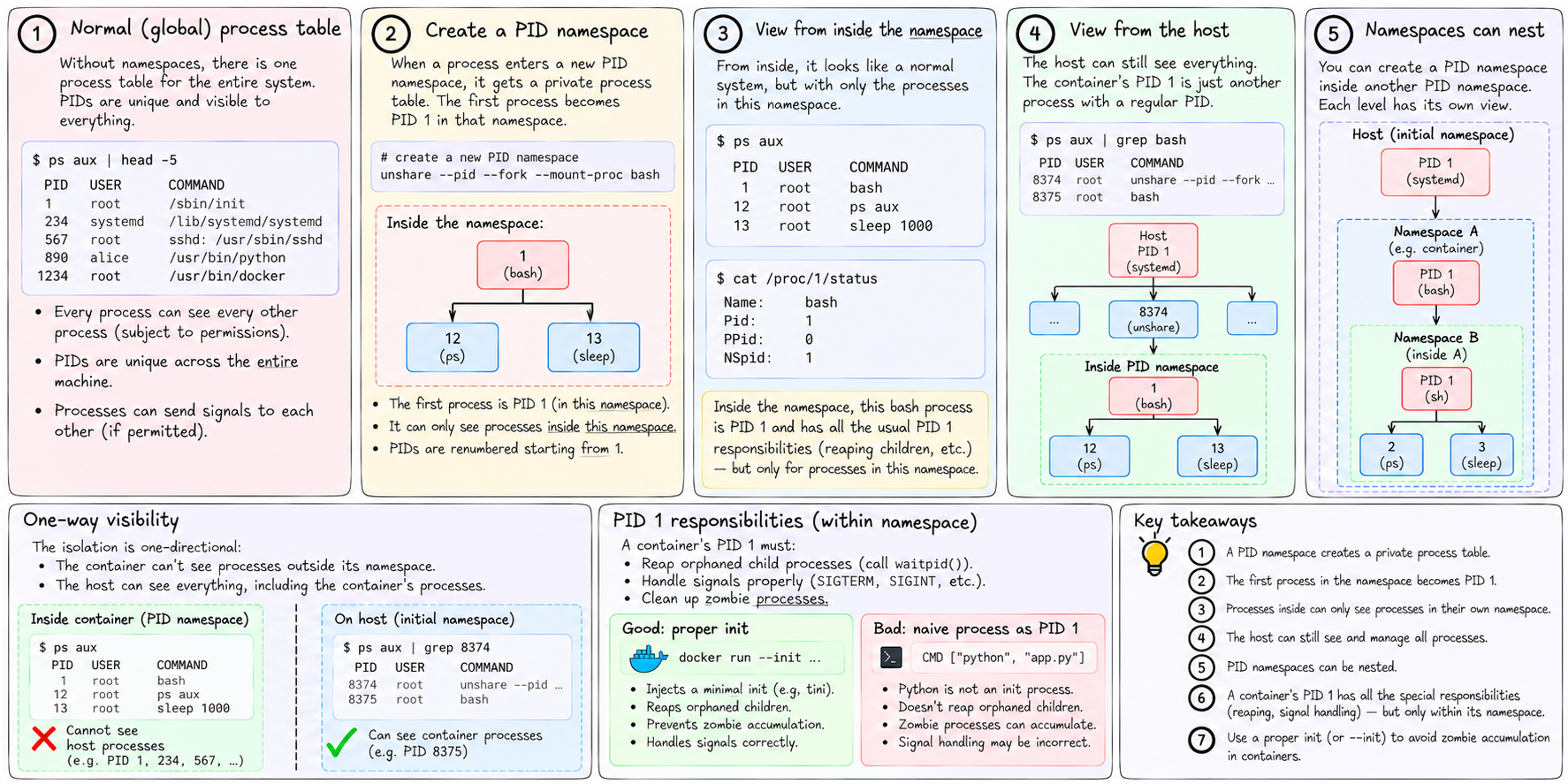
The process table is global. Run ps aux on any Linux machine and you see every process — PID 1 through whatever. Every process can send signals to every other process it has permission to signal. PIDs are unique across the entire machine.
A PID namespace creates a new, private process table. The first process to enter a new PID namespace becomes PID 1 within it. It can only see processes inside its own namespace — and their PIDs are renumbered starting from 1. From inside, the namespace looks like the whole machine, with a small population.
The host can still see everything. From the host's perspective, the container's PID 1 might be PID 8374. The host can signal it, inspect it in /proc/8374, kill it. The isolation is one-directional: the container can't see out, but the host can see in.
PID namespaces nest. You can create a namespace inside a namespace. From the outermost level, you can see every process on the machine. From each inner level, you can only see what's inside.
The critical implication: a container's PID 1 has all the special PID 1 responsibilities we discussed — reaping orphans, handling signals properly — but only within its namespace. The host's PID 1 is completely separate.
Mount namespaces
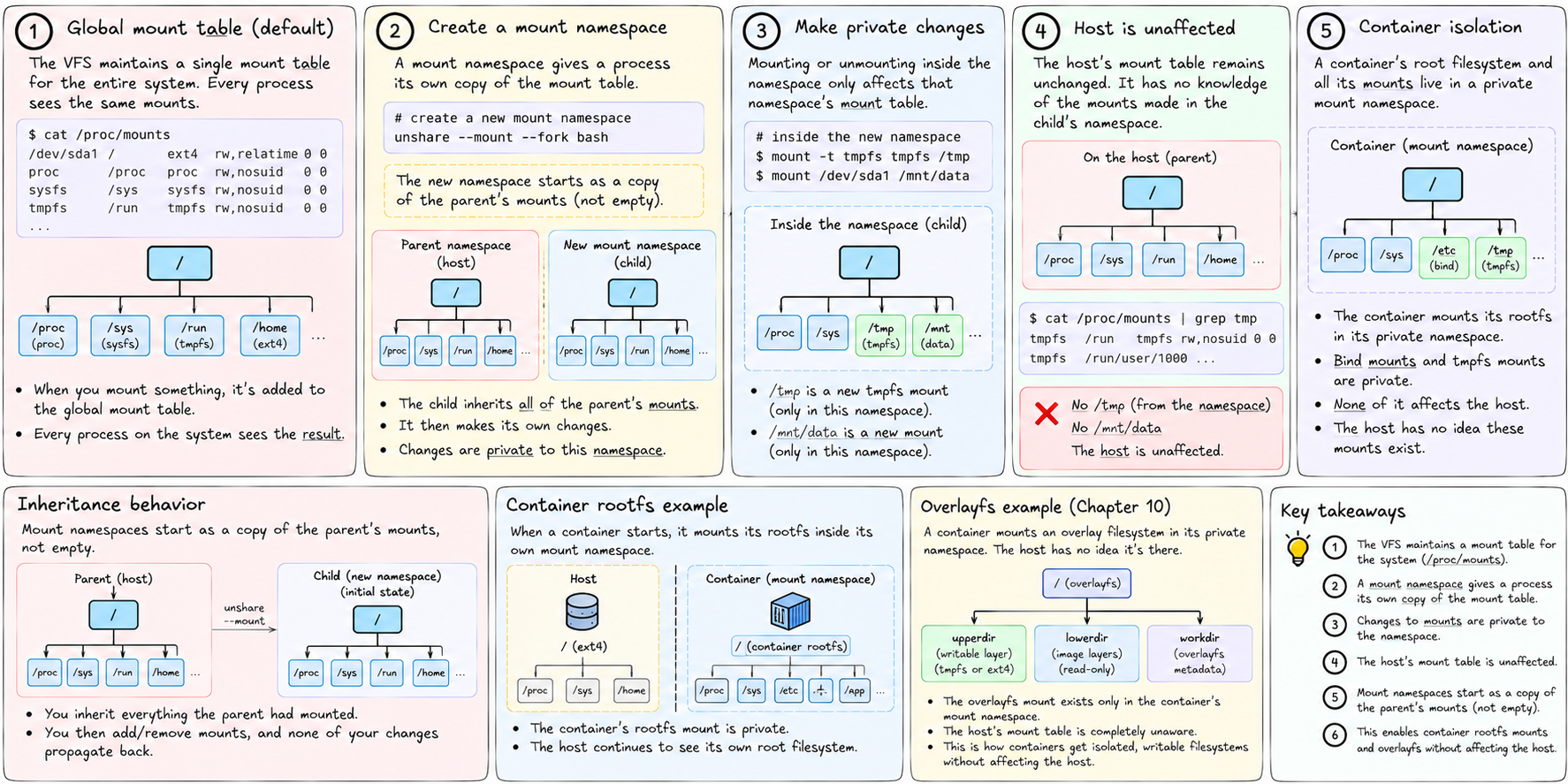
The VFS maintains a mount table — a list of which filesystems are mounted at which paths. cat /proc/mounts shows it. When you mount something, that entry is added to the global mount table. Every process sees the result.
A mount namespace gives a process its own copy of the mount table. Changes to mounts — mounting, unmounting — are private to that namespace. The host's mount table is unaffected.
This is fundamental to container isolation. When a container mounts its rootfs, that mount is in the container's private mount namespace. When the container creates /tmp entries or bind-mounts configuration, none of it affects the host.
It also enables the overlayfs trick we'll get to in Chapter 10. The container mounts an overlay filesystem in its private namespace. The host has no idea it's there.
One subtlety: mount namespaces start as a copy of the parent's mounts, not empty. When you create a new mount namespace, you inherit everything the parent had mounted. You then work from there — adding mounts, removing mounts — and none of your changes propagate back.
Network namespaces
Each network namespace has its own:
- Network interfaces (only
lo— loopback — by default) - Routing table
- iptables rules
- Socket table
A process in a new network namespace can bind to port 80 without conflicting with anything on the host, because it's on a completely separate network stack. It can have its own iptables rules. Its connections go through its own routing table.
The challenge is that an isolated network namespace can't reach the outside world on its own. To give it internet access, you create a veth pair — a virtual ethernet cable with two ends. One end goes into the container's network namespace. The other end stays on the host, attached to a bridge. Traffic flows in and out through this virtual cable.
This is exactly what tiny-aws does in networking.rs:
tinyaws0 bridge (host)
    |
    veth-i-1 (host end)  ←→  veth-i-1-i (container end)
The container's veth-i-1-i interface gets an IP address. A masquerade iptables rule on the host NATs outbound traffic from the container's subnet. The container can reach the internet through this chain, and the host can reach the container directly through its bridge IP.
UTS namespaces
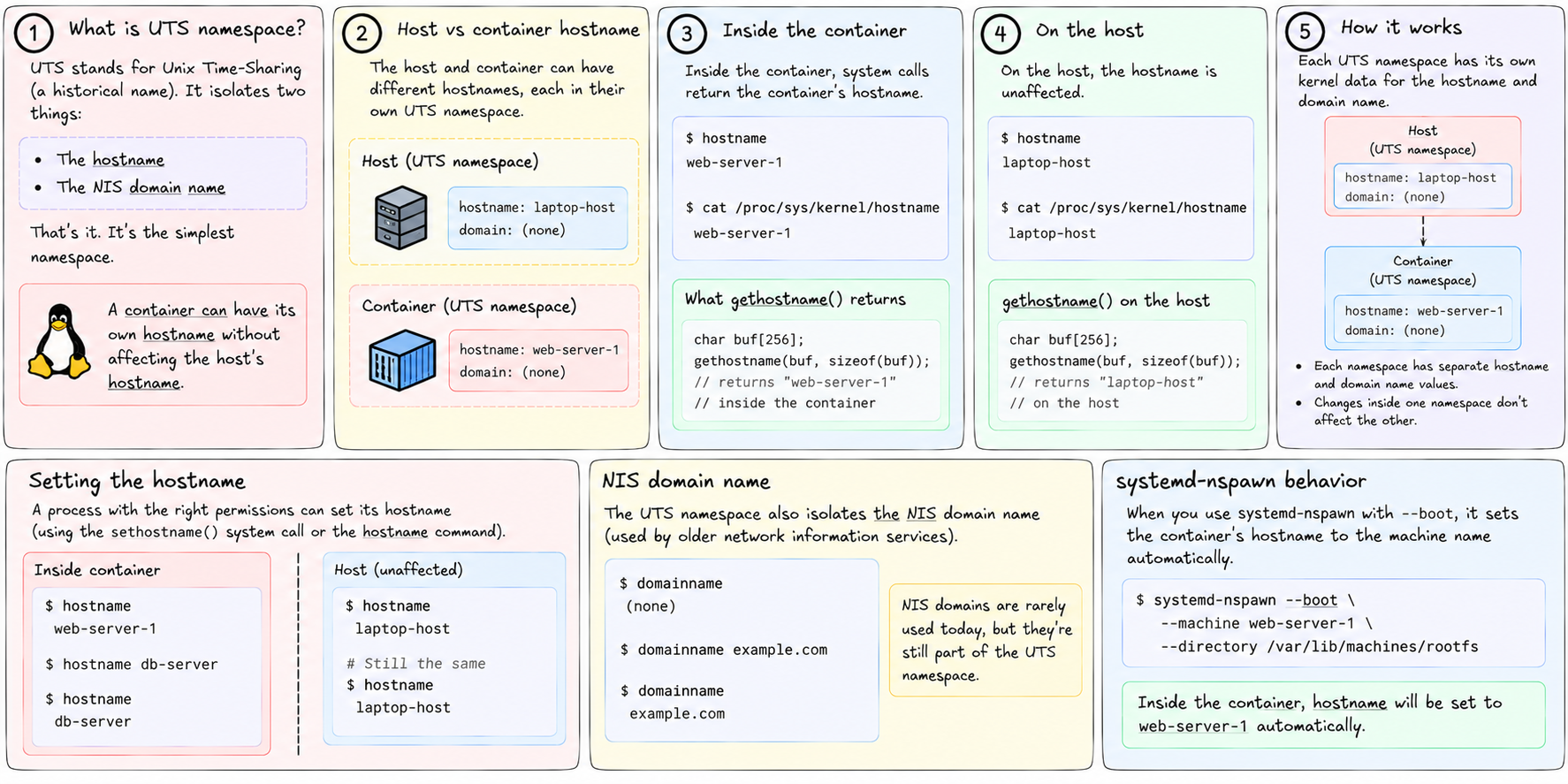
UTS stands for Unix Time-Sharing — a historical name. The UTS namespace isolates two things: the hostname and the NIS domain name.
That's it. It's the simplest namespace. A container can set its hostname to web-server-1 without changing the host's hostname. gethostname() inside the container returns the container's hostname. gethostname() on the host returns the host's.
systemd-nspawn sets the container's hostname to the machine name automatically when using --boot.
IPC namespaces
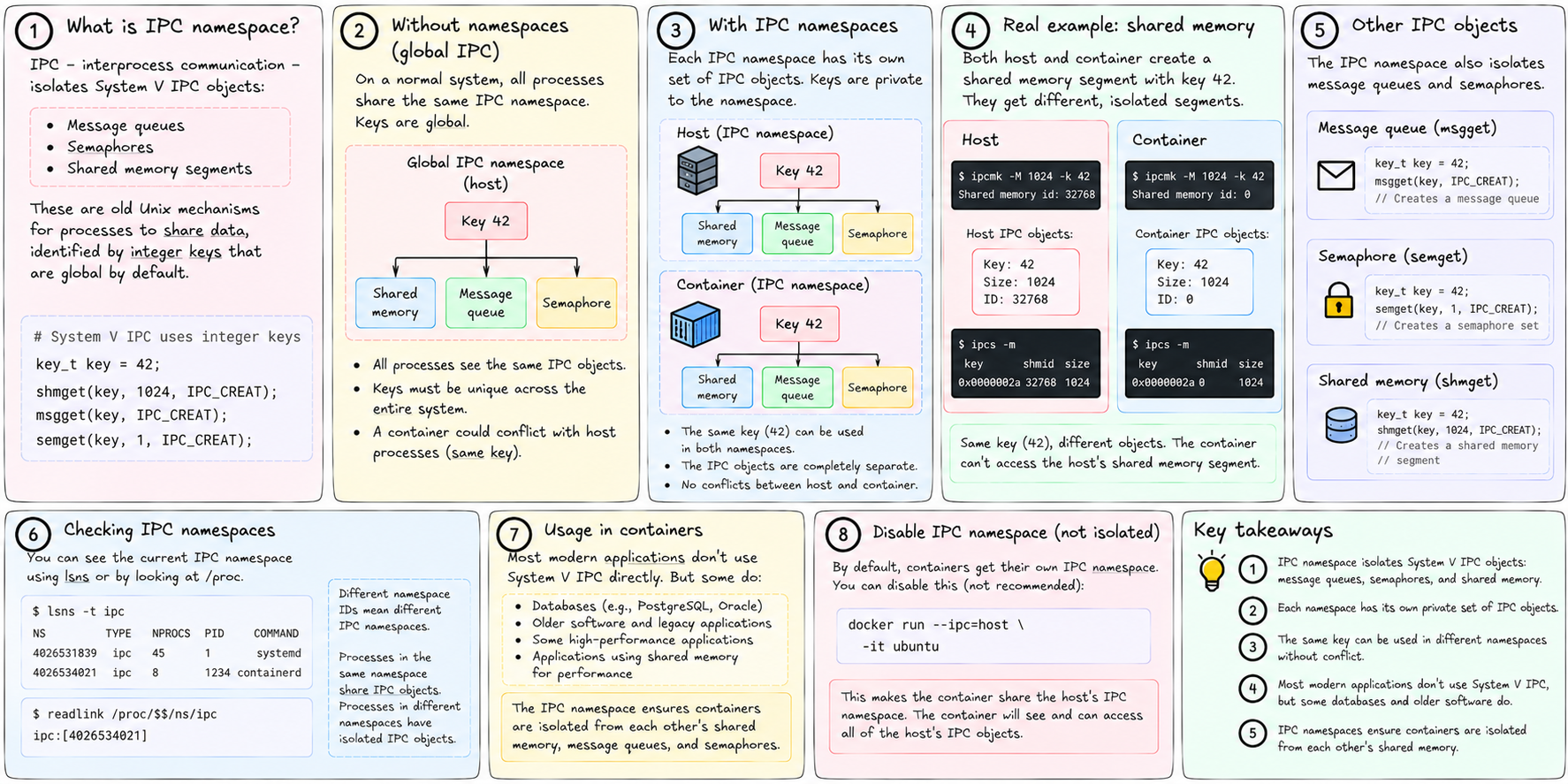
IPC — interprocess communication — isolates System V IPC objects: message queues, semaphores, and shared memory segments. These are old Unix mechanisms for processes to share data. They're identified by integer keys that are global by default.
An IPC namespace makes those keys private. A container can create shared memory segment with key 42 without conflicting with a host process that has its own shared memory segment with key 42. They're in different namespaces; the keys are independent.
Most modern applications don't use System V IPC directly. But databases sometimes do, and some older software relies on it. The IPC namespace ensures containers are isolated from each other's shared memory.
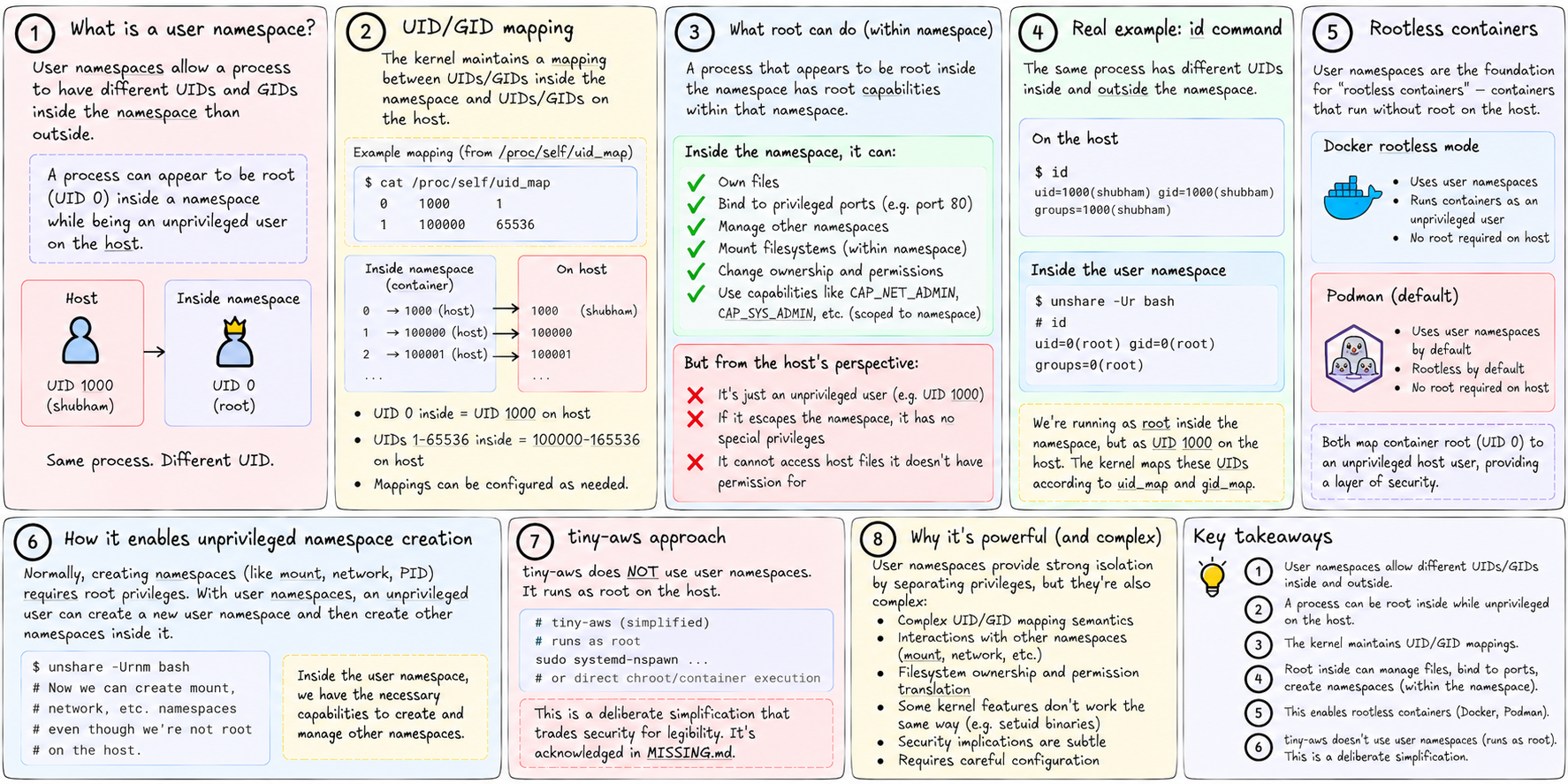
User namespaces
User namespaces are the most powerful and the most complex.
They allow a process to have a different UID inside the namespace than outside. Specifically: a process can appear to be root (UID 0) inside a namespace while being an unprivileged user on the host. This is user namespace remapping.
The kernel maintains a mapping: UID X inside the namespace = UID Y on the host. A process that appears to be root inside the namespace has root capabilities within the namespace — it can own files, bind to privileged ports, manage other namespaces — but it's actually an unprivileged user from the host's perspective. If it escapes the namespace somehow, it has no special privileges.
This is the foundation for "rootless containers" — containers that run without root on the host. Docker's rootless mode uses user namespaces. Podman uses them by default.
tiny-aws doesn't use user namespaces. It runs as root on the host. That's acknowledged in MISSING.md — it's a deliberate simplification that trades security for legibility.
How unshare works
unshare(1) is the userspace tool. Under the hood it calls the unshare(2) syscall, which takes flags indicating which namespaces to unshare from the current process. After the call, the process is in new, private versions of those namespaces.
For creating a child in new namespaces, the lower-level syscall is clone(2), which is like fork but lets you specify namespace flags. CLONE_NEWPID, CLONE_NEWNS (mount), CLONE_NEWNET, CLONE_NEWUTS, CLONE_NEWIPC, CLONE_NEWUSER, CLONE_NEWCGROUP.
tiny-aws uses unshare as an external command:
Command::new("unshare")
    .args(["--pid", "--mount", "--ipc", "--fork", "--mount-proc", "--", &prog])
--fork is required with --pid because the PID namespace change only takes effect for child processes — you can't be PID 1 in a namespace if you already have a PID in the old one. --fork causes unshare to fork a child, which becomes PID 1 in the new namespace. --mount-proc re-mounts /proc inside the new namespace so it reflects the new PID table.
The kernel tracks namespace membership for every process in /proc/<pid>/ns/. Each file there is a symlink to a namespace object. Two processes in the same namespace have symlinks pointing to the same object. Two processes in different namespaces have symlinks pointing to different objects.
You can move a running process into a different namespace with nsenter — useful for debugging: nsenter --target <pid> --mount --pid --net drops you into the same namespaces as a running container.
Next: cgroups. Namespaces handle what a process can see. Cgroups handle what it can consume.