

Chapter 3: The Linux primitives
Four kernel features stacked together to form a sandbox — namespaces, cgroups, rootfs, and seccomp — with the tiny-aws code that wires them up.
Chapter 2 ended with virtualization — a hypervisor carving fake machines out of real hardware, and AWS doing that isolation in silicon with Nitro.
tiny-aws takes a different path. No hypervisor, no custom hardware. Instead, it stacks four Linux kernel features — namespaces, cgroups, a private rootfs, and seccomp — to create containers that behave like isolated machines. Same goal: untrusted code runs somewhere it cannot see or touch the rest of the system. Different mechanism: software the kernel already provides.
This chapter introduces all four layers and shows the tiny-aws code that applies them.
First: what do "sandbox" and "rootfs" actually mean?
These words get used loosely. Here's what they mean precisely.
A rootfs (root filesystem) is the directory tree that a process sees as /. Every Linux process has one. Normally it's the host's actual disk — /bin, /etc, /home, all the files that came with your OS. A rootfs is just what the filesystem looks like from inside the process. It's not a container, not a jail, not anything special — it's just which directory the process treats as the root of the world.
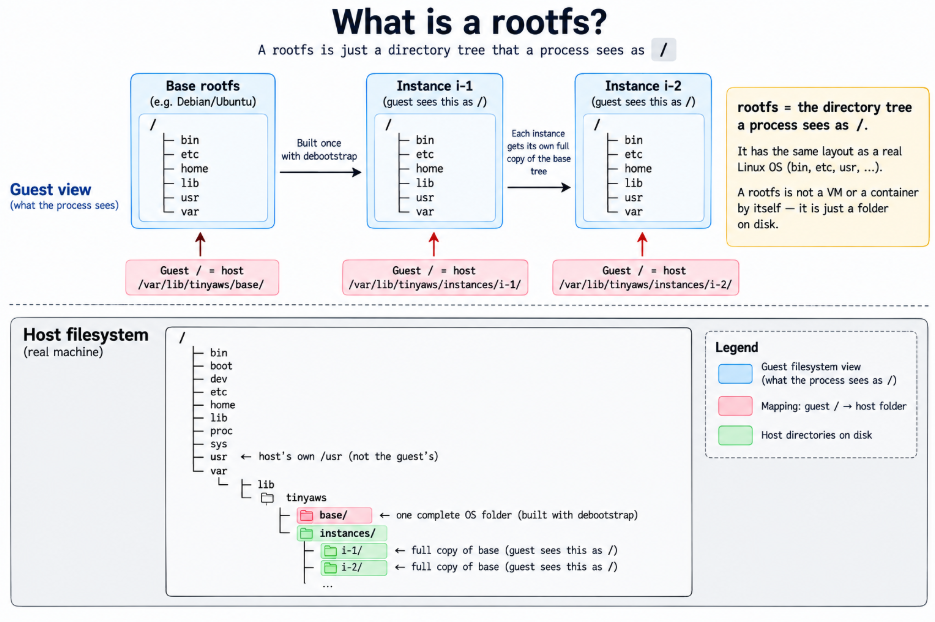
When people say "the instance has its own rootfs," they mean: the process running inside it sees a different / than the host does. That different / is typically a minimal Debian or Ubuntu install — a full OS userland, but completely separate from the host's files. tiny-aws builds these with debootstrap and stores them in /var/lib/tinyaws/base.
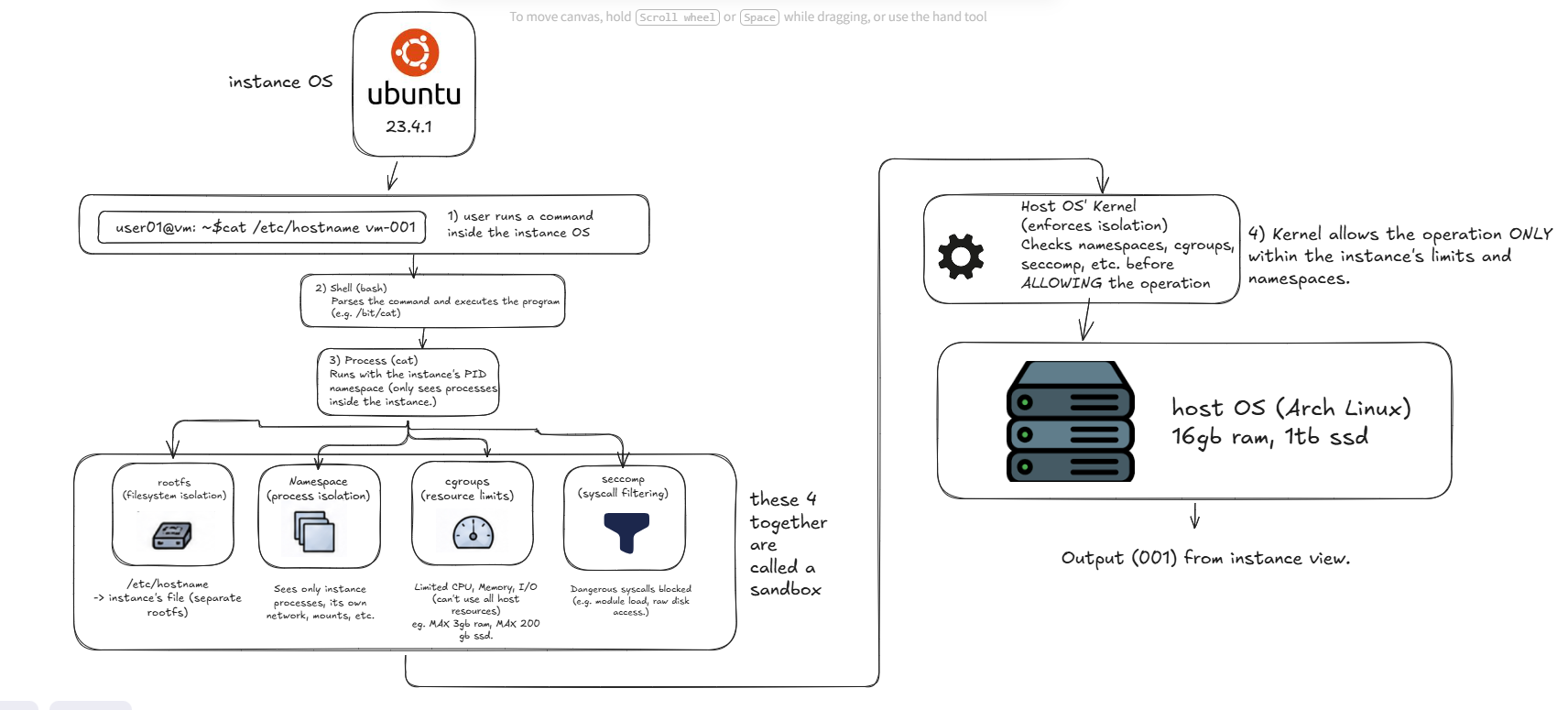
Isolation is the broader idea. A rootfs gives you filesystem isolation — the process can't see the host's files. But filesystem isolation alone is not enough. The process can still see every other process on the machine. It can still use all the CPU and RAM. It can still make dangerous kernel calls. Full isolation requires four separate things working together: a private filesystem (rootfs), process visibility limits (namespaces), resource caps (cgroups), and syscall filtering (seccomp).
Isolation in case of a single Instanced Operating System
Isolation in caase of multiple Instances of Operating System per user
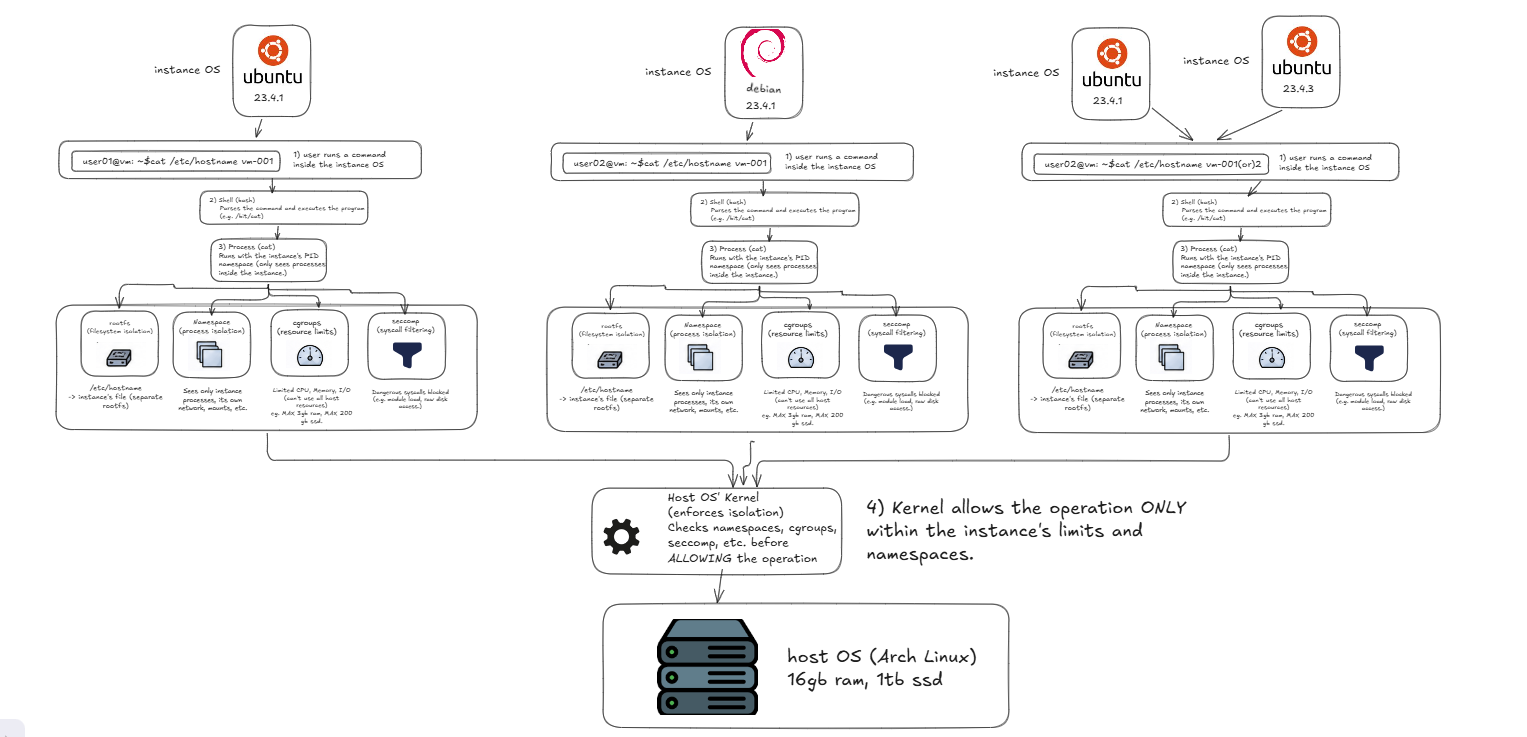
A sandbox is the combination of all four. When tiny-aws runs your code "in a sandbox," it means: your code has its own rootfs, runs in its own namespaces, is limited by cgroups, and has a seccomp filter applied. The sandbox is not a single thing — it's the result of stacking four independent Linux primitives on top of each other.
So the relationship is:
sandbox
├── rootfs          (what files can you see?)
│     └── overlayfs + pivot_root
├── namespaces      (what processes/interfaces can you see?)
│     └── unshare --pid --mount --ipc
├── cgroups         (how much CPU/RAM can you use?)
│     └── /sys/fs/cgroup/tinyaws/<job_id>/
└── seccomp         (which kernel calls can you make?)
      └── seccomp-default.json
The rest of this chapter explains each layer in turn.
The problem: a process thinks it owns the world
A process has a view of the filesystem that looks like the whole machine. It can see every other running process in /proc. It can send signals to them. It can use shared memory to talk to them. As far as a normal process is concerned, it is running on a machine it shares with everything else.
This is fine when you trust the code. It stops being fine when you're running someone else's code on your hardware.
If you're selling compute to strangers, you need a different model. You need each tenant's process to think it owns a machine — and you need that to be an illusion the kernel enforces.
Layer 1 — Namespaces: what you can see
A namespace is a boundary the kernel draws around a process's view of some resource. There are several kinds. Each one isolates a different part of what a process can see.
PID namespace. Put a process in a new PID namespace and it can only see itself and its children. The host's other thousand processes don't exist from its point of view. It becomes PID 1 in its own private universe.
Mount namespace. The host has its own set of mounts — /, /home, /var. Give a process a new mount namespace and any mounts it makes are private. The host doesn't see them. Other processes don't see them.
IPC namespace. Shared memory segments and semaphores are isolated. A process in its own IPC namespace can't read or write the shared memory of processes outside it.
The Linux tool for creating namespaces is called unshare. The name is exactly right. You are unsharing resources with the rest of the system.
Here is how tiny-aws uses it, in data-plane/compute/ec2-agent/src/sandbox.rs:
let mut wrapped_args: Vec<String> = vec![
    "--pid".into(),
    "--mount".into(),
    "--ipc".into(),
    "--fork".into(),
    "--mount-proc".into(),
    "--".into(),
];
wrapped_args.push(prog.into());
What each flag does: --pid gives the process a new PID namespace (it becomes PID 1, can't see the host's processes). --mount gives it a new mount namespace (its filesystem changes are private). --ipc isolates shared memory. --fork is required when creating a PID namespace — the calling process forks first so the child becomes PID 1. --mount-proc remounts /proc inside the new namespace so it reflects the new PID space instead of the host's. The -- signals the end of unshare flags; everything after is the command to run.
Every job tiny-aws runs goes through this. The process that runs your code is born into three private namespaces. It cannot see the host's processes. It cannot interfere with the host's mounts. It cannot touch the host's shared memory.
Layer 2 — Cgroups: what you can use
Namespaces handle visibility. They don't handle consumption.
A process in its own PID namespace can still allocate all available RAM. It can spin all CPUs at 100%. It can't see other processes, but it can starve them.
Cgroups — control groups — are how the kernel limits what a process can use, not just what it can see. You put a process in a cgroup and set limits: this group gets at most 512 MB of memory, at most one CPU's worth of time.
Cgroups are configured through the filesystem. Under /sys/fs/cgroup, there's a hierarchy of directories. Each directory is a cgroup. Inside each directory are files that control limits. To limit a process to 512 MB of memory, you write 536870912 to /sys/fs/cgroup/yourgroup/memory.max. No special API — the kernel exposes cgroup management as plain file writes.
Here is tiny-aws doing exactly this, in data-plane/compute/ec2-agent/src/sandbox.rs:
// memory.max in bytes
if mem_limit_mb > 0 {
    let mem_bytes = mem_limit_mb * 1024 * 1024;
    std::fs::write(
        format!("{}/memory.max", cgroup_path),
        mem_bytes.to_string(),
    )?;
}

// cpu.max: <quota> <period> — e.g. "50000 100000" for 50% of one core
if cpu_percent > 0 {
    let quota = cpu_percent * 1000; // microseconds per 100ms period
    let period = 100_000u64;
    std::fs::write(
        format!("{}/cpu.max", cgroup_path),
        format!("{} {}", quota, period),
    )?;
}
memory.max takes a number of bytes — the hard ceiling. If the process tries to allocate past this, the kernel kills it with an OOM (out-of-memory) signal. cpu.max takes two numbers: a quota and a period, both in microseconds. "50000 100000" means: in every 100ms window, this cgroup gets 50ms of CPU time — 50% of one core. "200000 100000" would be 200% — two full cores' worth.
This is how the instance types work. nano gets memory.max = 134217728 (128 MB) and cpu.max = 25000 100000 (25% of one core). large gets memory.max = 2147483648 (2 GB) and cpu.max = 400000 100000 (four cores). Two file writes. That's the entire billing-tier enforcement.
Layer 3 — Rootfs: what you can see on disk
Namespaces and cgroups together give you isolation and limits. But the process can still see the host's filesystem.
If you're running untrusted code, you don't want it reading /etc/passwd, browsing /home, or finding credentials in /root. You want each tenant to have their own private / — one that looks like a complete operating system but contains only what they're supposed to have.
This requires two things working together: overlayfs to create the private filesystem, and pivot_root to make it the process's actual root.
Overlayfs is a union filesystem. You give it two directories: a lower layer (read-only) and an upper layer (writable). The process sees a merged view. Reads come from the lower layer unless the upper layer has something overriding it. Writes always go to the upper layer — the lower layer is never modified.
This is exactly how Docker images work. The base image is the lower layer. Every write the container makes goes to the upper layer. Tear down the container, discard the upper layer, and the base image is unchanged. A hundred containers sharing the same base image use one copy of the lower layer on disk.
Pivot_root is the syscall that changes what a process thinks is /. chroot does something similar, but a root process can escape chroot by traversing .. far enough. pivot_root atomically swaps the filesystem root — the old host root gets moved to a mount point you specify, which you then immediately unmount. After that, the host filesystem simply does not exist from the process's perspective. There is no .. to follow back.
Here is tiny-aws building the overlayfs and calling pivot_root, in data-plane/compute/ec2-agent/src/sandbox.rs:
let script = format!(
    r#"set -e
mkdir -p '{upper}' '{work}' '{merged}' '{old_root}'
mount -t overlay overlay -o 'lowerdir={lower},upperdir={upper},workdir={work}' '{merged}'
cp -a '{app_dir}/.' '{merged}/app/' 2>/dev/null || true
cd '{merged}'
mkdir -p '{old_root}'
pivot_root . old_root
cd /app
umount -l /old_root 2>/dev/null || true
rmdir /old_root 2>/dev/null || true
exec {cmd}"#,
    // ...
);
Line by line: mkdir -p creates three directories — upper (the writable layer for this job), work (internal scratch space overlayfs requires), merged (the view the process will see), and old_root (a temporary home for the host's root before it gets unmounted). The mount -t overlay command is where the kernel creates the merged view — the process will see lowerdir (the base Debian rootfs) merged with upperdir (initially empty, accepts all writes). cp -a copies the app code into the merged root at /app. pivot_root . old_root atomically makes the merged directory the new / and moves the old host root to old_root. umount -l /old_root detaches the host filesystem — after this line, the host's files are completely invisible. exec {cmd} replaces the shell with the user's actual command.
The process wakes up inside a clean Debian filesystem with its app code at /app. The host's /etc/passwd, /home, /root, /var — none of it exists from its perspective.
Layer 4 — Seccomp: what you can call
Even with namespaces, cgroups, and a private rootfs, a process still has access to the full Linux syscall interface. It can call reboot. It can call kexec_load to replace the running kernel. It can call init_module to load a kernel module. These operations reach through the kernel and affect the entire machine, regardless of namespace or rootfs boundaries.
Seccomp — secure computing mode — lets you filter which syscalls a process is allowed to make. You write a policy before the process starts. The policy cannot be removed or loosened once set, even by root.
tiny-aws ships a seccomp profile at data-plane/compute/ec2-agent/seccomp-default.json:
{
  "defaultAction": "SCMP_ACT_ALLOW",
  "syscalls": [
    { "names": ["reboot", "kexec_load", "kexec_file_load"],
      "action": "SCMP_ACT_KILL_PROCESS" },
    { "names": ["ptrace"],
      "action": "SCMP_ACT_KILL_PROCESS" },
    { "names": ["init_module", "finit_module", "delete_module"],
      "action": "SCMP_ACT_KILL_PROCESS" }
  ]
}
The default is SCMP_ACT_ALLOW — every syscall is permitted unless explicitly listed. The exceptions are the dangerous ones: reboot and kexec_load would restart or replace the machine's kernel. ptrace can be used to inspect and control other processes outside the sandbox. init_module and friends load kernel code with full kernel privileges. A process that calls any of these doesn't get an error — it gets killed immediately by the kernel, no warning, no cleanup.
This is the same approach Docker uses. Their default seccomp profile blocks about 44 syscalls out of the ~350 Linux defines. The rest are allowed. The goal is not to restrict everything — it's to remove the handful of syscalls that can escape or damage the host.
Putting it all together
When a job arrives at the agent, data-plane/compute/ec2-agent/src/jobs.rs stacks these four layers in sequence:
-
Cgroup —
sandbox::setup_cgroup(job_id, mem_mb, cpu_pct)creates/sys/fs/cgroup/tinyaws/<job_id>/and writesmemory.maxandcpu.max. Resource limits are now in place. -
Rootfs — the agent finds the pre-built base rootfs at
/var/lib/tinyaws/base(or a custom image if atinyaws.buildfile was present).sandbox::prepare_overlay(job_id)creates the scratch directories for the writable upper layer. -
Namespace + rootfs together —
sandbox::wrap_command_with_rootfs(...)builds the shell script that mounts the overlayfs and callspivot_root, then wraps the whole thing inunshare --pid --mount --ipc --fork. One process spawn does both. -
Seccomp — applied via nspawn args if the profile file is found. The policy is locked in before the first line of user code runs.
-
On completion —
sandbox::cleanup_cgroup(job_id)removes the cgroup directory.sandbox::cleanup_overlay(job_id)unmounts the overlayfs and deletes the scratch dirs. The base rootfs is untouched and ready for the next job.
The full implementation is about 250 lines of Rust in two files: sandbox.rs and jobs.rs. No Docker. No containerd. No runc. Just unshare, some file writes, and the kernel doing what it was always able to do.
The gap from here to AWS
This is a real sandbox. It is not as strong as AWS.
AWS uses Nitro — a custom hardware card that enforces memory isolation between VMs at the silicon level. Even if the guest kernel is fully compromised, it cannot read another VM's memory. The Nitro card physically prevents it.
tiny-aws uses a shared kernel. A kernel exploit — a bug in the kernel itself — breaks all isolation instantly. All processes on the machine share the same kernel, regardless of namespace or rootfs boundaries. If the kernel can be tricked, it's over.
This is not a solvable problem with more Rust. It requires either hardware (Nitro) or a lightweight hypervisor (Firecracker) that runs each workload under a separate kernel. That's a substantially larger engineering effort.
For learning — for running your own code on your own machine — the sandbox is real, effective, and instructive. You now know exactly what each layer does, where the code lives, and what it does and doesn't protect against.
Next chapter: the filesystem in depth — what a VFS is, why /proc has no disk behind it, and why overlayfs is possible at all.