

Chapter 23: Subnetting — or, why you can't reach your neighbour's printer
Here's something that surprises people when they first notice it.
Here's something that surprises people when they first notice it.
Your laptop is on your home WiFi. Your phone is on your home WiFi. They can talk to each other — share files, stream to a Chromecast, whatever. Now you go to a coffee shop. Your laptop joins their WiFi. Your phone is still on your home WiFi. They can no longer talk directly. You'd have to go through the internet.
Same devices. Different networks. Completely different behaviour.
This isn't a WiFi quirk. It's how IP networking is designed. And subnetting is the concept that explains it.
The neighbourhood analogy
Think of IP addresses like postal addresses, but simplified.
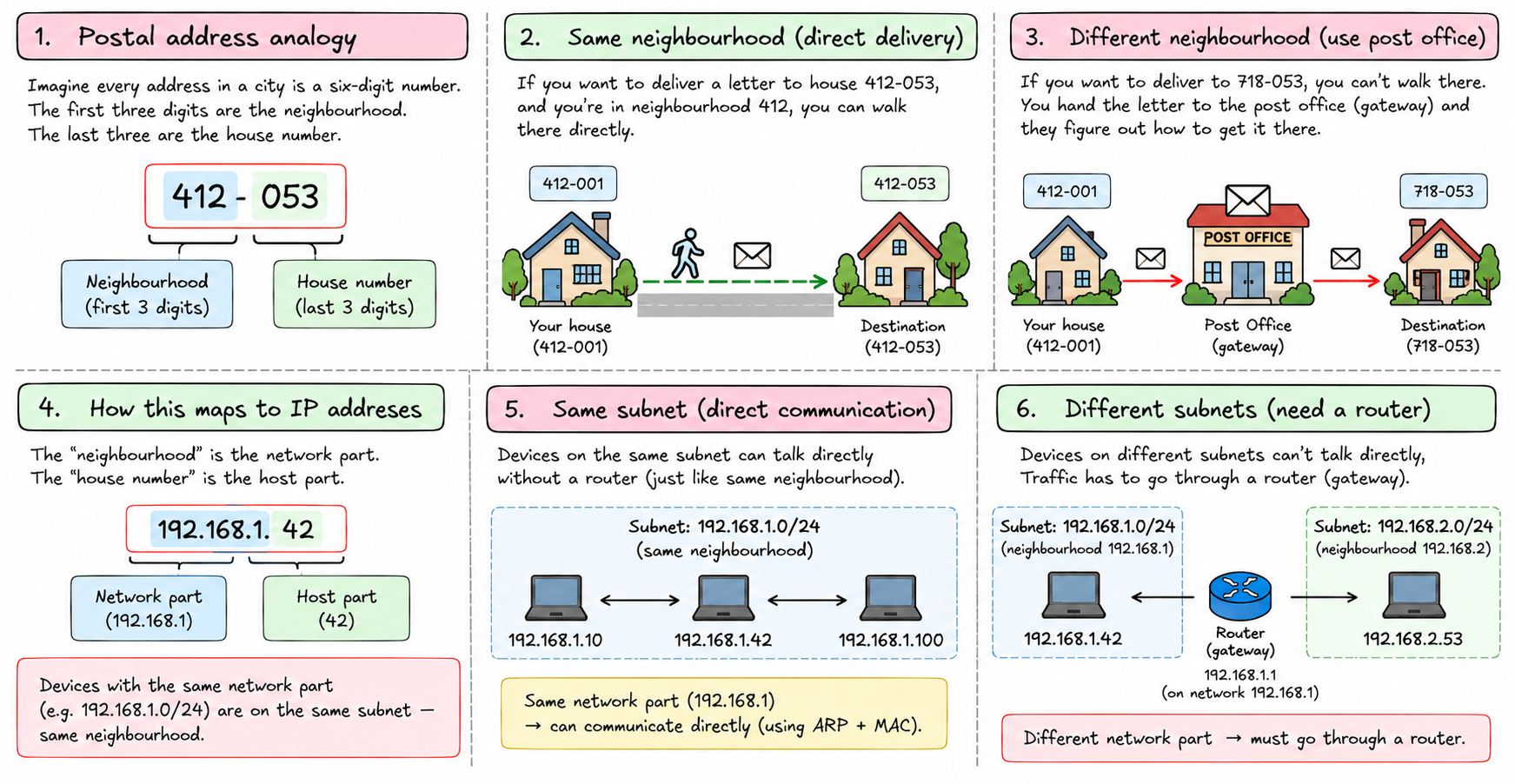
Imagine every address in a city is a six-digit number. The first three digits are the neighbourhood. The last three are the house number within that neighbourhood.
If you want to deliver a letter to house 412-053, and you're standing in neighbourhood 412, you can walk there directly. You know your neighbourhood. You know where 053 is.
If you want to deliver to 718-053, you can't walk there. You don't know where neighbourhood 718 is. You hand the letter to the post office — the gateway — and they figure out how to get it there.
That's exactly how subnets work.
The "neighbourhood" is the network part of the IP address. The "house number" is the host part. If two devices share the same network part, they're on the same subnet — same neighbourhood — and can talk directly. If they don't, traffic has to go through a router.
What the subnet mask actually does
Take two devices:
- Device A:
192.168.1.42 - Device B:
192.168.1.87
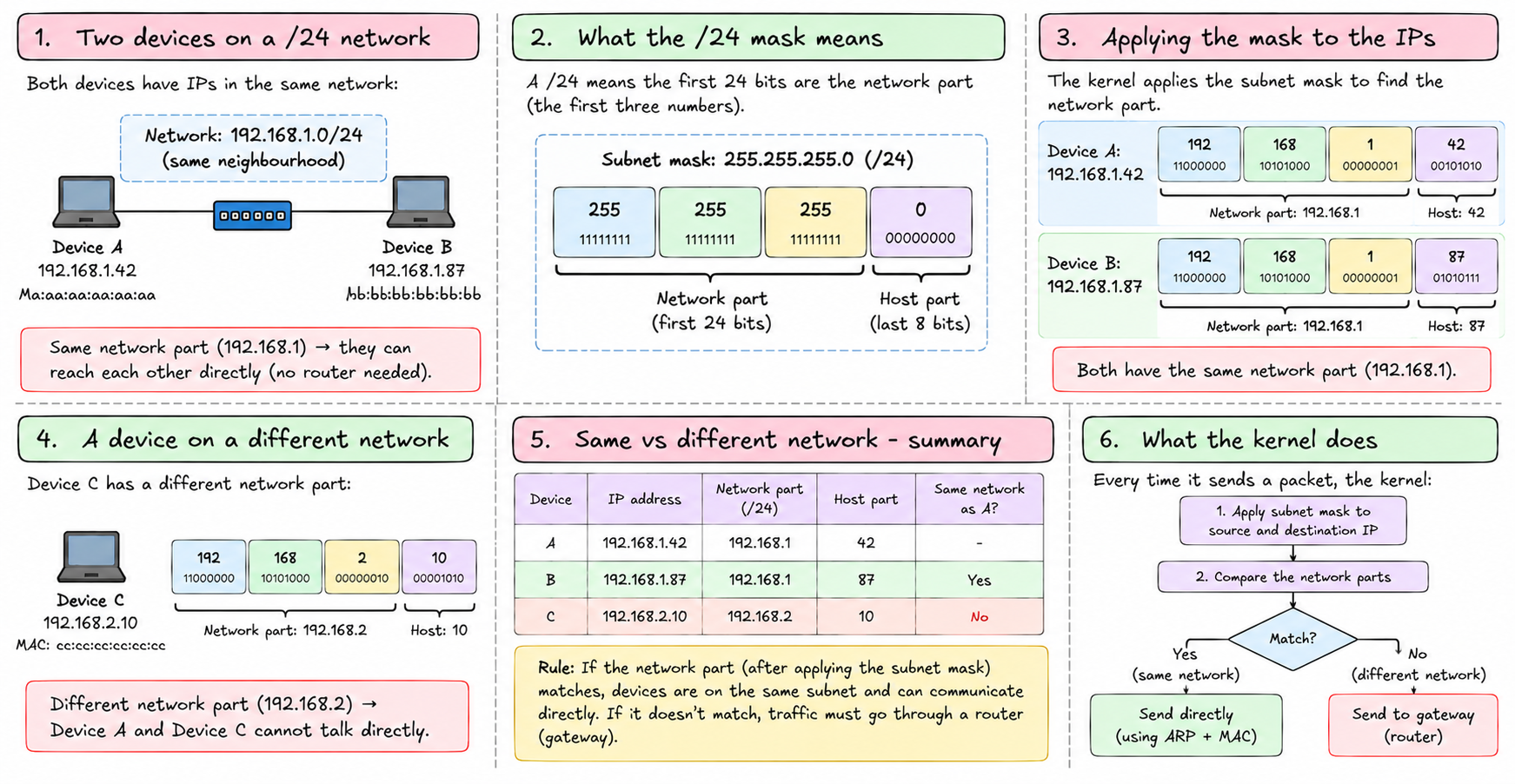
Both are on a /24 network — meaning the first 24 bits (the first three numbers) are the network part.
192.168.1 . 42   ← network: 192.168.1 | host: 42
192.168.1 . 87   ← network: 192.168.1 | host: 87
Same network part. They're in the same neighbourhood. They can reach each other directly.
Now a third device:
- Device C:
192.168.2.10
192.168.2 . 10 ← network: 192.168.2 | host: 10Different network part. Different neighbourhood. Device A and Device C cannot talk directly — traffic has to go through a router.
This is the rule the kernel uses every time it sends a packet. It applies the subnet mask to both the source and destination. If the masked results match — same network — send directly. If not — send to the gateway.
Your home WiFi
Your router hands out addresses like 192.168.1.x with a /24 mask. Every device on your WiFi gets an address in that range. They all share the network part 192.168.1. So your phone, your laptop, your smart TV, your printer — they're all in the same neighbourhood. They can reach each other directly.
Your internet connection is a different neighbourhood entirely. 8.8.8.8 (Google's DNS) is in a completely different range. Your devices can't reach it directly. They send packets to the router — the gateway — which is connected to both your home network and the internet, and can forward between them.
The router is the post office. It sits at the edge of your neighbourhood and knows how to send things further.
Calculating what's in a subnet
A /24 means 24 bits for the network, 8 bits for hosts. 8 bits gives you 2⁸ = 256 addresses. Minus the network address (first) and broadcast address (last) = 254 usable hosts.
A /16 means 16 bits for the network, 16 bits for hosts. 16 bits = 65,536 addresses. Minus 2 = 65,534 usable hosts.
A /8 means 24 bits for hosts. 2²⁴ = 16,777,216 addresses.
The shorter the prefix, the bigger the network:
| Prefix | Usable hosts | Example |
|---|---|---|
| /30 | 2 | Point-to-point links |
| /28 | 14 | Small office |
| /24 | 254 | Home network, small server subnet |
| /16 | 65,534 | Large organisation, container networks |
| /8 | 16,777,214 | Huge private networks |
tiny-aws uses 10.0.0.0/16 for containers. That's up to 65,534 containers, each in the same neighbourhood as the host bridge, each able to reach each other directly — no routing needed between containers on the same host.
Carving a network into smaller pieces
Say you have 10.0.0.0/16 — a big space — and you want to divide it into smaller subnets. Maybe one for web servers, one for databases, one for containers.
You borrow bits from the host part and give them to the network part.
10.0.0.0/16 → divide into /24s:
10.0.0.0/24   → 254 hosts (web servers)
10.0.1.0/24   → 254 hosts (databases)
10.0.2.0/24   → 254 hosts (containers)
Devices in 10.0.0.x can't directly reach devices in 10.0.1.x — different neighbourhoods now. You'd need a router between them. This is useful: your web servers can't directly connect to your database subnet unless you explicitly route between them. Containment is the point.
AWS VPCs work this way. You get a big private CIDR — say 10.0.0.0/16 — and carve it into subnets, one per availability zone, one per tier. The subnets enforce boundaries. Security groups and routing tables control what can cross those boundaries.
tiny-aws models this in its networking service — the control plane tracks VPCs and subnets as metadata, and the network agent enforces the rules. The concept is the same; the implementation is simpler.
The rule, simply
If two devices have the same network part of their IP address — determined by the subnet mask — they're on the same network and can talk directly.
If they don't, they need a router.
Your home WiFi works because your router puts all your devices in the same subnet. Containers on the same host work because they're all in 10.0.0.0/16. Security isolation works because putting things in different subnets forces all traffic through a chokepoint you can inspect and filter.
That's subnetting. Not a calculation trick — a design tool for controlling who can reach who.