

Chapter 10: overlayfs and pivot_root
We have a rootfs — a directory tree containing a minimal Debian installation. We want to run a container from it. But we want multiple containers to share...
We have a rootfs — a directory tree containing a minimal Debian installation. We want to run a container from it. But we want multiple containers to share the same base, and we want each container's writes to stay private and disappear when the container exits.
The naive approach: copy the whole rootfs for each container. Works, but a 200 MB base image times a hundred containers is 20 GB just for base images — most of it identical data.
overlayfs solves this.
The union filesystem idea
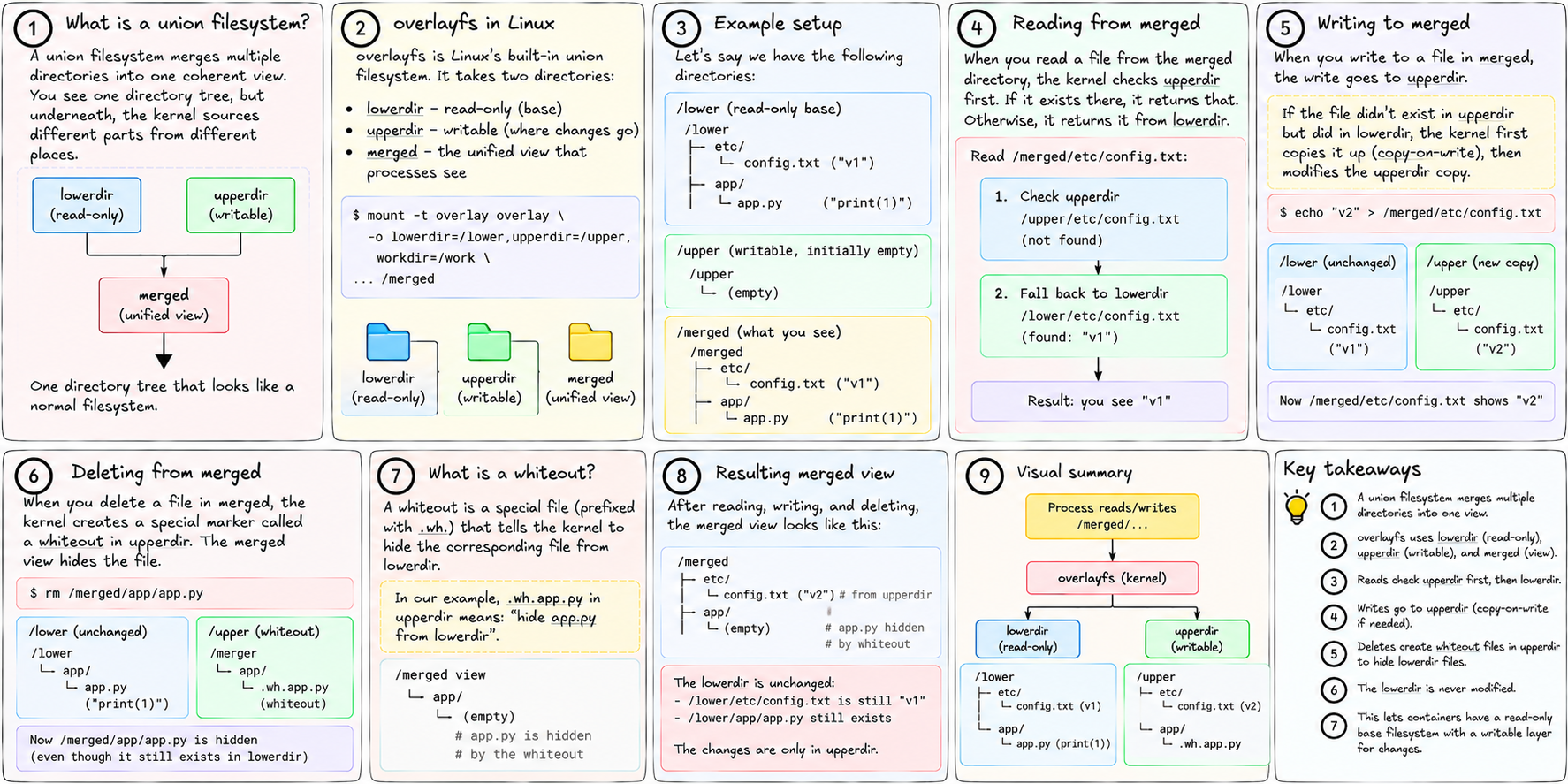
A union filesystem merges multiple directories into one coherent view. You see one directory tree; underneath, the kernel is sourcing different parts of it from different places.
overlayfs is Linux's built-in union filesystem. It takes two directories:
- lowerdir — read-only. This is the base. It cannot be modified.
- upperdir — writable. This is where changes go.
- merged — the unified view that processes see.
Reading from merged: the kernel checks upperdir first. If the file exists there, return it. Otherwise, return it from lowerdir. The two layers are stacked, with upperdir on top.
Writing to merged: the write goes to upperdir. If the file didn't exist there before but did in lowerdir, the kernel first copies it up to upperdir (this is called copy-on-write), then modifies the upperdir copy. The lowerdir original is untouched.
Deleting from merged: the kernel creates a special marker called a whiteout in upperdir. The merged view hides the file. The lowerdir original still exists, but it's masked.
In practice
Here's a concrete setup:
/var/lib/tinyaws/images/abc123/    ← lowerdir (the base rootfs, read-only, shared)
/tmp/tinyaws-overlay/job-42/upper/ ← upperdir (this container's private writes)
/tmp/tinyaws-overlay/job-42/work/  ← workdir  (kernel scratch space, required)
/tmp/tinyaws-overlay/job-42/merged/ ← the merged view
Mount command:
mount -t overlay overlay \
  -o lowerdir=/var/lib/tinyaws/images/abc123,\
     upperdir=/tmp/tinyaws-overlay/job-42/upper,\
     workdir=/tmp/tinyaws-overlay/job-42/work \
  /tmp/tinyaws-overlay/job-42/merged
After this, merged looks like a complete Debian rootfs. The container runs inside it. It writes logs to /var/log — those writes go to upper. It creates temporary files — those go to upper. It installs a package — that goes to upper.
The lowerdir never changes. A hundred containers running from the same base all share one copy of those 200 MB on disk. Each has its own upper directory that starts empty and holds only what that container wrote.
When the container exits: discard upper. The base image is still there, untouched, ready for the next container.
pivot_root
overlayfs gives us a merged directory that looks like a complete system. Now we need to make a process think that directory is its /.
This is what pivot_root does.
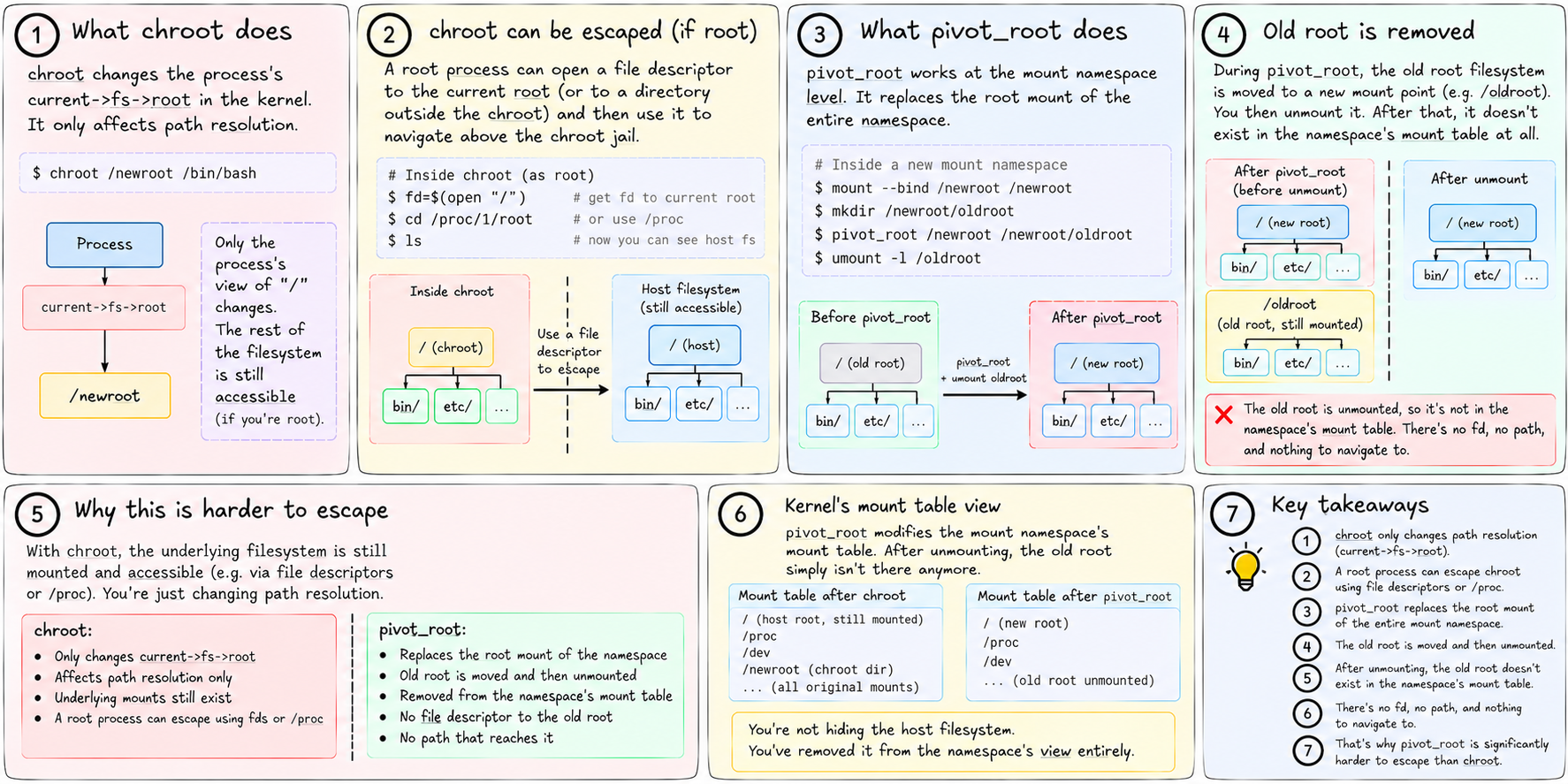
chroot is the familiar alternative. It changes the root directory for a process — path resolution starts from the new root. But chroot is not a security boundary. A process running as root inside a chroot can escape it: create a directory, bind-mount / into it, chroot into that new directory. With enough tricks, the original host filesystem becomes reachable.
pivot_root is different. It's a syscall — not just a userspace tool — that atomically replaces the root filesystem of the current mount namespace. It takes two arguments: the new root, and a path inside the new root where the old root should be moved.
The steps in tiny-aws's sandbox shell script:
# 1. Mount the overlay at the merged directory
mount -t overlay overlay -o 'lowerdir=...,upperdir=...,workdir=...' /merged

# 2. Copy the application into the merged view
cp -a /app/. /merged/app/

# 3. Create a directory inside merged to temporarily hold the old root
mkdir -p /merged/old_root

# 4. pivot_root: make /merged the new /, put the old / at /merged/old_root
pivot_root /merged /merged/old_root

# 5. Now inside the new root: unmount the old root immediately
cd /app
umount -l /old_root
rmdir /old_root

# 6. Execute the actual command
exec <command>
After step 4, the process's / is the merged overlay directory. The old host filesystem is at /old_root. After step 5, it's gone — unmounted and removed. There's no path back to the host.
The -l flag on umount means lazy unmount — the mount is detached from the filesystem hierarchy immediately, but the kernel keeps the underlying filesystem alive until all existing file descriptors to it are closed. This handles the case where the kernel still has references to the old root during the unmount.
Why pivot_root is harder to escape than chroot
chroot changes current->fs->root in the kernel's process descriptor. It only affects path resolution. A root process can still call open("/") and get a file descriptor to the current root, then use that to navigate above the chroot jail.
pivot_root works at the mount namespace level. It replaces the root mount of the entire namespace. The old root filesystem is moved to a new mount point — and then you unmount it. After that, it doesn't exist in the namespace's mount table at all. There's nothing to navigate to, no file descriptor pointing to it, no path that reaches it.
You're not hiding the host filesystem. You've removed it from the namespace's view entirely.
Multiple lower layers
overlayfs supports multiple lower directories, colon-separated:
lowerdir=/images/layer2:/images/layer1:/images/baseThe leftmost is on top. Reads check each layer in order until a match is found. This is how Docker images with multiple layers work — each RUN instruction in a Dockerfile creates a new layer, and the final container stacks them all as lower dirs with a fresh upper dir on top.
tiny-aws uses a single lower dir (one cached rootfs per build hash). Multiple layers are noted in MISSING.md as a future direction.
What this looks like from the host
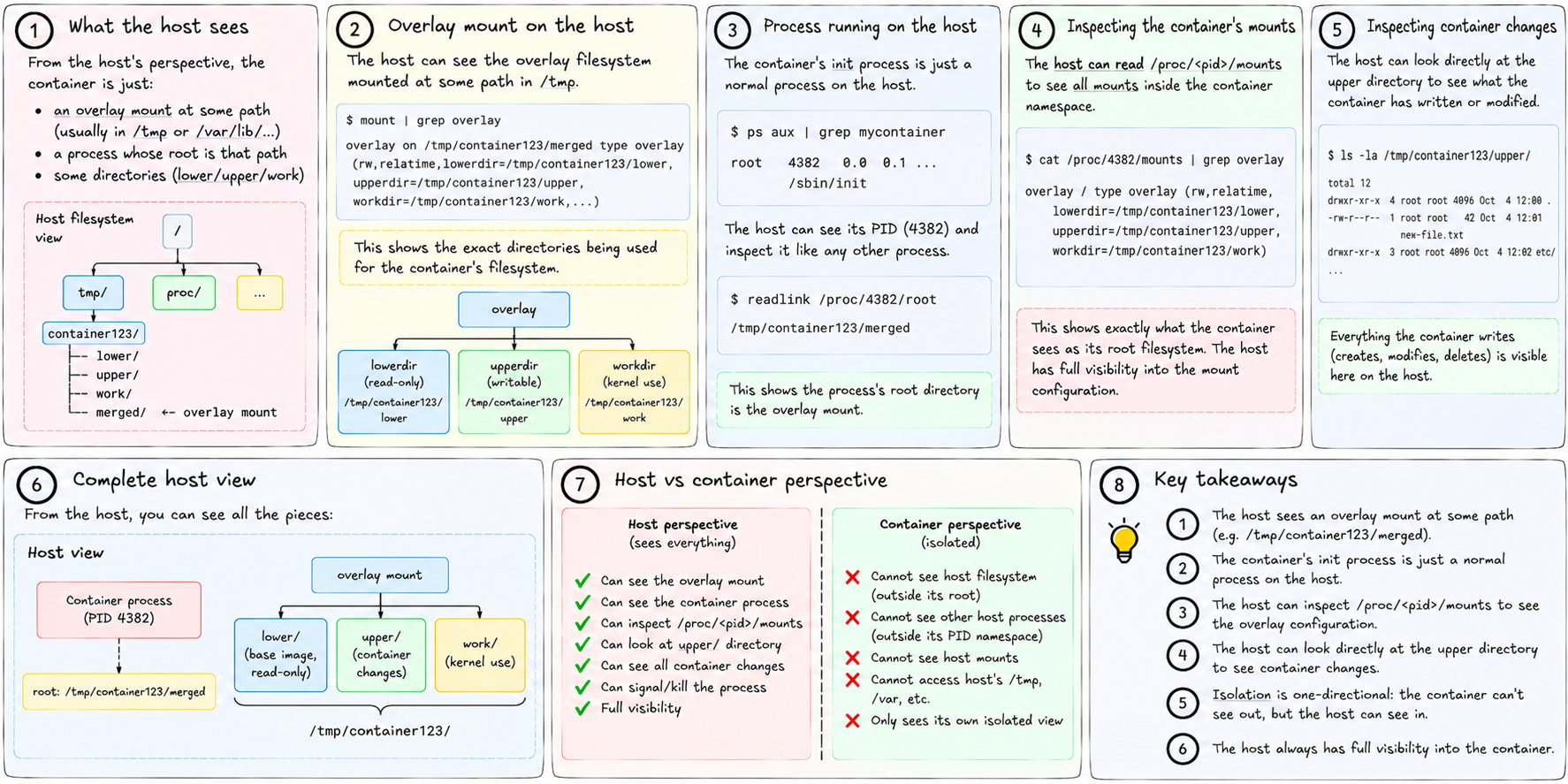
From the host's perspective: there's an overlay mount at some path in /tmp. There's a process running whose root is that path. The host can see all of this. It can inspect /proc/<pid>/mounts to see the overlay mount. It can look directly at the upper directory to see what the container has written.
The isolation is from the container's perspective, not the host's. The host always has full visibility. This is the same as namespaces — one-directional. The container can't see out. The host can see in.
Cleanup
When the container exits, tiny-aws calls cleanup_overlay() in sandbox.rs, which:
- Unmounts the merged directory
- Removes the
upper,work, andmergeddirectories under/tmp/tinyaws-overlay/<job_id>/
The base image at /var/lib/tinyaws/images/<hash>/ is untouched and stays for the next container.
We now have all three parts of filesystem isolation: the rootfs (the directory tree), overlayfs (the copy-on-write layering), and pivot_root (the hard cutover that makes the merged view become /).
There's one piece of isolation we haven't covered: the syscall surface. A process in a container still has access to the full Linux syscall interface. That interface includes calls that can damage the host regardless of namespaces. Restricting it is seccomp's job.