

Chapter 9: Cgroups
Namespaces are about visibility. A process in a PID namespace can't see other processes. A process in a network namespace can't see other network...
Namespaces are about visibility. A process in a PID namespace can't see other processes. A process in a network namespace can't see other network interfaces. The isolation is perceptual — it limits what the process knows about.
But a process that can't see anything can still consume everything. It can allocate all of RAM. It can peg every CPU core. It can flood the disk with writes. Namespaces don't prevent any of this.
Cgroups — control groups — are how the kernel limits resource consumption. Not what a process can see. What it can use.
The concept is simple: you group processes together, and you set limits on what that group can collectively consume. Memory, CPU time, disk I/O, network bandwidth. The kernel enforces those limits in the same places it already accounts for resource usage — the scheduler, the memory allocator, the I/O layer.
cgroups have had two major versions. cgroups v1 was added in 2008 and had a somewhat chaotic design — each resource controller (memory, CPU, etc.) had its own independent hierarchy. cgroups v2, stabilized around 2015 and now the default on modern Linux, has a unified hierarchy. All controllers hang off the same tree. A process belongs to exactly one cgroup.
Everything below refers to cgroups v2, which is what tiny-aws uses.
The filesystem interface
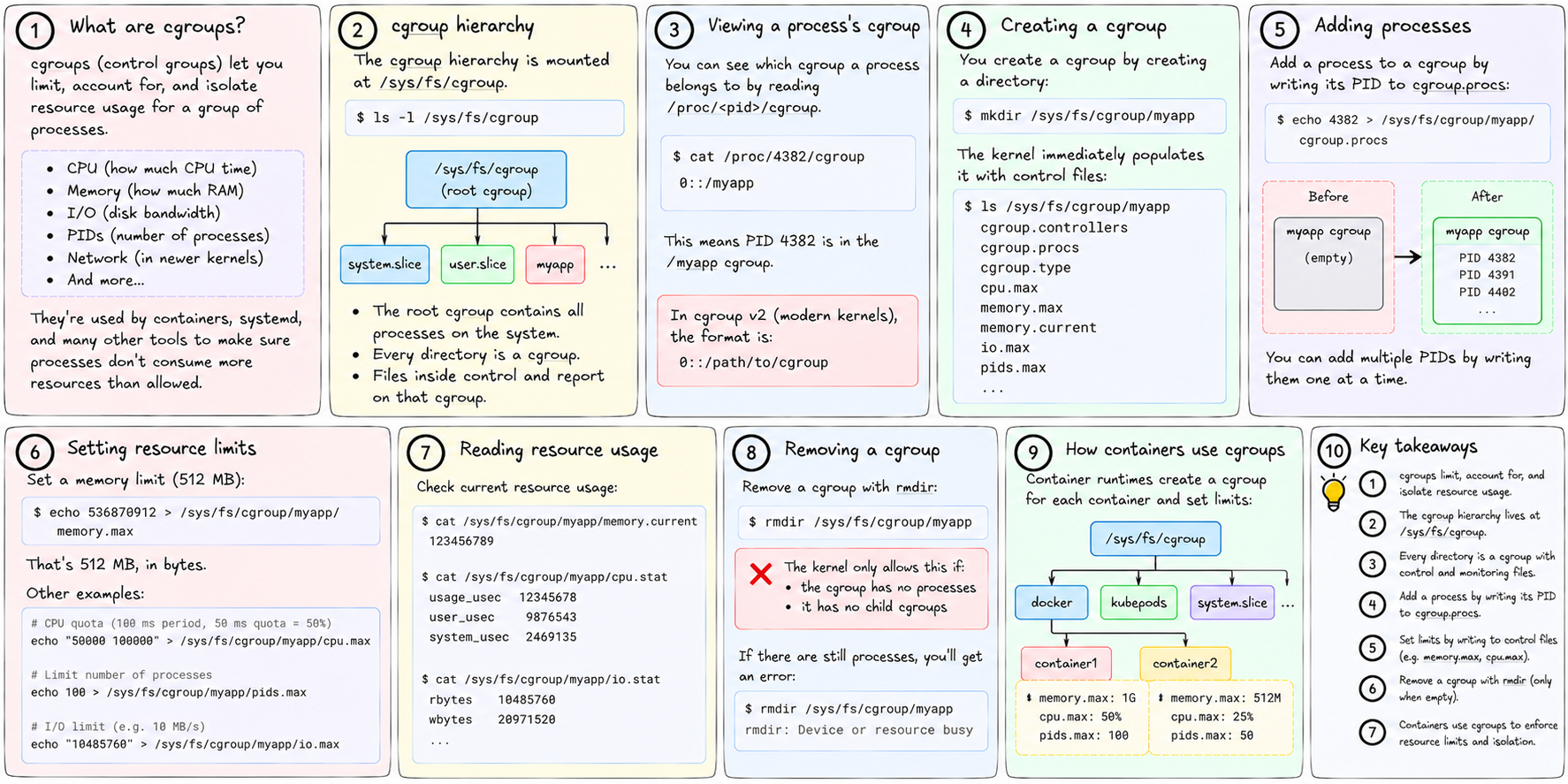
The cgroup hierarchy lives at /sys/fs/cgroup. It's a filesystem — cgroupfs — that the kernel mounts there. Every directory is a cgroup. Files inside control and report on that cgroup.
The root cgroup is /sys/fs/cgroup itself. It contains all processes on the system. You can see the current cgroup for any process by reading /proc/<pid>/cgroup.
Creating a cgroup is just creating a directory:
mkdir /sys/fs/cgroup/myappThe kernel immediately populates it with control files:
/sys/fs/cgroup/myapp/
    cgroup.controllers      # which controllers are available
    cgroup.procs            # PIDs of processes in this cgroup
    cgroup.type             # domain, threaded, etc.
    cpu.max                 # CPU quota
    memory.max              # memory limit
    memory.current          # current memory usage
    io.max                  # I/O limits
    ...
Adding a process to the cgroup:
echo 4382 > /sys/fs/cgroup/myapp/cgroup.procsSetting a memory limit:
echo 536870912 > /sys/fs/cgroup/myapp/memory.maxThat's 512 MB, in bytes. No special API. No daemon. Just a filesystem write. The kernel intercepts it, parses the number, and sets the limit on the cgroup's memory controller.
Removing a cgroup: rmdir it. The kernel only allows this once the cgroup has no processes and no child cgroups. This is enforced — you can't orphan processes in a deleted cgroup.
CPU limiting
The CPU controller uses a quota mechanism. The relevant file is cpu.max, which contains two numbers: a quota (in microseconds) and a period (in microseconds).
echo "100000 100000" > /sys/fs/cgroup/myapp/cpu.maxThis means: within every 100,000 microsecond window (100ms), this cgroup can use at most 100,000 microseconds of CPU time. That's 100% of one core. On an 8-core machine, the default period is 100ms — so 200000 100000 would allow up to 200% (two full cores).
The kernel's scheduler tracks CPU time for each cgroup. When a cgroup exhausts its quota for the current period, all its processes are throttled — they're runnable, but the scheduler won't schedule them until the next period begins. They don't get killed. They just wait.
This throttling shows up in /proc/<pid>/schedstat and in cpu.stat inside the cgroup. There's a counter called nr_throttled. If you're wondering why a container is slow, check whether it's being throttled.
cpu.max of max 100000 (the literal string max) means no limit — use as much CPU as available.
tiny-aws sets CPU limits in sandbox.rs:
let quota = (cpu_limit * period as f64) as u64;
std::fs::write(format!("{}/cpu.max", cgroup_path),
    format!("{} {}", quota, period))
For a job with cpu_limit = 1.0 (one full core) and period = 100000, this writes 100000 100000.
Memory limiting
memory.max is the hard limit. When a process in the cgroup tries to allocate memory beyond this limit, the kernel invokes the OOM killer for that cgroup — it picks a process to kill to reclaim memory.
There's also memory.high, a soft limit. When usage exceeds this, the kernel starts applying memory pressure — slowing allocations, reclaiming pages more aggressively — but doesn't kill anything yet. Useful for "warn before kill" semantics.
memory.current shows current usage in bytes. You can watch it:
watch cat /sys/fs/cgroup/myapp/memory.currentMemory accounting in cgroups counts page cache separately from anonymous memory. A process reading a large file might show high memory usage even if it hasn't malloc'd much — the kernel is caching those file pages in the cgroup's accounting. memory.stat breaks this down.
I/O limiting
The io.max file accepts limits in the form:
echo "8:0 rbps=10485760 wbps=10485760" > /sys/fs/cgroup/myapp/io.max8:0 is the major:minor device number (find it with ls -la /dev/sda). rbps and wbps are read and write bytes per second limits.
tiny-aws doesn't set I/O limits — acknowledged in MISSING.md. Adding them would be the same pattern as CPU and memory: a std::fs::write to io.max.
Cgroups and containers
When you start a container, you create a cgroup for it, move its PID into that cgroup, and all children it spawns automatically inherit the cgroup. The whole process tree is accounted and limited together.
This is important: the limit is collective, not per-process. If a container spawns 50 worker processes, they all share the same 512 MB limit. The cgroup doesn't care about the structure of the process tree inside — it sees one group with a combined total.
When the container is done, every process leaves the cgroup (either by exiting or by moving to another cgroup), and you rmdir it. Clean.
For tiny-aws instances using systemd-nspawn, the cgroup management is delegated to systemd-run:
systemd-run --property=CPUQuota=200% --property=MemoryMax=512M -- systemd-nspawn ...systemd translates those properties into cgroup writes on your behalf. For raw jobs, tiny-aws does the writes directly in sandbox.rs.
Why this matters for a cloud
Every cloud provider runs multiple tenants on shared hardware. Without cgroup limits, one tenant's runaway process could steal all CPU time from everyone else on the physical server. One memory leak could trigger the OOM killer for an unrelated tenant's database.
Cgroups are the mechanism that makes multi-tenancy safe at the kernel level. They're what lets AWS sell you a t3.micro with "2 vCPU, 1 GB RAM" and actually enforce those numbers — not as an honor system, but as kernel-enforced limits that your code can't circumvent.
tiny-aws enforces the same limits with the same mechanism. The instance types in the README (nano, micro, small, medium, large) are just named tuples of (cpu_cores, memory_mb) that get written to cgroup files when the instance starts.
Next: we have namespaces (isolation of view) and cgroups (limits on usage). There's one more piece of the puzzle — giving each container its own private filesystem. That requires overlayfs and pivot_root.