

Chapter 26: Ports and sockets
A machine has one IP address (or a few). It runs many processes. A web server, an SSH daemon, a database, a metrics exporter — all listening for incoming...
A machine has one IP address (or a few). It runs many processes. A web server, an SSH daemon, a database, a metrics exporter — all listening for incoming connections at the same time, on the same machine, through the same network interface.
How does the kernel know which incoming packet belongs to which process?
Ports.
Port numbers
A port is a 16-bit number — 0 to 65535. TCP and UDP both have port numbers in their headers. Every TCP segment and every UDP datagram says: source port, destination port.
When a packet arrives at a machine, the kernel looks at the destination IP and destination port together. That combination identifies exactly one process (if any) that's waiting for traffic on that port. The kernel delivers the packet there.
Ports are divided by convention:
- 0–1023 — well-known ports. Assigned by IANA. HTTP is 80. HTTPS is 443. SSH is 22. DNS is 53. SMTP is 25. Binding to these requires root on Linux (or the
CAP_NET_BIND_SERVICEcapability). - 1024–49151 — registered ports. Less strictly controlled. Databases often live here: PostgreSQL is 5432, MySQL is 3306, Redis is 6379.
- 49152–65535 — ephemeral ports. The kernel picks from this range when a process makes an outgoing connection and doesn't specify a source port.
When you connect to example.com:443, your machine picks an ephemeral port — say 54832 — as the source. The full connection is identified by the four-tuple: (your_ip:54832, server_ip:443). That's enough to distinguish it from all other connections.
Sockets
A socket is a file descriptor that represents one end of a network connection (or a listening endpoint for incoming connections). In Unix, everything is a file — and sockets follow the rule. You read() and write() to them just like regular files.
The socket API has a few key calls:
socket() — creates a socket and returns a file descriptor. You specify the address family (IPv4, IPv6, Unix domain), the type (stream for TCP, datagram for UDP), and the protocol.
bind() — associates the socket with a local IP address and port. A server calls this to claim port 8080.
listen() — marks a TCP socket as passive — ready to accept incoming connections. You pass a backlog size: how many pending connections to queue before rejecting new ones.
accept() — blocks until a client connects. Returns a new socket file descriptor for that specific connection. The original listening socket stays open to accept more. This is why servers can handle multiple simultaneous clients — accept produces a new fd for each one.
connect() — initiates a TCP connection to a remote address. Triggers the SYN.
read() / write() — send and receive data on an established connection.
close() — closes the socket. For TCP, this triggers the FIN.
The lifecycle
A server's lifecycle:
socket() → bind() → listen() → accept() → read()/write() → close()
                                    ↑ loops back for each client
A client's lifecycle:
socket() → connect() → read()/write() → close()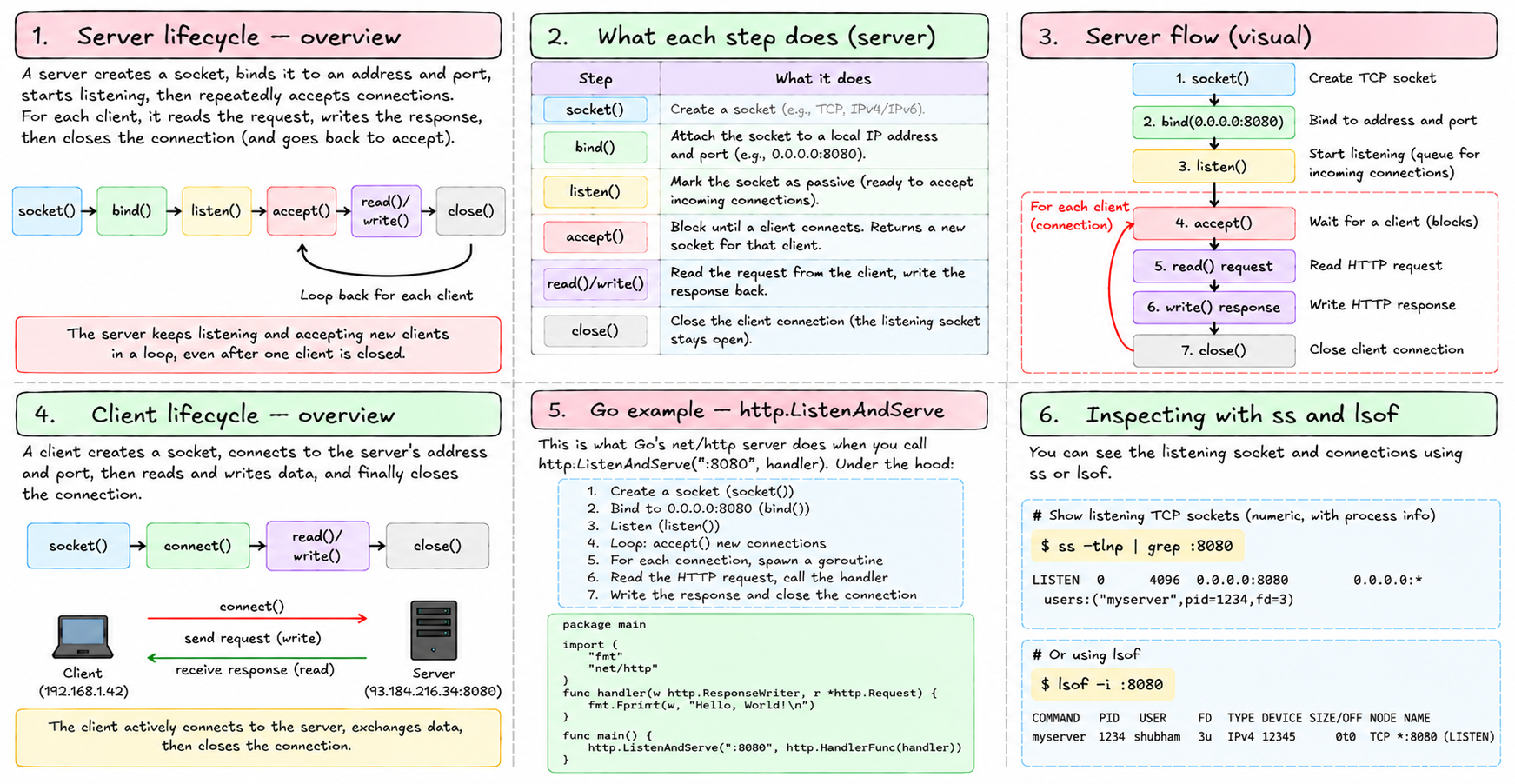
This is what Go's net/http server does when you call http.ListenAndServe(":8080", handler). Under the hood: create a socket, bind to 0.0.0.0:8080, listen, loop calling accept, spawn a goroutine for each accepted connection, read the HTTP request, call the handler, write the response, close.
You can see all of this with ss -tlnp (TCP, listening, numeric, with process info) or lsof -i :8080.
What "binding to 0.0.0.0" means
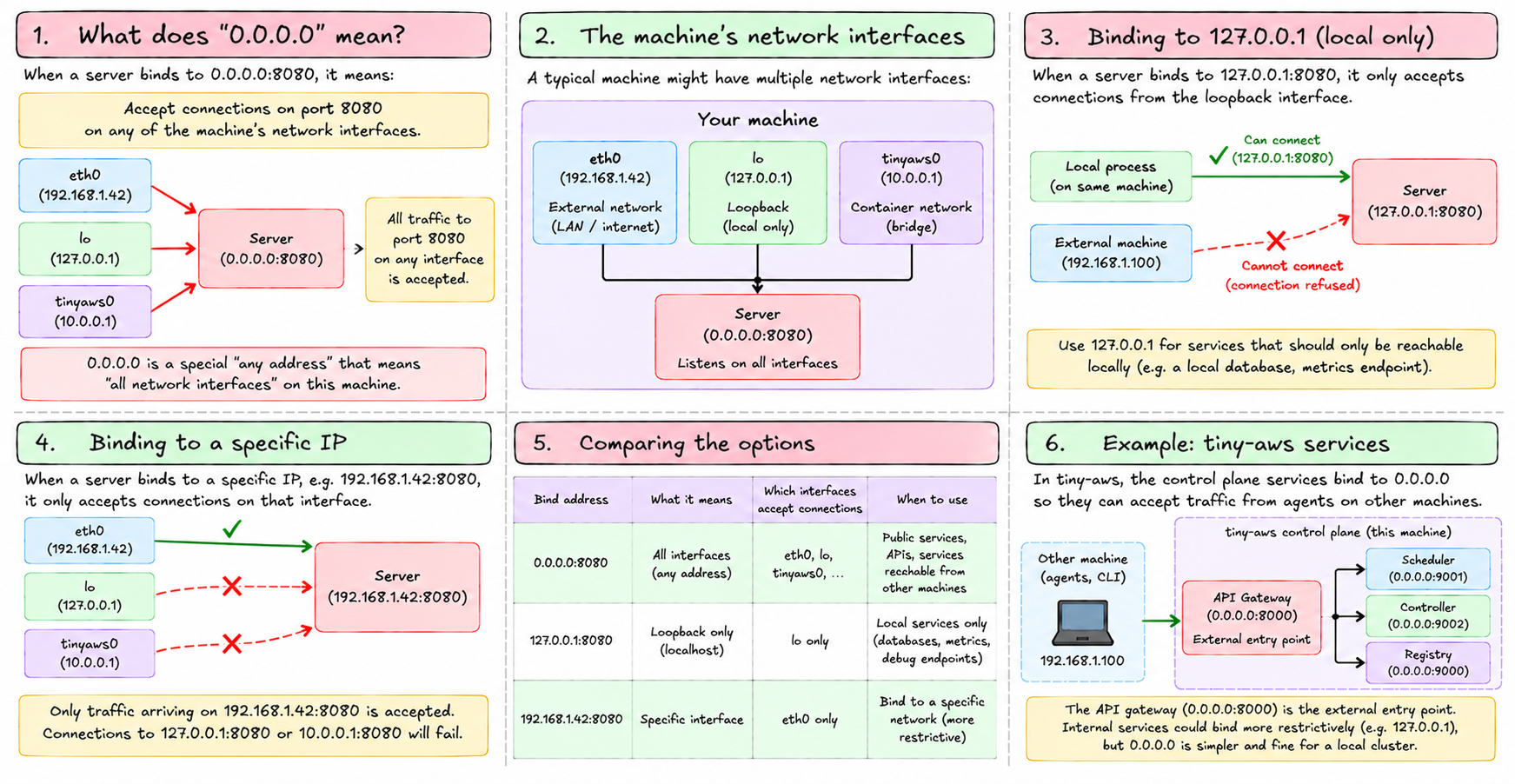
When a server binds to 0.0.0.0:8080, it's saying: accept connections on port 8080 on any of my network interfaces. Traffic arriving on eth0, lo, tinyaws0 — all of it, as long as it's going to port 8080.
Binding to 127.0.0.1:8080 is more restrictive: only accept connections from the loopback interface. External traffic can't reach it. Services that only need to be reachable locally — a local database, a metrics endpoint — should bind to 127.0.0.1 for this reason.
Binding to a specific external IP — 192.168.1.42:8080 — only accepts connections on that interface.
tiny-aws's control plane services bind to 0.0.0.0 to accept traffic from agents on other machines. The API gateway (0.0.0.0:8000) is the external entry point. All internal services could reasonably bind more restrictively, but 0.0.0.0 is simpler and fine for a local cluster.
Unix domain sockets
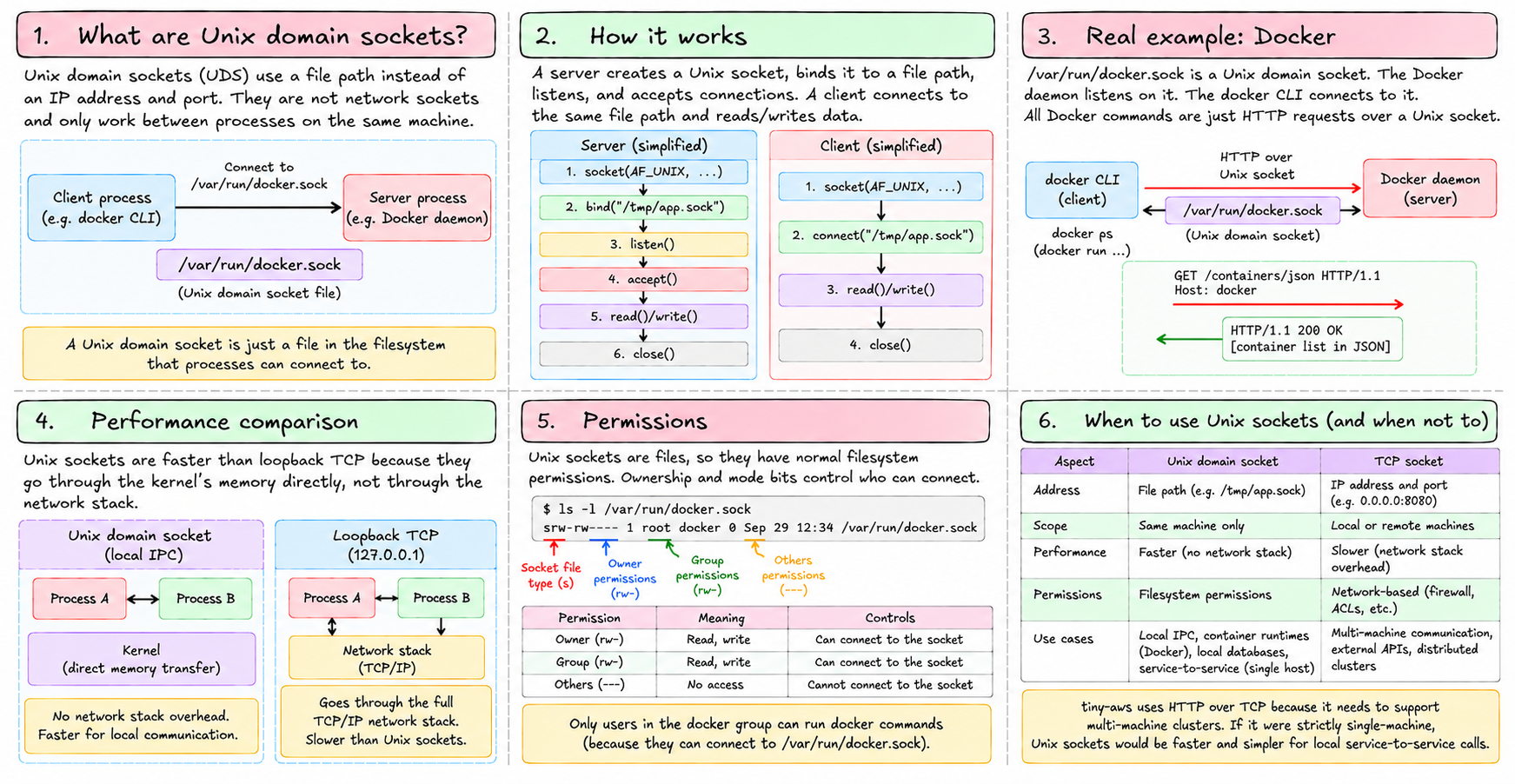
Not all sockets are network sockets. Unix domain sockets use a file path instead of an IP and port. They only work between processes on the same machine.
/var/run/docker.sock is a Unix domain socket. The Docker daemon listens on it. The docker CLI connects to it. All Docker commands are just HTTP requests over a Unix socket.
Unix sockets have no network overhead — they go through the kernel's memory directly, not through a network stack. They're faster than loopback TCP for local IPC. They also have filesystem-based permissions: ownership and mode bits on the socket file control who can connect.
tiny-aws uses HTTP over TCP rather than Unix sockets — it needs to support multi-machine clusters, so Unix sockets aren't an option. If it were strictly single-machine, Unix sockets would be faster and simpler for local service-to-service calls.
Ephemeral ports and connection tracking
When your browser opens a connection to a server, the kernel picks an ephemeral source port. The four-tuple (source IP, source port, dest IP, dest port) uniquely identifies the connection.
The kernel tracks this in the connection table — ss -tn shows it. Each entry is one live TCP connection, with its current state.
Under NAT (which we cover in chapter 19), ephemeral ports become important in a different way: the NAT device uses source port to track which internal machine a return packet belongs to.
Port exhaustion
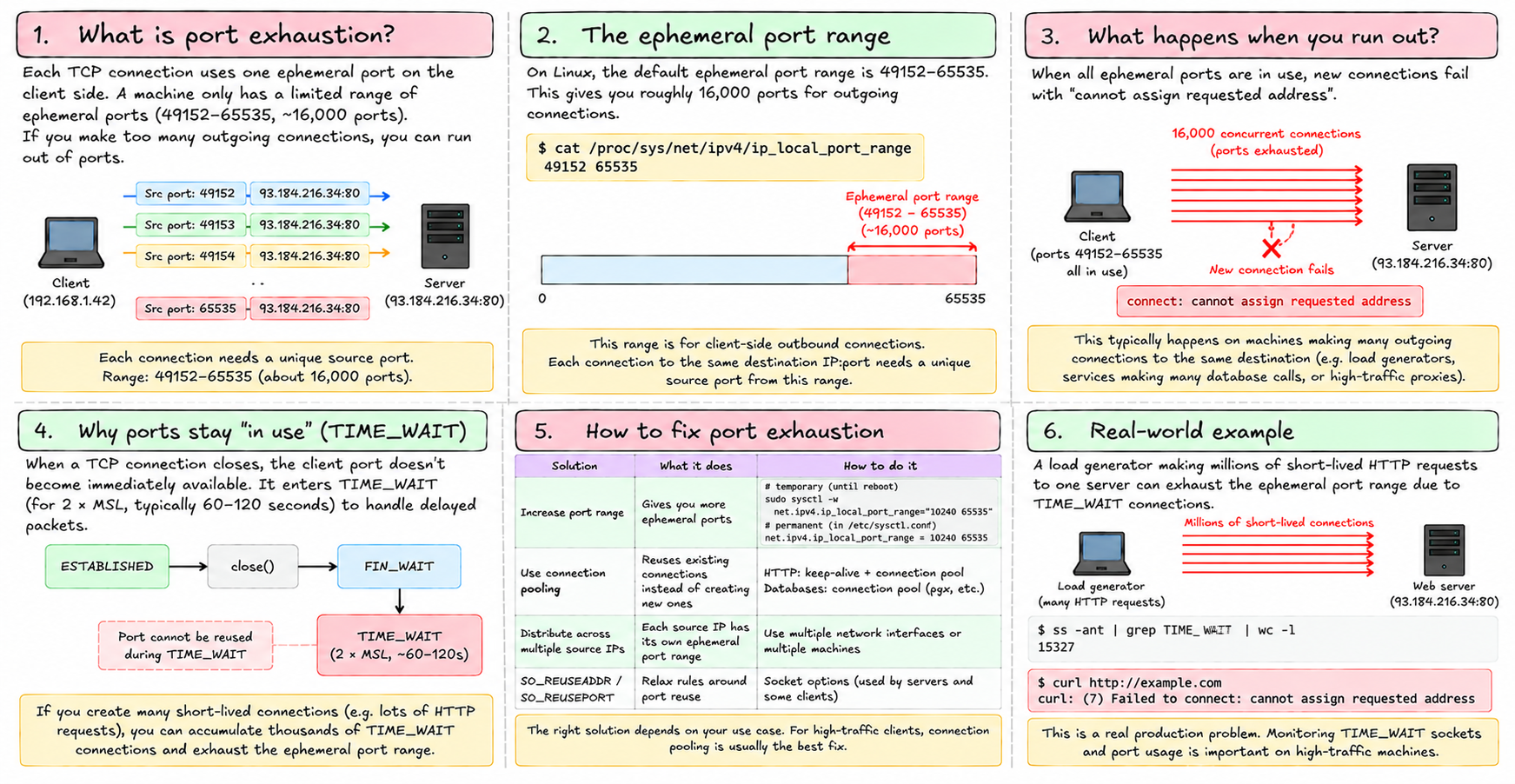
Each TCP connection consumes one ephemeral port on the client side. The range is 49152–65535, about 16,000 ports. On a machine making outgoing connections to the same destination IP and port — a load generator hitting one server, or a service making many database calls — you can run out.
When the ephemeral range is exhausted, new connections fail: connect: cannot assign requested address. The fix is to tune the range (net.ipv4.ip_local_port_range), use connection pooling to reuse connections, or distribute connections across multiple source IPs.
This is a real production problem. On a high-traffic machine making millions of short-lived HTTP requests, TIME_WAIT connections (which hold their ports until the 2×MSL timer expires) can exhaust the ephemeral range. SO_REUSEADDR and SO_REUSEPORT socket options relax the rules around reuse.
The socket API is what all network programming is built on. HTTP libraries, database clients, message queues — all of them eventually call socket(), connect(), bind(), accept(). The higher-level abstraction is just a wrapper.
Next: how Linux represents network interfaces, and the commands you use to inspect and configure them.