

Chapter 24: Routing
A packet knows where it wants to go. It has a destination IP address. But knowing where you want to go and knowing how to get there are different problems.
A packet knows where it wants to go. It has a destination IP address. But knowing where you want to go and knowing how to get there are different problems.
That's routing: the process of deciding, at each step, where to forward a packet next.
The routing table
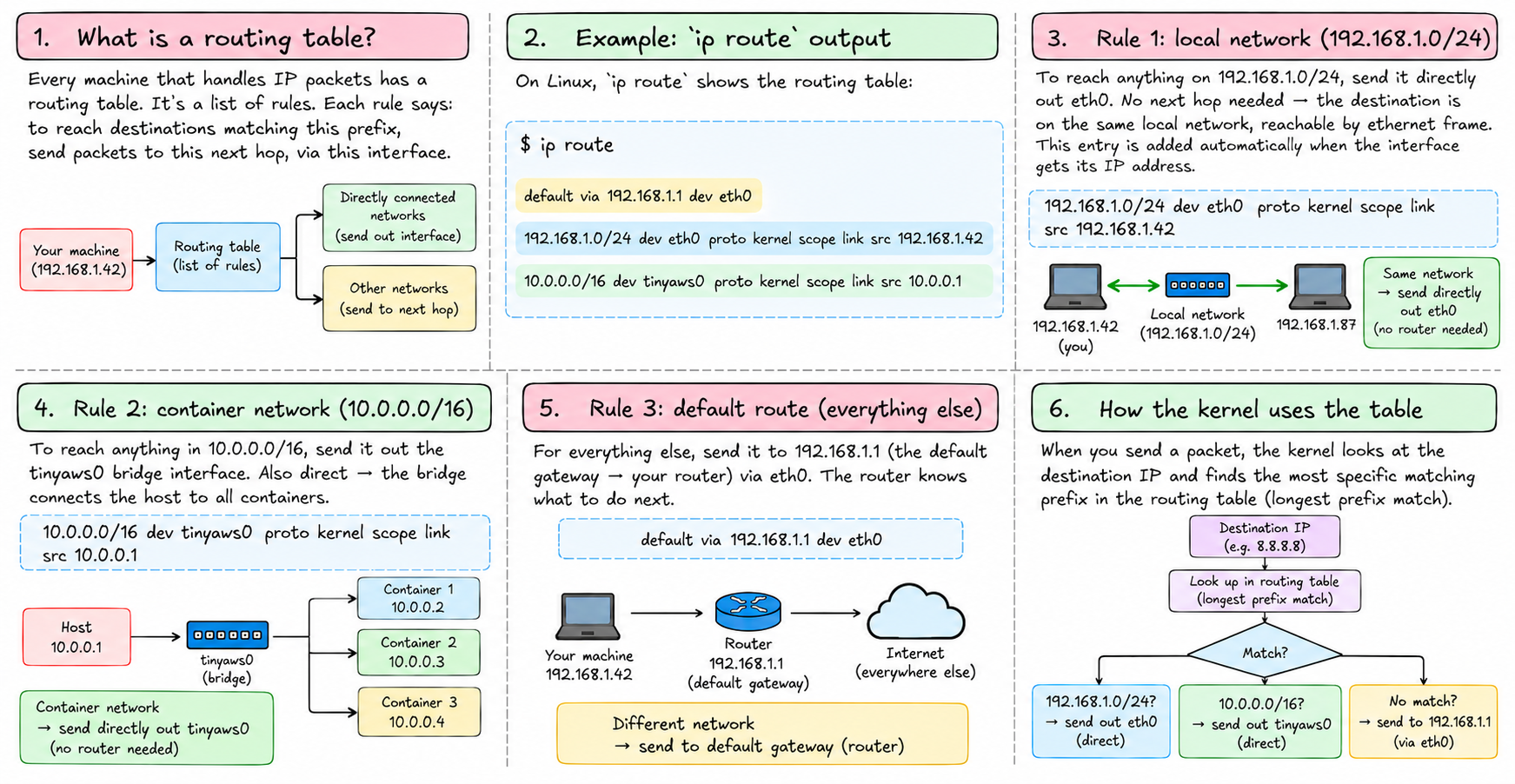
Every machine that handles IP packets — your laptop, a server, a router in a data center — has a routing table. It's a list of rules. Each rule says: to reach destinations matching this prefix, send packets to this next hop, via this interface.
On Linux, ip route shows the routing table:
default via 192.168.1.1 dev eth0
192.168.1.0/24 dev eth0 proto kernel scope link src 192.168.1.42
10.0.0.0/16 dev tinyaws0 proto kernel scope link src 10.0.0.1
Three entries:
192.168.1.0/24 dev eth0 — to reach anything on the 192.168.1.0/24 network, send it directly out eth0. No next hop needed — the destination is on the same local network, reachable by ethernet frame. This entry was added automatically when the interface got its IP address.
10.0.0.0/16 dev tinyaws0 — to reach anything in 10.0.0.0/16 (the container network), send it out the tinyaws0 bridge interface. Also direct — the bridge connects the host to all containers.
default via 192.168.1.1 dev eth0 — for everything else, send it to 192.168.1.1 (the default gateway — your router) via eth0. The router knows what to do next.
Longest prefix match
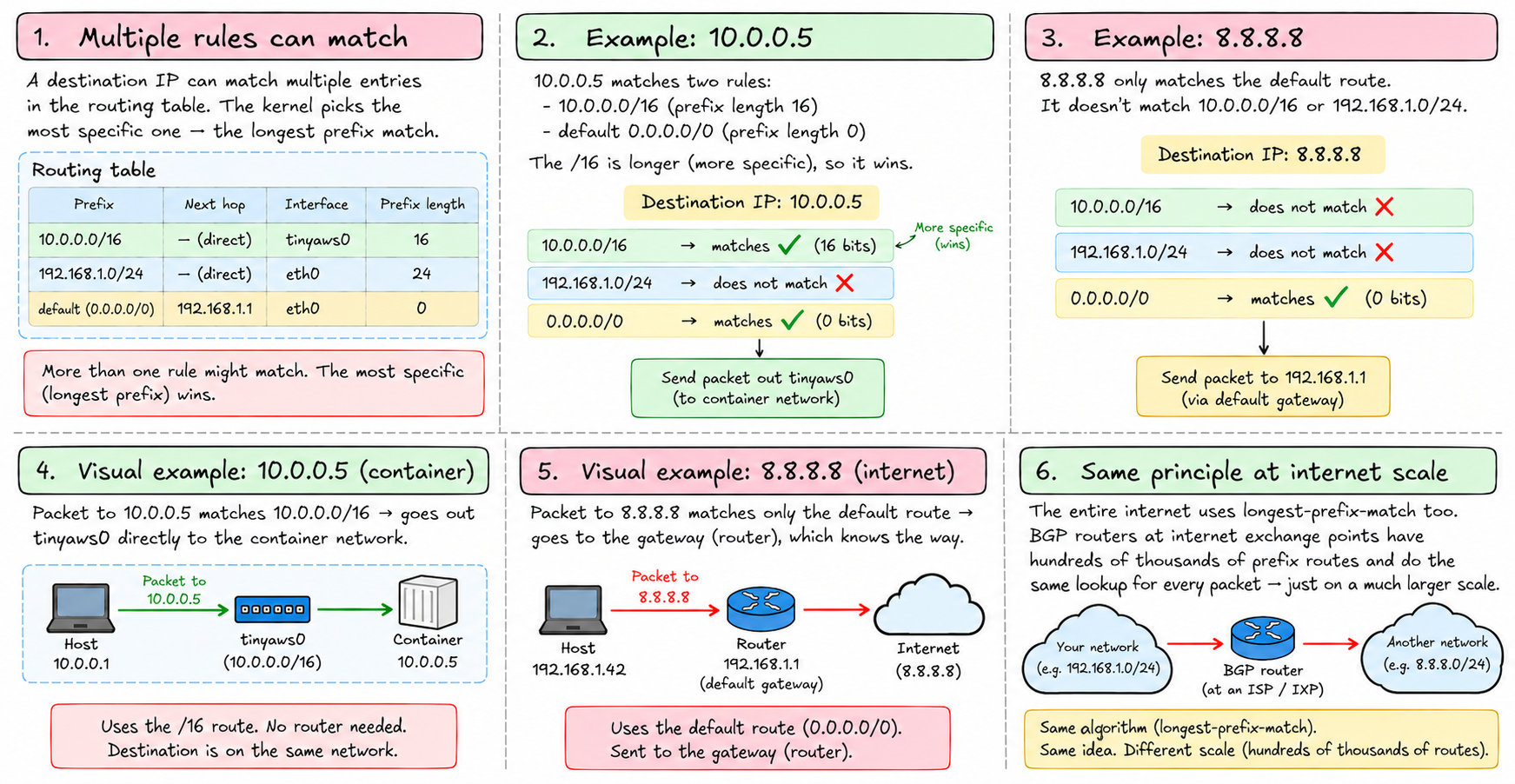
When a packet arrives and needs to be forwarded, the kernel looks up the destination IP in the routing table. Multiple rules might match. The kernel picks the most specific one — the longest prefix match.
10.0.0.5 matches both 10.0.0.0/16 (16-bit prefix) and default (0-bit prefix, matches everything). The /16 is longer — more specific — so it wins. The packet goes to tinyaws0.
8.8.8.8 only matches default. It goes to the gateway.
This is how the entire internet's routing infrastructure works — just at a much larger scale. BGP routers at internet exchange points have routing tables with hundreds of thousands of entries, each a prefix, and they do longest-prefix-match for every packet. The structure is the same; the scale is not.
Hops
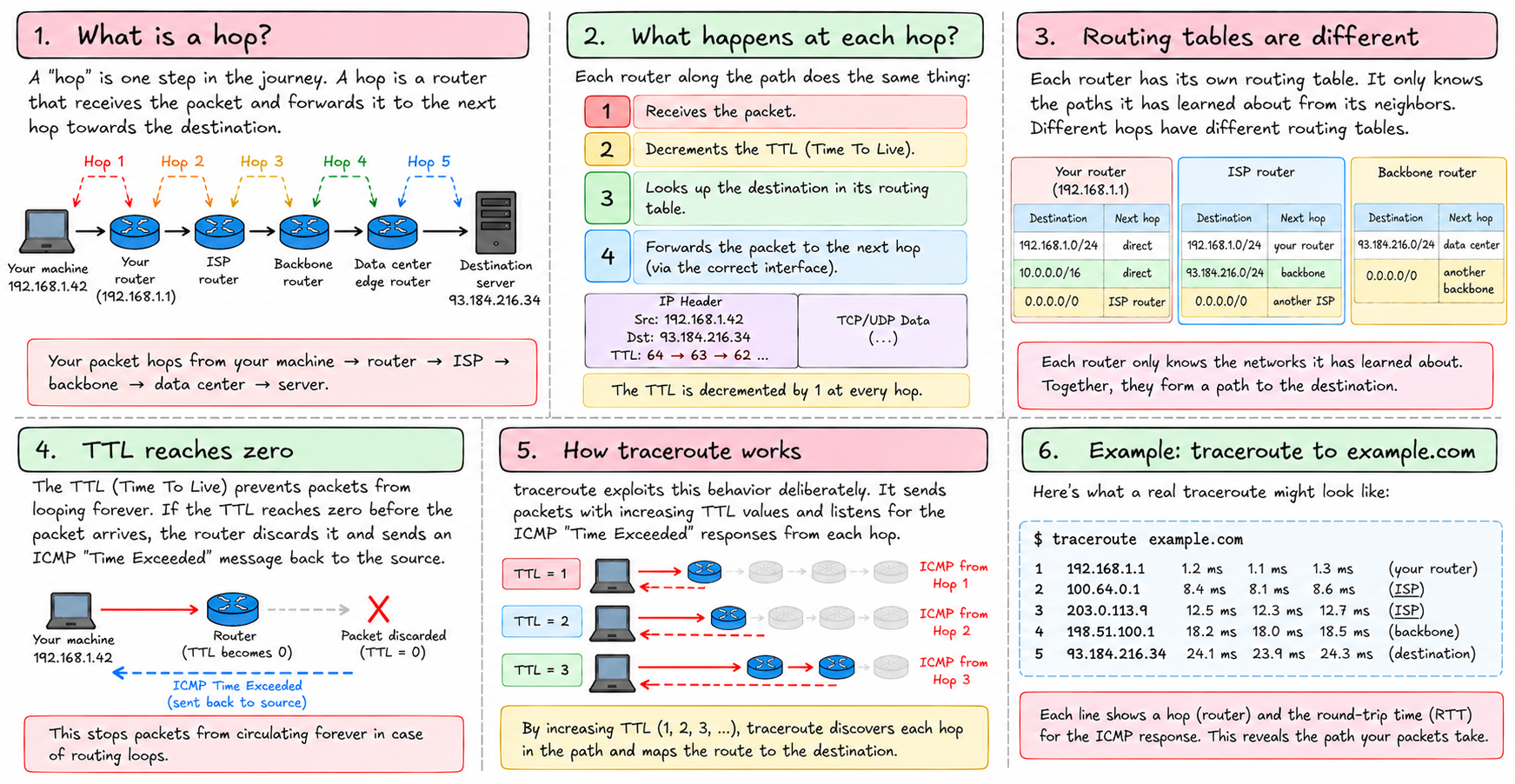
A "hop" is one step in the journey. Your packet hops from your machine to your router. From your router to your ISP. From your ISP to a backbone router. From there to a data center. From the data center's edge router to the server.
Each hop is a router that receives the packet, decrements the TTL, looks up the destination in its routing table, and forwards it. The routing table at each hop is different — each router only knows the paths it has learned about from its neighbors.
If the TTL reaches zero before the packet arrives, the router discards it and sends an ICMP "Time Exceeded" message back to the source. traceroute exploits this deliberately — it sends packets with TTL=1, then TTL=2, then TTL=3, and collects the ICMP responses to map the path.
Static vs. dynamic routing
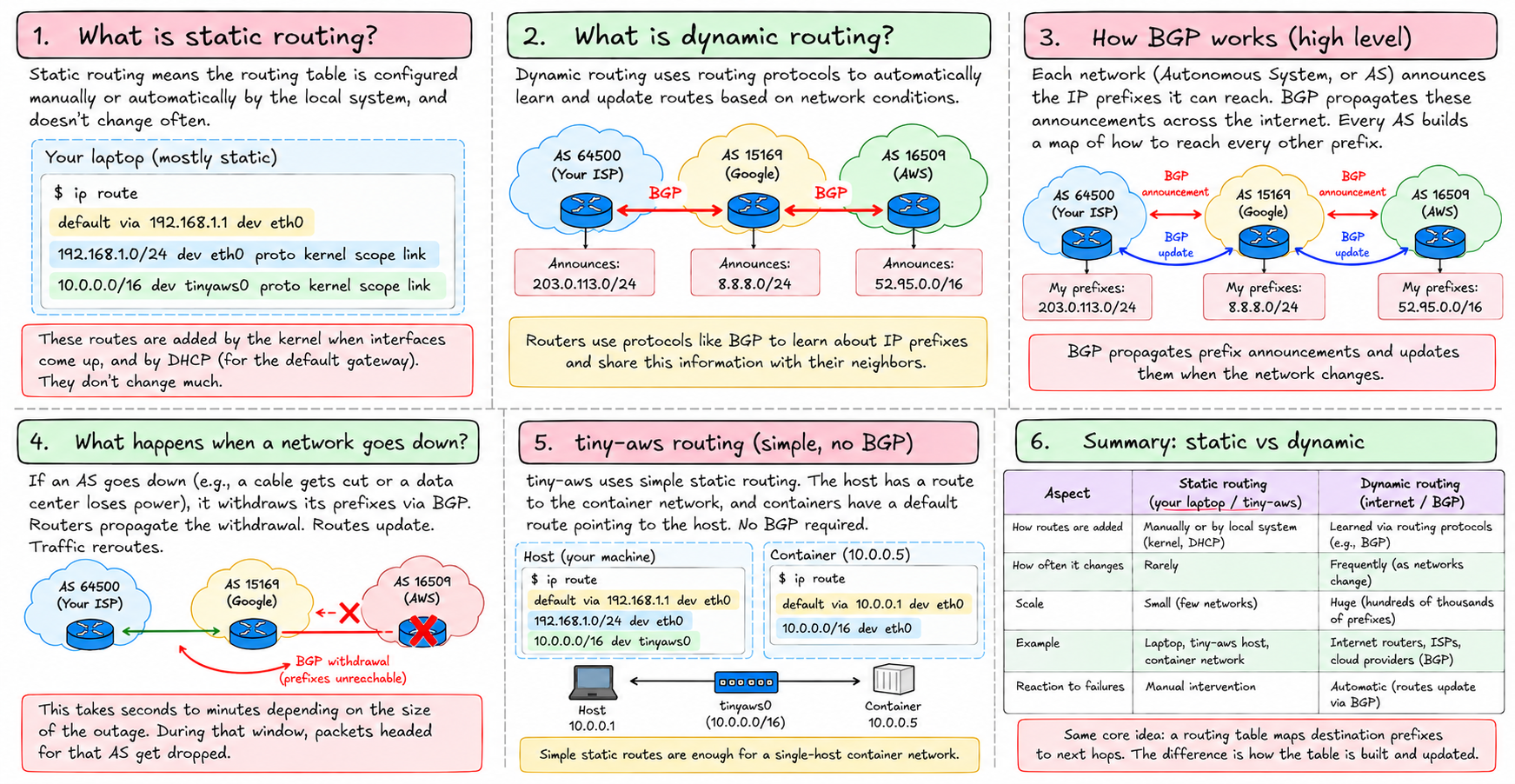
The routing table on your laptop is mostly static — filled in by the kernel when interfaces come up, and by your DHCP server setting the default gateway. It doesn't change much.
Routers on the internet use dynamic routing protocols. BGP — Border Gateway Protocol — is the one that glues the internet together. Each network (called an Autonomous System, or AS) announces which IP prefixes it can reach. BGP propagates these announcements. Every AS builds a map of how to reach every other prefix.
When an AS goes down — a cable gets cut, a data center loses power — BGP propagates the withdrawal. Routes update. Traffic reroutes. This takes seconds to minutes depending on the size of the outage. During that window, packets headed for that AS get dropped.
For tiny-aws, routing is simple — the host has a route to the container network, and containers have a default route pointing to the host. No BGP required.
The default gateway
The default gateway is the router you send everything you don't know how to reach. For a machine on a local network, it's usually the router your ISP provided or your company's edge router.
Inside a container, the default gateway is the host machine — specifically the host's end of the veth pair or the bridge interface. Every packet the container sends to an external address goes to the host, which then routes it further.
This is set automatically by tiny-aws when a container starts. The container's routing table looks like:
default via 10.0.0.1 dev eth0
10.0.0.0/16 dev eth0 proto kernel scope link src 10.0.0.2
10.0.0.1 is the host's bridge address. Everything not in 10.0.0.0/16 — which is everything on the real internet — goes there.
ICMP
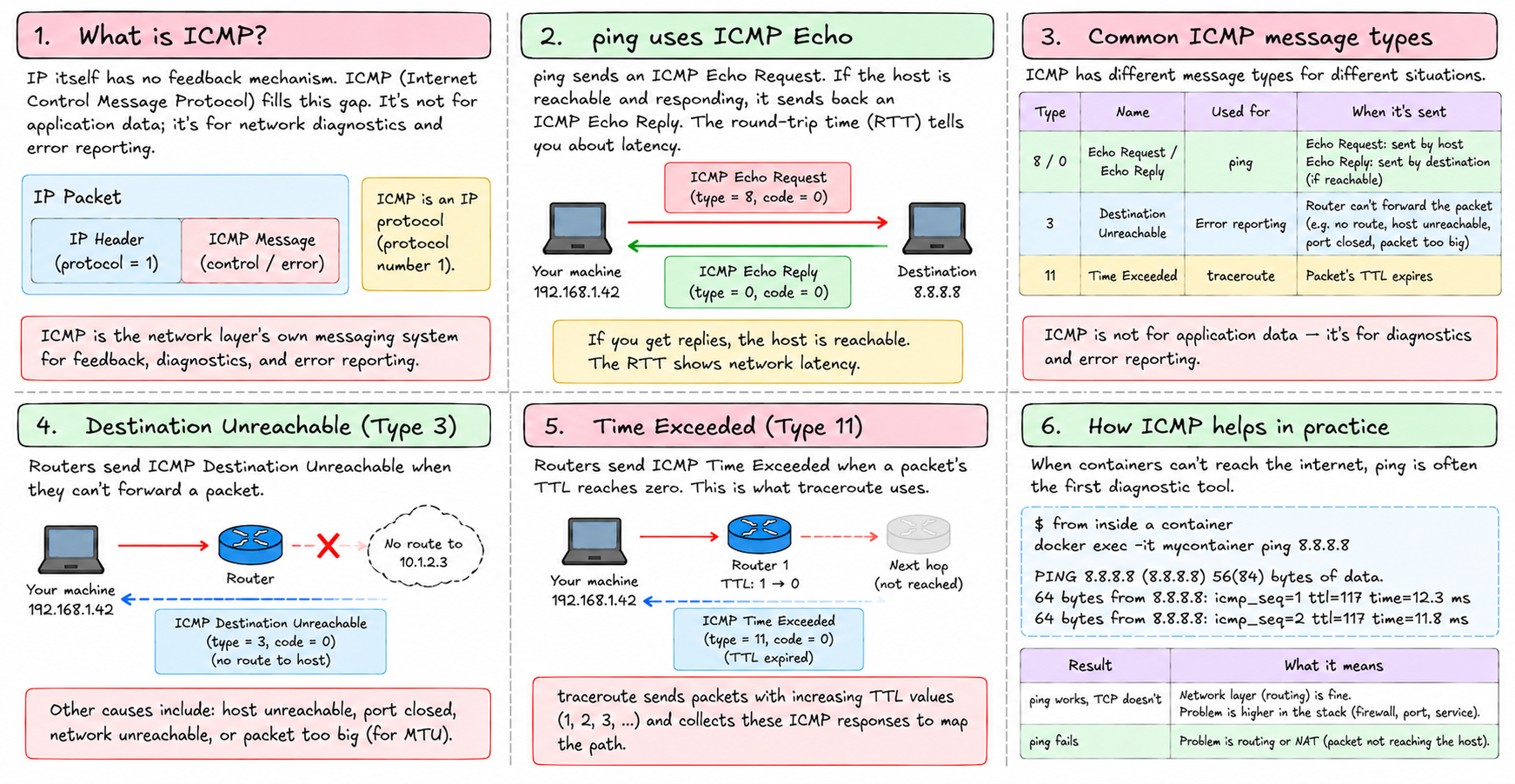
IP itself has no feedback mechanism. If a packet gets dropped, the sender doesn't know. ICMP — Internet Control Message Protocol — fills this gap. It's not for application data; it's for network diagnostics and error reporting.
ping uses ICMP Echo Request and Echo Reply. Send an echo request; if the host is reachable and responding, it sends back an echo reply. The round-trip time tells you about latency.
ICMP Destination Unreachable is sent by routers when they can't forward a packet — no route to host, port closed, packet too big.
ICMP Time Exceeded is sent when a packet's TTL expires. This is what traceroute uses.
ICMP is technically an IP protocol (protocol number 1), but it's the layer's own messaging system. Worth knowing because when containers can't reach the internet, ping 8.8.8.8 from inside the container is often the first diagnostic. If ping works but TCP doesn't, the problem is higher in the stack. If ping fails, the problem is routing or NAT.
Routing in tiny-aws
When tiny-aws brings up a container network in networking.rs, it:
- Creates a bridge
tinyaws0with IP10.0.0.1/16— this is the host's entry point into the container network - Creates a veth pair per container — one end on the bridge, one end in the container's network namespace
- Assigns the container end an IP like
10.0.0.2/16 - Sets
10.0.0.1as the container's default gateway
The host automatically has a route to 10.0.0.0/16 via tinyaws0 — the kernel adds it when the bridge gets its IP. The container has a default route via 10.0.0.1. Packets flow in both directions.
What's missing is internet access — packets from 10.0.0.2 that leave the host would arrive at your ISP's router with a source IP of 10.0.0.2, which is a private address. Your ISP's router would drop them. NAT fixes this. That's chapter 19.
Next: TCP — how processes have reliable conversations over an unreliable IP layer.