

Chapter 29: Virtual networking — bridges and veth pairs
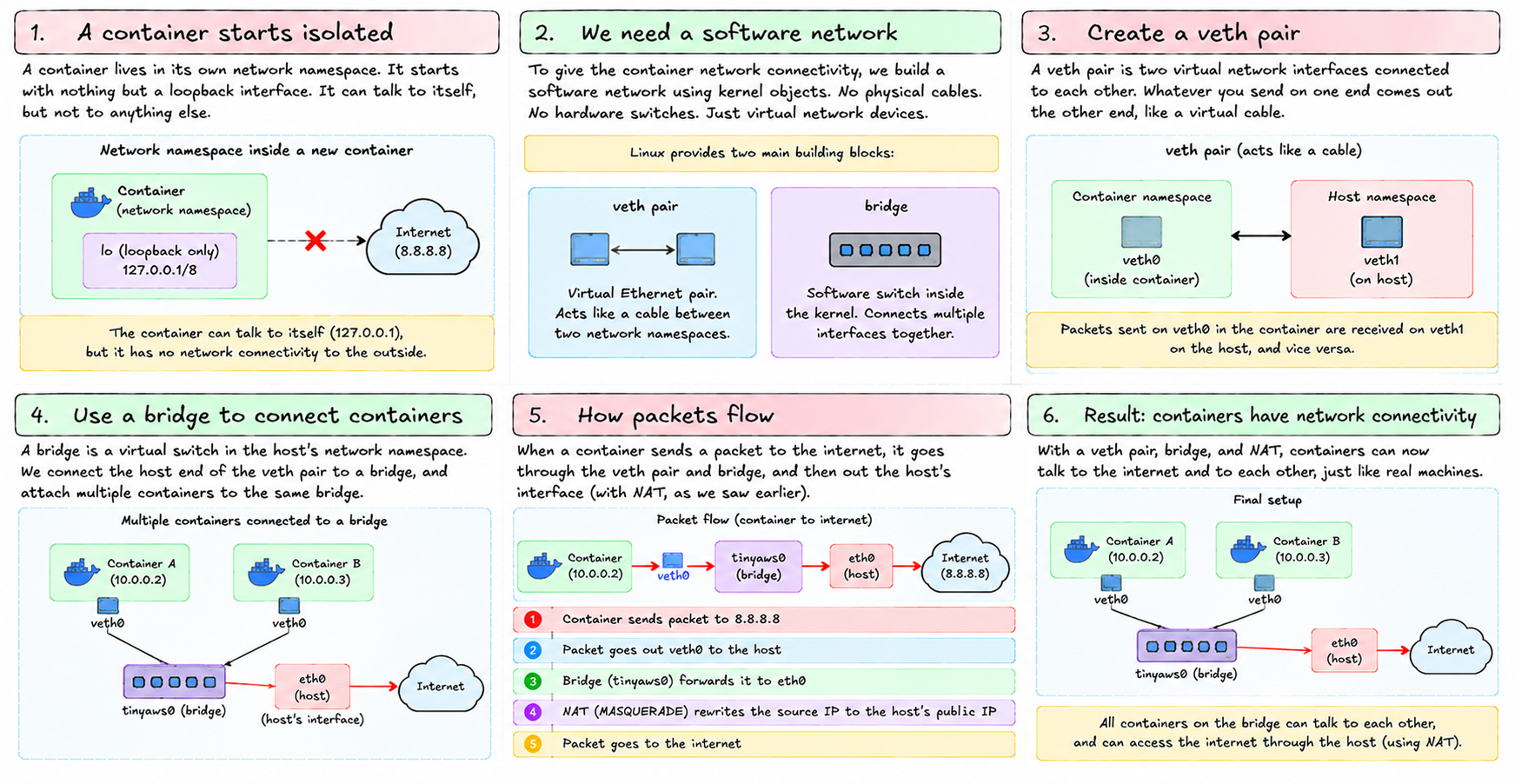
A container lives in its own network namespace. It starts with nothing but a loopback interface. It can talk to itself, but not to anything else.
A container lives in its own network namespace. It starts with nothing but a loopback interface. It can talk to itself, but not to anything else.
To give it network connectivity, we need to build a software network. No physical cables. No hardware switches. Just kernel objects that behave like the real thing.
Linux provides two building blocks: veth pairs and bridges.
veth pairs
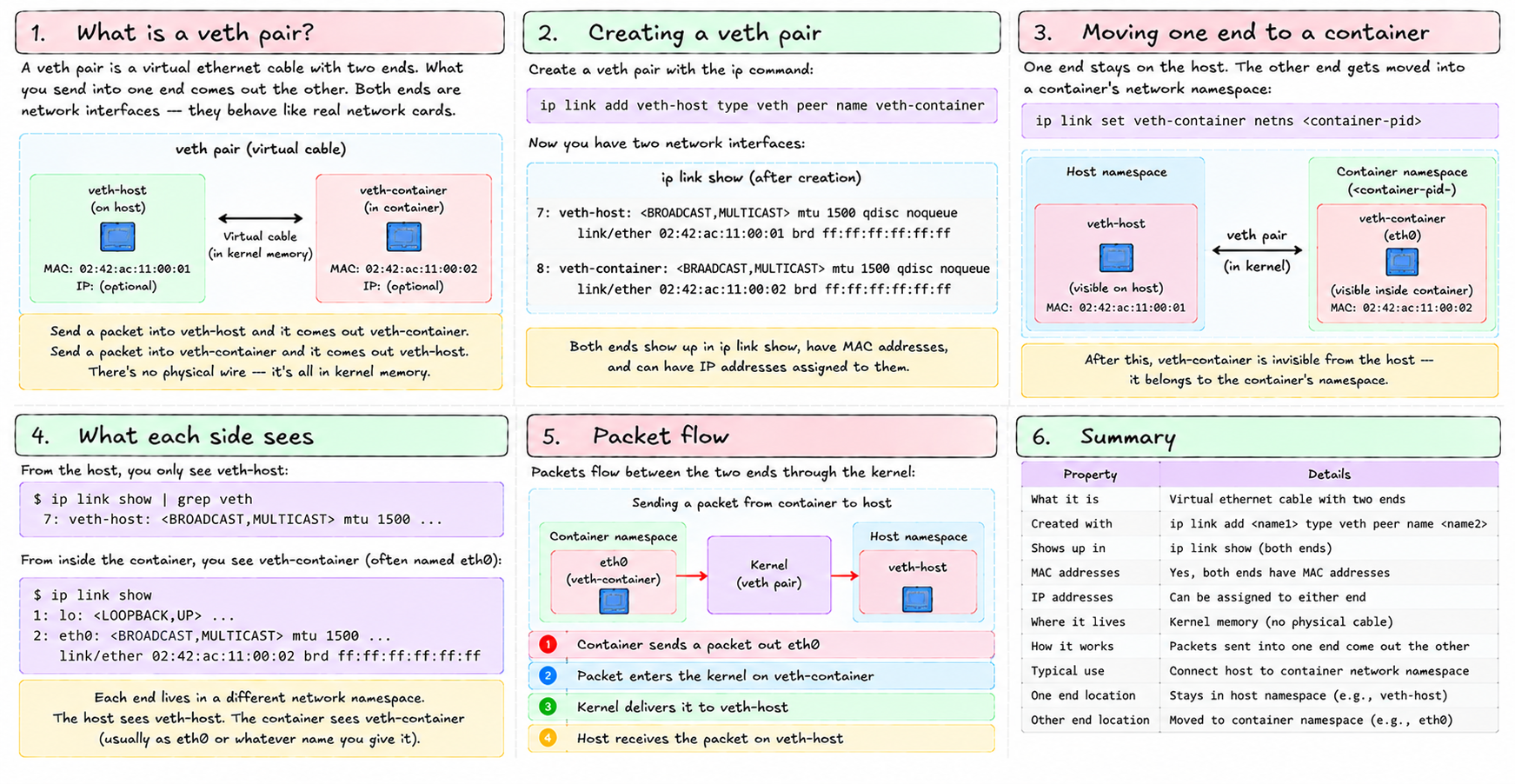
A veth pair is a virtual ethernet cable with two ends. What you send into one end comes out the other. Both ends are network interfaces — they show up in ip link show, they have MAC addresses, they can have IP addresses assigned to them.
Creating one:
ip link add veth-host type veth peer name veth-containerNow you have two interfaces: veth-host and veth-container. Send a packet into veth-host and it comes out veth-container. Send a packet into veth-container and it comes out veth-host. There's no wire — it's all in kernel memory. But it behaves exactly like a physical cable.
The trick is what you do with the two ends. One end stays on the host. The other end gets moved into a container's network namespace:
ip link set veth-container netns <container-pid>After this, veth-container is invisible from the host — it belongs to the container's namespace. The container sees it as eth0 (or whatever name you give it). The host sees veth-host. Traffic flows between them through the kernel.
Bridges
A veth pair connects one container to the host. But what if you want multiple containers? And what if you want them to talk to each other?
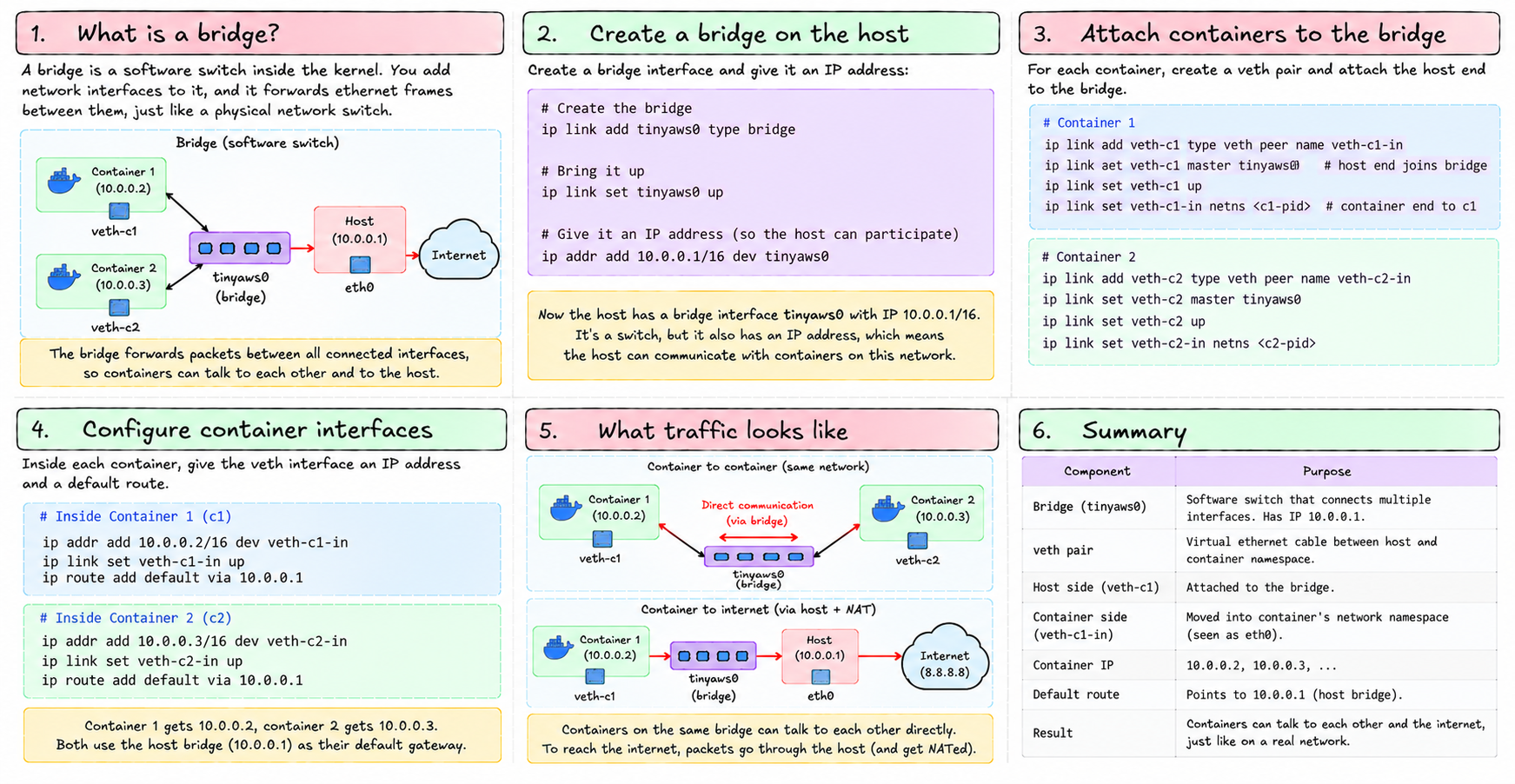
That's what a bridge is for. A bridge is a software switch. You add interfaces to it, and it forwards ethernet frames between them, just like a physical network switch.
Creating a bridge:
ip link add tinyaws0 type bridge
ip link set tinyaws0 up
ip addr add 10.0.0.1/16 dev tinyaws0
Now you have a bridge interface tinyaws0 with the IP 10.0.0.1. It's a switch, but it also has an IP address — which means the host can participate in the network it's switching.
For each container, create a veth pair and attach the host end to the bridge:
# Container 1
ip link add veth-c1 type veth peer name veth-c1-in
ip link set veth-c1 master tinyaws0     # host end joins the bridge
ip link set veth-c1 up
ip link set veth-c1-in netns <c1-pid>   # container end goes into c1's namespace

# Container 2
ip link add veth-c2 type veth peer name veth-c2-in
ip link set veth-c2 master tinyaws0
ip link set veth-c2 up
ip link set veth-c2-in netns <c2-pid>
Inside container 1, give veth-c1-in an IP and a default route:
ip addr add 10.0.0.2/16 dev veth-c1-in
ip link set veth-c1-in up
ip route add default via 10.0.0.1
Container 2 gets 10.0.0.3. The host bridge is 10.0.0.1.
How packets flow
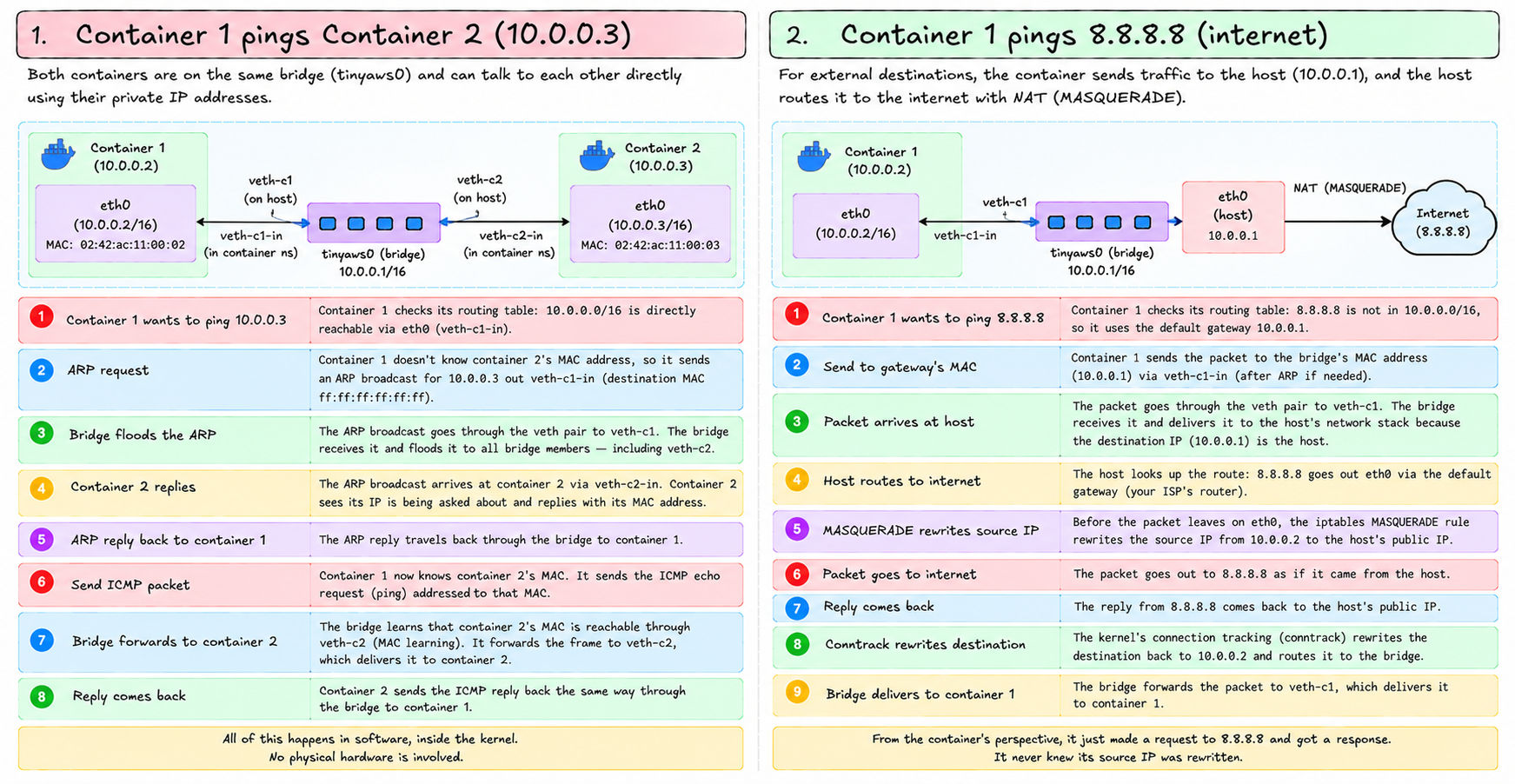
Container 1 pings Container 2 (10.0.0.3):
- Container 1 sends a packet to
10.0.0.3. Its routing table says:10.0.0.0/16is directly reachable viaveth-c1-in. - It needs the MAC address for
10.0.0.3. It sends an ARP broadcast outveth-c1-in. - The ARP broadcast goes through the veth pair to the host's
veth-c1. The bridge receives it and floods it to all bridge members — includingveth-c2. - The ARP broadcast arrives at container 2 via
veth-c2-in. Container 2 sees its IP is being asked about, replies with its MAC address. - The ARP reply travels back through the bridge to container 1.
- Container 1 now knows container 2's MAC. It sends the ICMP packet addressed to that MAC.
- The bridge learns: that MAC is reachable through
veth-c2. It forwards the frame toveth-c2, which delivers it to container 2.
All in software. No physical hardware involved.
Container 1 pings 8.8.8.8:
- Container 1 sends a packet to
8.8.8.8. Routing table: not in10.0.0.0/16, so use the default gateway10.0.0.1. - It sends the packet to the bridge's MAC address via
veth-c1-in. - The packet arrives at the bridge and is delivered to the host's network stack (because
10.0.0.1is the host). - The host routes it:
8.8.8.8goes outeth0via the default gateway. - But the source IP is
10.0.0.2— a private address. The MASQUERADE rule rewrites it to the host's public IP. - The packet goes out as if it came from the host. The reply comes back to the host.
- Conntrack rewrites the destination back to
10.0.0.2. The host routes it to the bridge. The bridge delivers it to container 1.
The container never knew its source IP was rewritten. From its perspective, it made a request to 8.8.8.8 and got a response.
What this looks like in tiny-aws
networking.rs in the ec2-agent does exactly this. Key parts:
ip link add tinyaws0 type bridge
ip addr add 10.0.0.1/16 dev tinyaws0
ip link set tinyaws0 up
iptables -t nat -A POSTROUTING -s 10.0.0.0/16 ! -o tinyaws0 -j MASQUERADE
That's the one-time setup when the agent starts.
For each instance:
ip link add veth-<id> type veth peer name veth-<id>-i
ip link set veth-<id> master tinyaws0
ip link set veth-<id> up
ip link set veth-<id>-i netns <pid>
Then inside the container's namespace:
ip addr add 10.0.0.<seq>/16 dev veth-<id>-i
ip link set veth-<id>-i up
ip route add default via 10.0.0.1
The sequence number is the container's index — container 2 gets 10.0.0.2, container 3 gets 10.0.0.3. Simple, sequential, no DHCP needed.
Cleanup
When a container exits, the veth pair is automatically cleaned up — when the container's namespace is destroyed, the interface in it is destroyed too, which also destroys the host end (veth pairs are linked: destroy one end, the other goes away).
The bridge stays up as long as the agent is running. No cleanup needed between containers.
The full picture
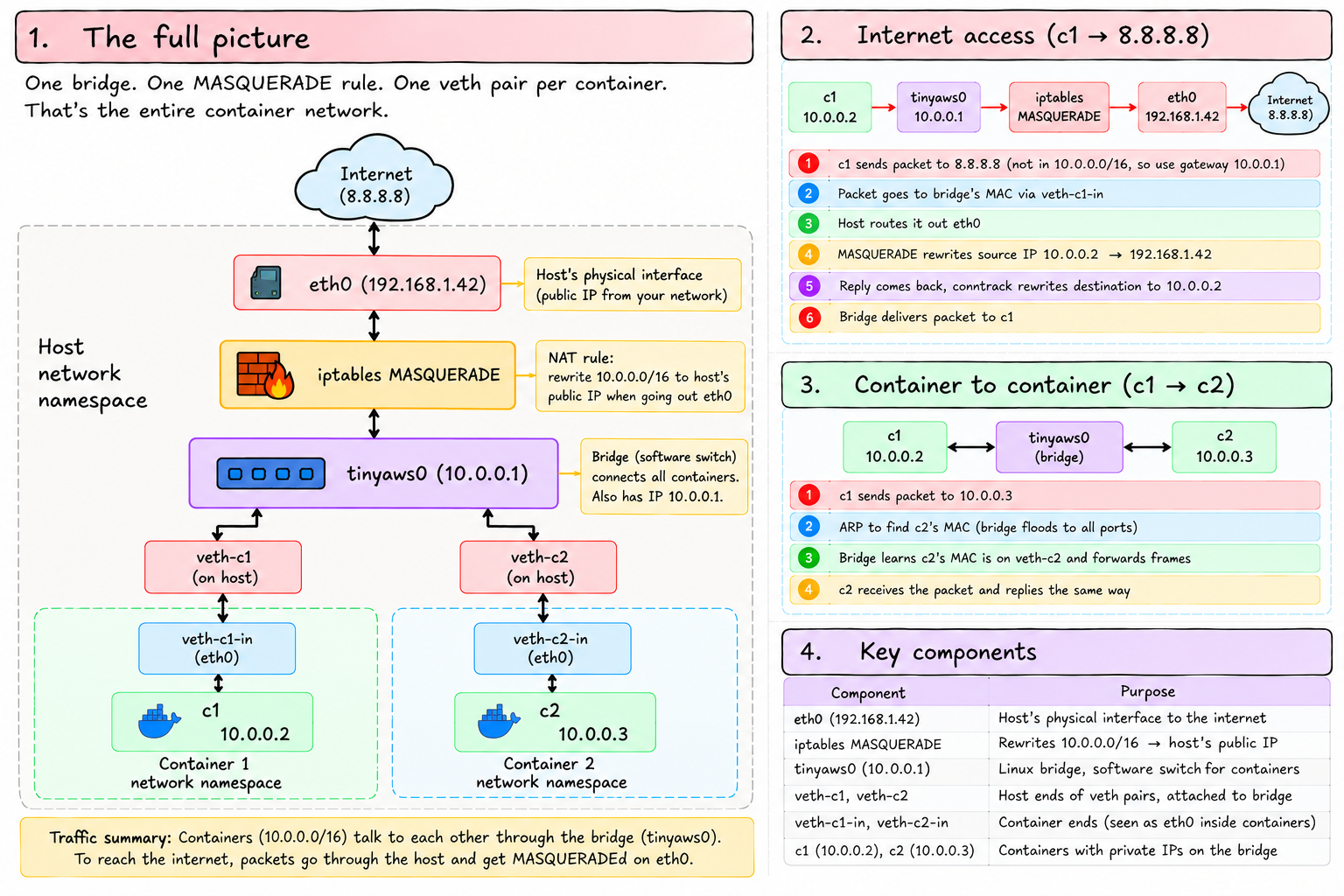
Internet
    |
  eth0 (192.168.1.42) — host's physical interface
    |
  [iptables MASQUERADE]
    |
  tinyaws0 (10.0.0.1) — the bridge
    |          |
  veth-c1    veth-c2         ← host ends, attached to bridge
    |          |
  veth-c1-in  veth-c2-in     ← container ends, in each namespace
    |          |
  [c1: 10.0.0.2]  [c2: 10.0.0.3]
One bridge. One MASQUERADE rule. One veth pair per container. That's the entire container network.
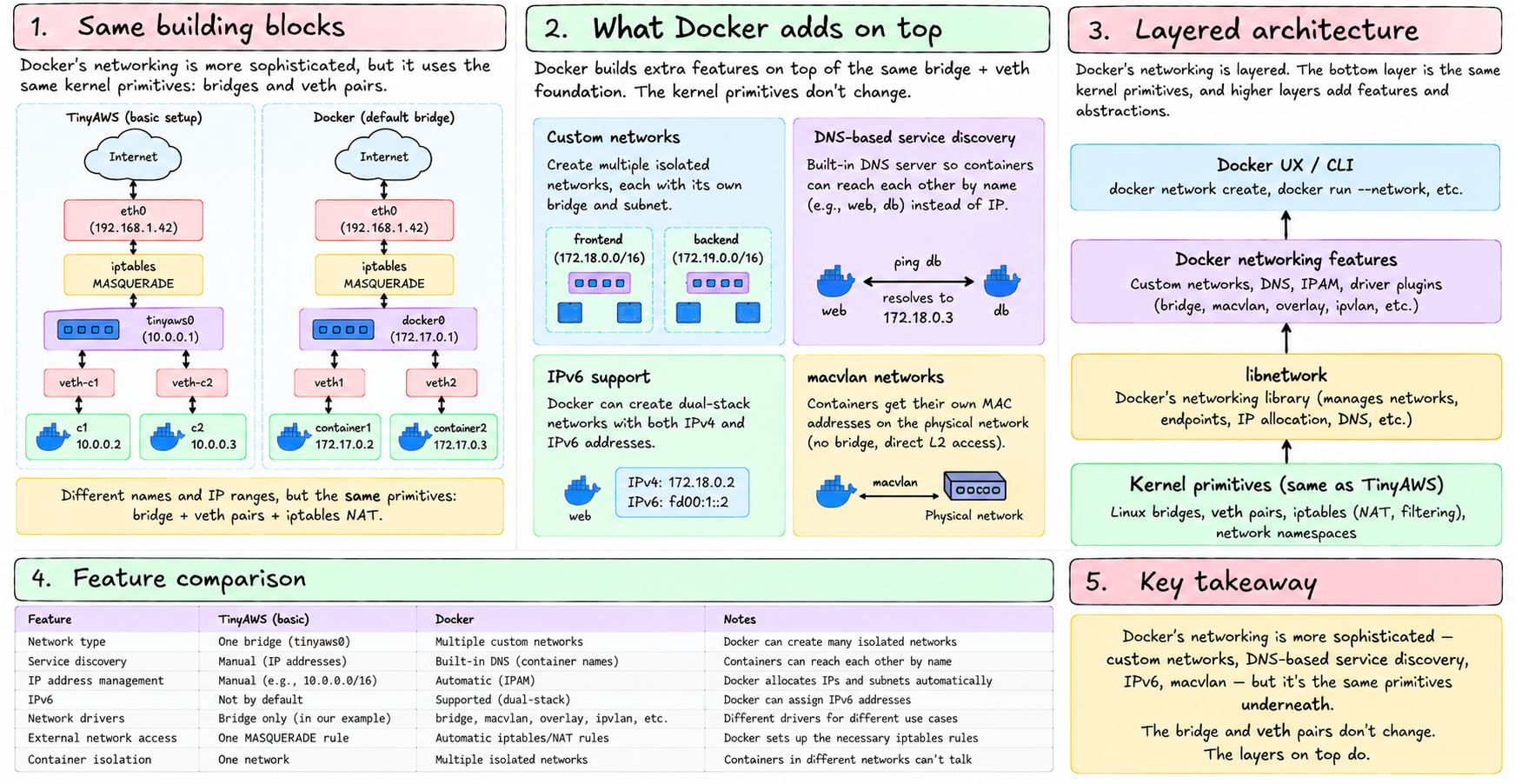
Docker's networking is more sophisticated — custom networks, DNS-based service discovery, IPv6, macvlan — but it's the same primitives underneath. The bridge and veth pairs don't change. The layers on top do.
We've now covered all the networking fundamentals: ethernet frames, IP packets, routing, TCP, UDP, sockets, Linux interfaces, iptables, and virtual networking. Everything that happens when a container makes a network request is explained.
Next: Chapter 30 — we open tiny-aws itself and see how all of this assembles into a real cloud platform.