

Chapter 27: Network interfaces in Linux
The network stack we've built up in the last few chapters — ethernet frames, IP packets, TCP segments — has to be grounded somewhere in the actual kernel....
The network stack we've built up in the last few chapters — ethernet frames, IP packets, TCP segments — has to be grounded somewhere in the actual kernel. The grounding point is the network interface.
A network interface is the kernel's abstraction for a network connection. It could represent a physical ethernet port, a wifi radio, a loopback device, a virtual ethernet cable, or a bridge. From the kernel's perspective, they all look the same: a named device that can send and receive packets.
Listing interfaces
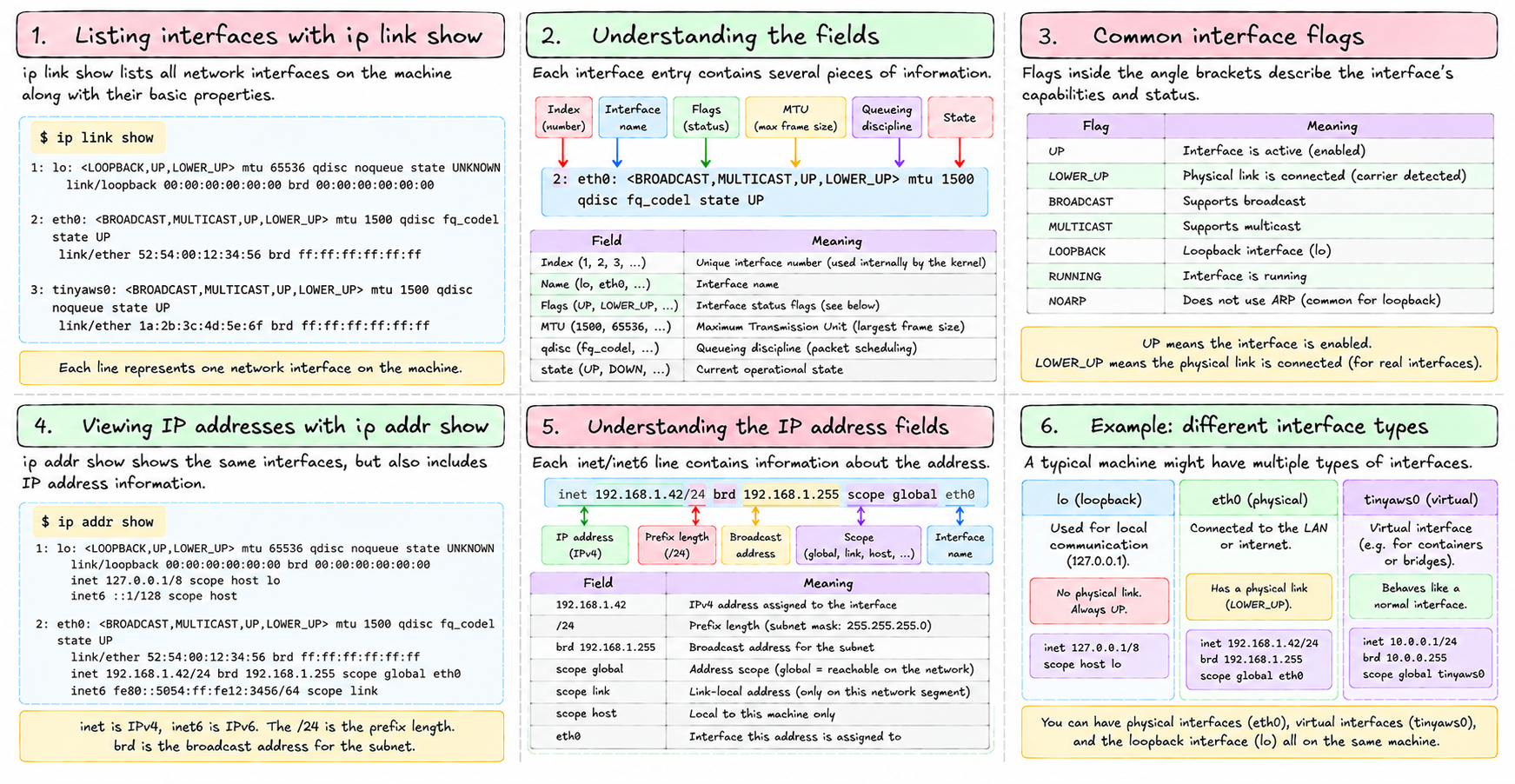
ip link show lists all interfaces on the machine:
1: lo: <LOOPBACK,UP,LOWER_UP> mtu 65536 qdisc noqueue state UNKNOWN
    link/loopback 00:00:00:00:00:00 brd 00:00:00:00:00:00
2: eth0: <BROADCAST,MULTICAST,UP,LOWER_UP> mtu 1500 qdisc fq_codel state UP
    link/ether 52:54:00:12:34:56 brd ff:ff:ff:ff:ff:ff
3: tinyaws0: <BROADCAST,MULTICAST,UP,LOWER_UP> mtu 1500 qdisc noqueue state UP
    link/ether 1a:2b:3c:4d:5e:6f brd ff:ff:ff:ff:ff:ff
Each entry has:
- A number (the interface index)
- A name (
lo,eth0,tinyaws0) - Flags in angle brackets —
UPmeans the interface is active;LOWER_UPmeans the physical link is connected - MTU — maximum transmission unit, the largest frame this interface will send
- A MAC address
ip addr show adds IP address information:
2: eth0: <BROADCAST,MULTICAST,UP,LOWER_UP> mtu 1500 ...
    inet 192.168.1.42/24 brd 192.168.1.255 scope global eth0
inet is IPv4. inet6 is IPv6. The /24 is the prefix length. brd is the broadcast address for the subnet.
lo — the loopback interface
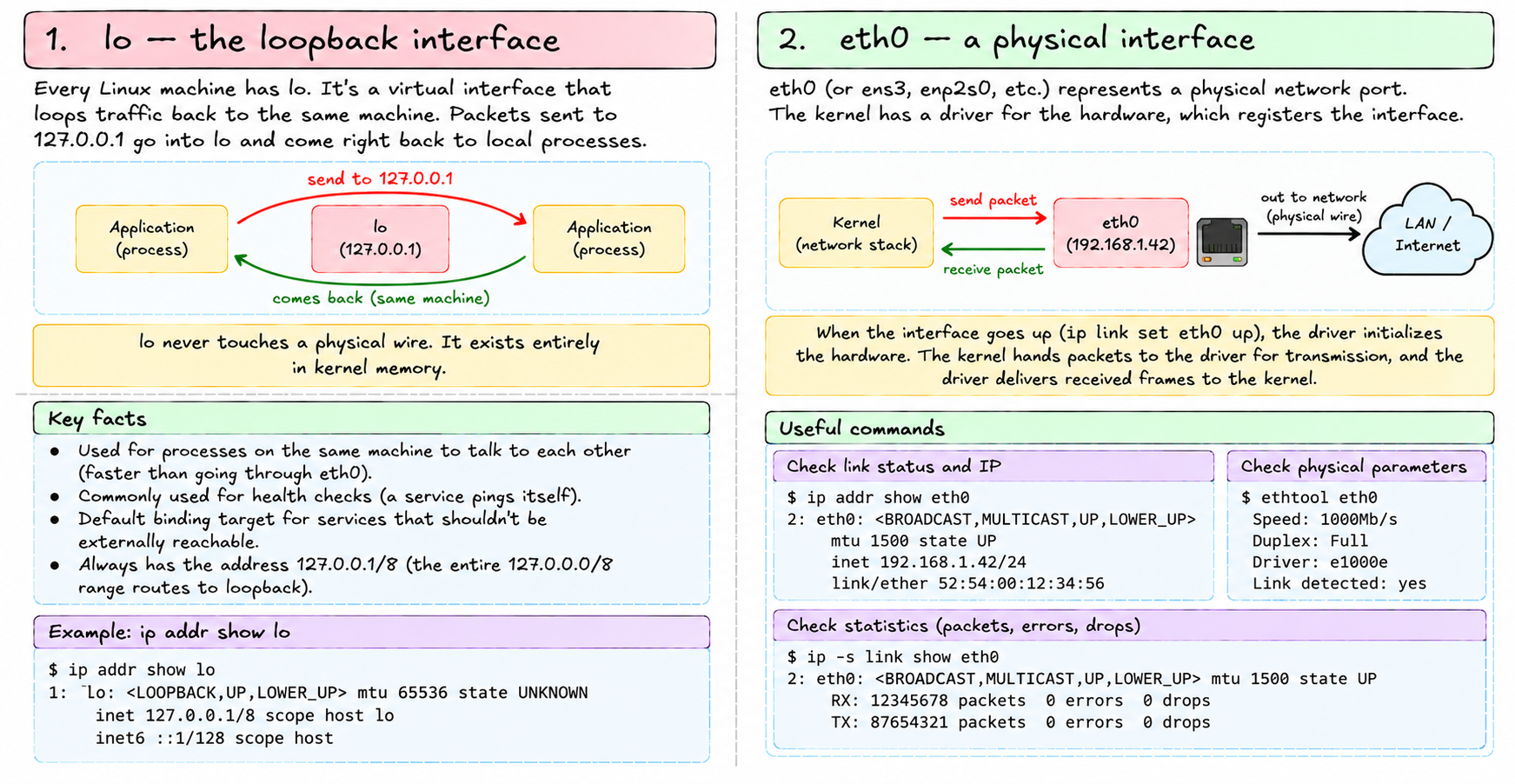
Every Linux machine has lo. It's a virtual interface that loops traffic back to the same machine. Packets sent to 127.0.0.1 go into lo and come right back out to local processes.
lo never touches a physical wire. It exists entirely in kernel memory. It's used for:
- Processes on the same machine talking to each other without involving the network stack (faster than going through eth0)
- Health checks where a service pings itself
- Default binding target for services that shouldn't be externally reachable
lo always has the address 127.0.0.1/8. The entire 127.0.0.0/8 range routes to loopback.
eth0 — a physical interface
eth0 (or ens3, enp2s0, or whatever your system names it) represents a physical network port. The kernel has a driver for the hardware, which registers the interface.
When the interface goes up (ip link set eth0 up), the driver initializes the hardware. When a packet needs to be sent out eth0, the kernel hands it to the driver, which queues it for transmission. When the hardware receives a frame, the driver delivers it to the kernel.
ethtool eth0 shows the physical parameters: link speed, duplex, driver version. ip -s link show eth0 shows counters: packets sent, packets received, errors, drops.
Bringing up an interface
An interface can exist in the kernel without being active. ip link set eth0 up brings it up. ip link set eth0 down takes it down. Down means: no packets in or out, even if the wire is connected.
Adding an IP address:
ip addr add 192.168.1.42/24 dev eth0Removing one:
ip addr del 192.168.1.42/24 dev eth0An interface can have multiple IP addresses. This is used for virtual hosting (a web server hosting many domains on different IPs), for failover (taking over a floating IP when another machine fails), or for multi-subnet connectivity.
Interface flags
The flags in <BROADCAST,MULTICAST,UP,LOWER_UP> tell you about the interface's capabilities and state:
- UP — interface is administratively enabled
- LOWER_UP — physical link is detected (cable plugged in, wifi associated)
- BROADCAST — supports broadcast (ethernet)
- MULTICAST — supports multicast
- LOOPBACK — this is the loopback interface
- POINTOPOINT — this is a point-to-point link (e.g., a VPN tunnel)
- NOARP — doesn't use ARP
For virtual interfaces like veth pairs, LOWER_UP is set as long as both ends exist and one end is up. When a container exits and its veth end is deleted, the host end shows LOWER_UP dropping.
The interface and the network namespace
Every interface belongs to exactly one network namespace. When a new network namespace is created, it starts with only lo — no other interfaces.
Moving an interface between namespaces:
ip link set veth-i-1-i netns <pid>This moves the veth-i-1-i interface into the network namespace of the process with that PID. After this, ip link show on the host no longer shows it. nsenter --target <pid> --net ip link show does.
This is how container networking works: create a veth pair, move one end into the container's namespace, configure both ends. The host sees one end; the container sees the other.
Inspecting traffic
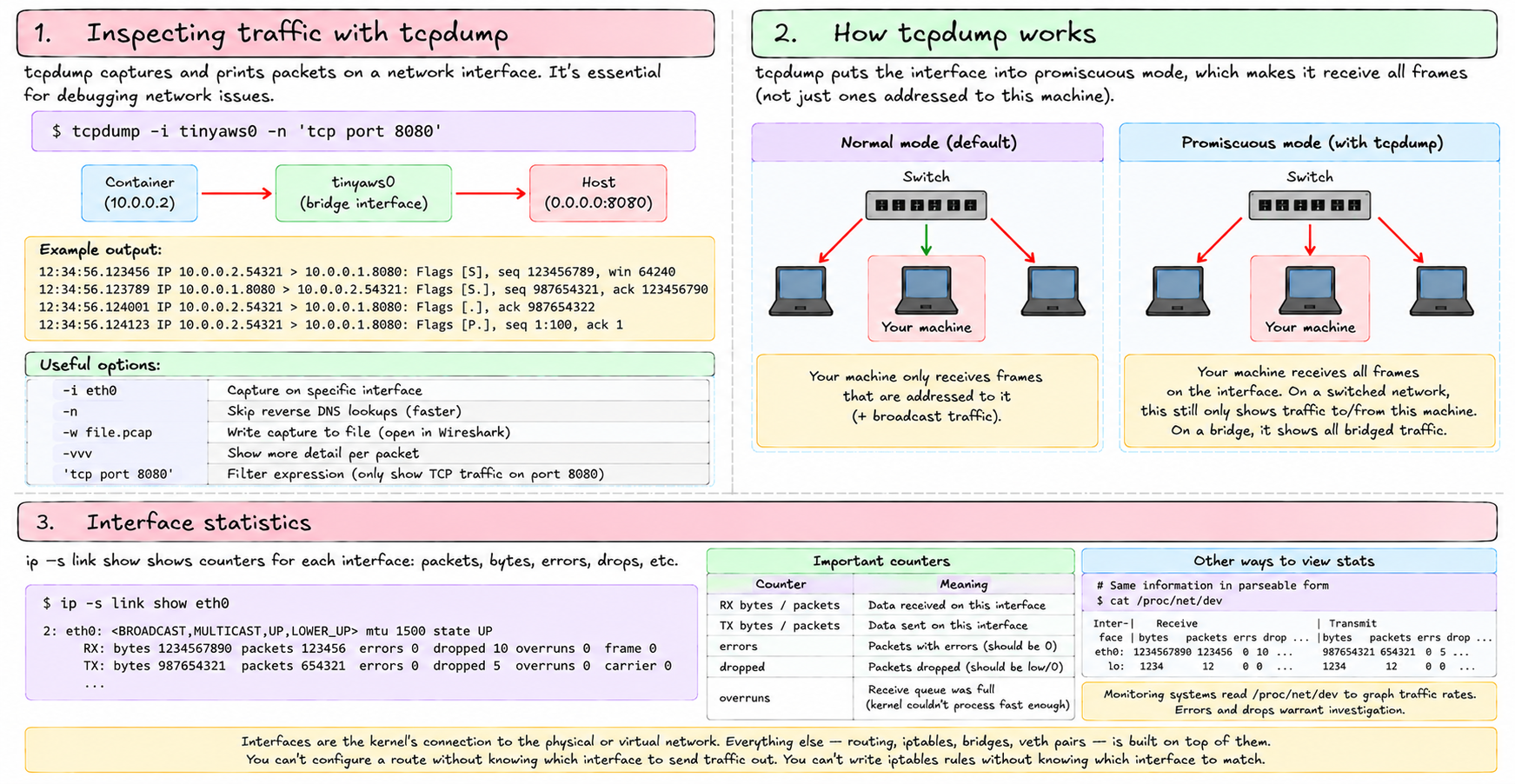
tcpdump -i eth0 captures and prints packets on an interface. Essential for debugging.
tcpdump -i tinyaws0 -n 'tcp port 8080'This captures TCP traffic on port 8080 on the bridge interface — useful for watching container-to-host traffic without the noise of everything else.
-n skips reverse DNS lookups. -w file.pcap writes to a file you can open in Wireshark. -vvv gives more detail per packet.
tcpdump works by putting the interface into promiscuous mode — it receives all frames, not just ones addressed to this machine. On a switched network, this only shows traffic to/from this machine (plus broadcasts). On a bridge, it shows all bridged traffic.
Interface statistics
ip -s link show eth0Shows counters: RX bytes, TX bytes, RX packets, TX packets, errors, drops, overruns. Errors and drops warrant investigation. An overrun means the kernel's receive queue filled up — the CPU couldn't process incoming packets fast enough.
/proc/net/dev has the same information in parseable form. Monitoring systems read it to graph traffic rates.
Interfaces are the kernel's connection to the physical or virtual network. Everything else — routing, iptables, bridges, veth pairs — is built on top of them. You can't configure a route without knowing which interface to send traffic out. You can't write iptables rules without knowing which interface to match.
Next: iptables — the kernel's packet filtering and NAT framework that makes security groups and internet access from containers possible.