

Chapter 4: The filesystem is not the disk
When most people think about a filesystem, they think about a hard drive.
When most people think about a filesystem, they think about a hard drive.
That makes sense. On your laptop, the files you save live on a disk. The filesystem is how those files are organized — folders, names, paths. It feels like the filesystem and the disk are the same thing.
They're not. And the distinction matters enormously for understanding how Linux works.
Start with what a disk actually is.
A disk is a block device. It stores data in fixed-size chunks called blocks — typically 4096 bytes each. You can read block 0, write block 47, read blocks 100 through 200. The disk doesn't know about files or folders. It knows about blocks. Nothing else.
A filesystem is software that imposes structure on those blocks. It decides: block 0 through 10 are the superblock, which describes the filesystem. Blocks 11 through 100 are the inode table. The rest are data blocks. It defines a format, and then every read and write goes through code that understands that format.
The Linux kernel has a layer called the VFS — the Virtual File System. It's an abstraction that sits between everything that wants to read and write files, and everything that actually stores data. Programs don't talk to ext4 or xfs or btrfs directly. They talk to the VFS. The VFS figures out which filesystem is responsible for the path being accessed and delegates to it.
This means the kernel can present things as files without them being on a disk at all.
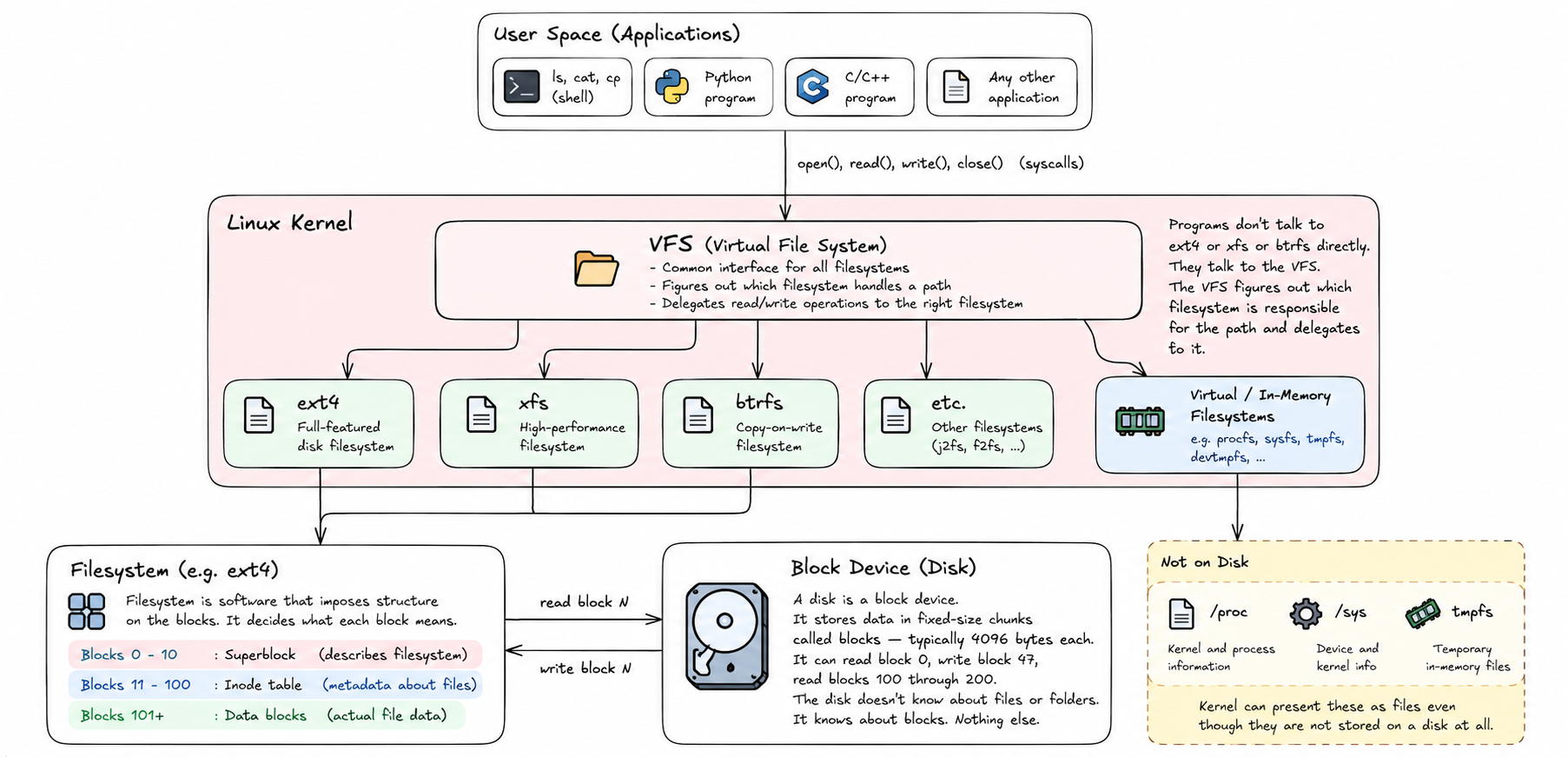
/proc is the clearest example.
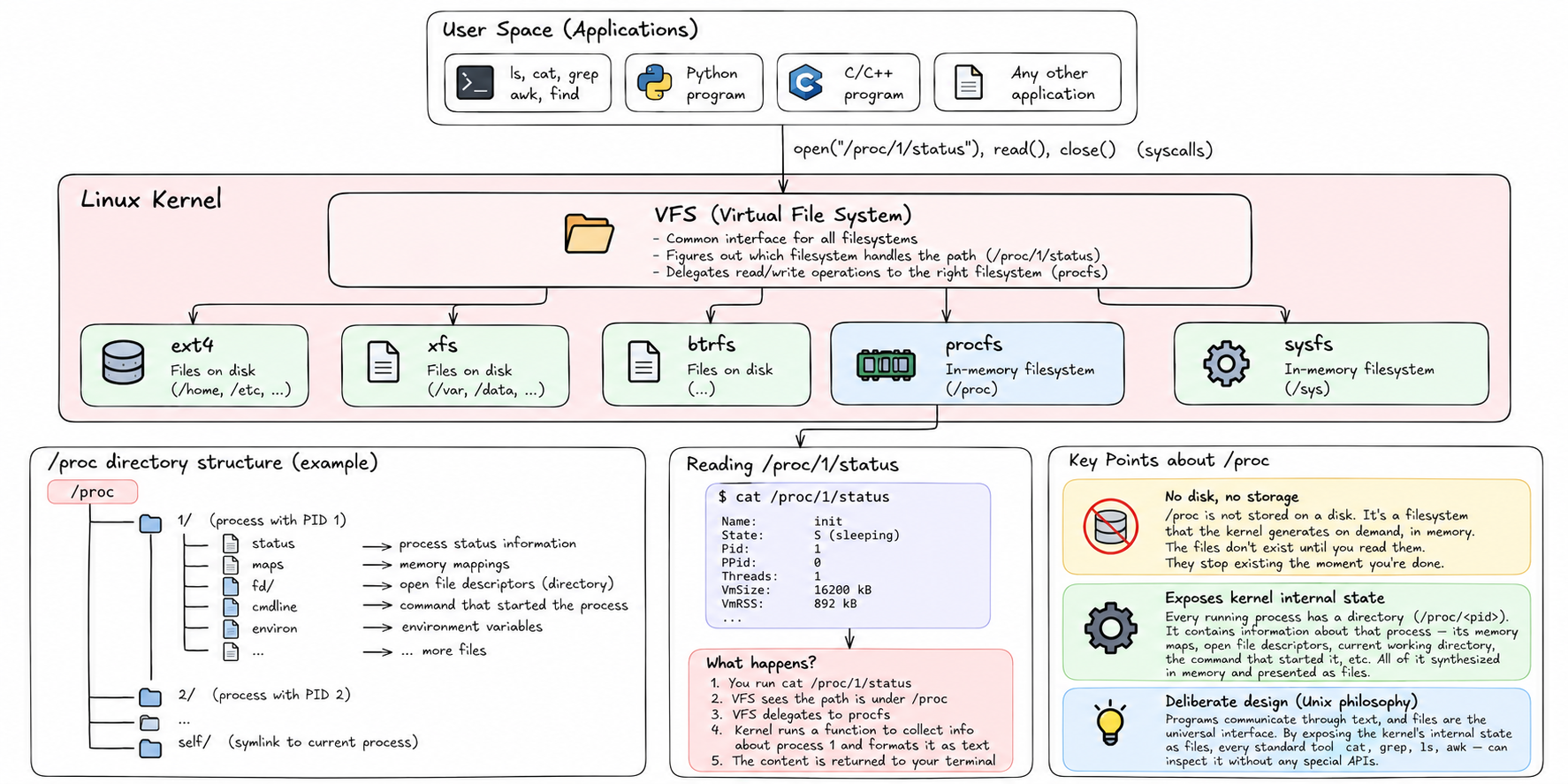
Open a terminal and look at /proc/1. That's a directory. Inside it there are files — status, maps, fd, cmdline. Those files have sizes. You can cat them. They have permissions. As far as the VFS is concerned, they are files.
There is no disk. There is no storage. /proc is a filesystem that the kernel generates on demand, in memory. When you read /proc/1/status, the kernel runs a function that collects information about process 1 and formats it as text. The file doesn't exist until you read it. It stops existing the moment you're done.
/proc exposes the kernel's internal state as a navigable directory tree. Every running process has a directory. The directory contains information about that process — its memory maps, its open file descriptors, its current working directory, the command that started it. All of it synthesized in memory, presented as files.
This is not a quirk. It's deliberate design. The Unix philosophy is that programs communicate through text, and files are the universal interface. If the kernel's internal state looks like files, then every standard tool — cat, grep, ls, awk — can inspect it without any special APIs.
/sys works the same way.
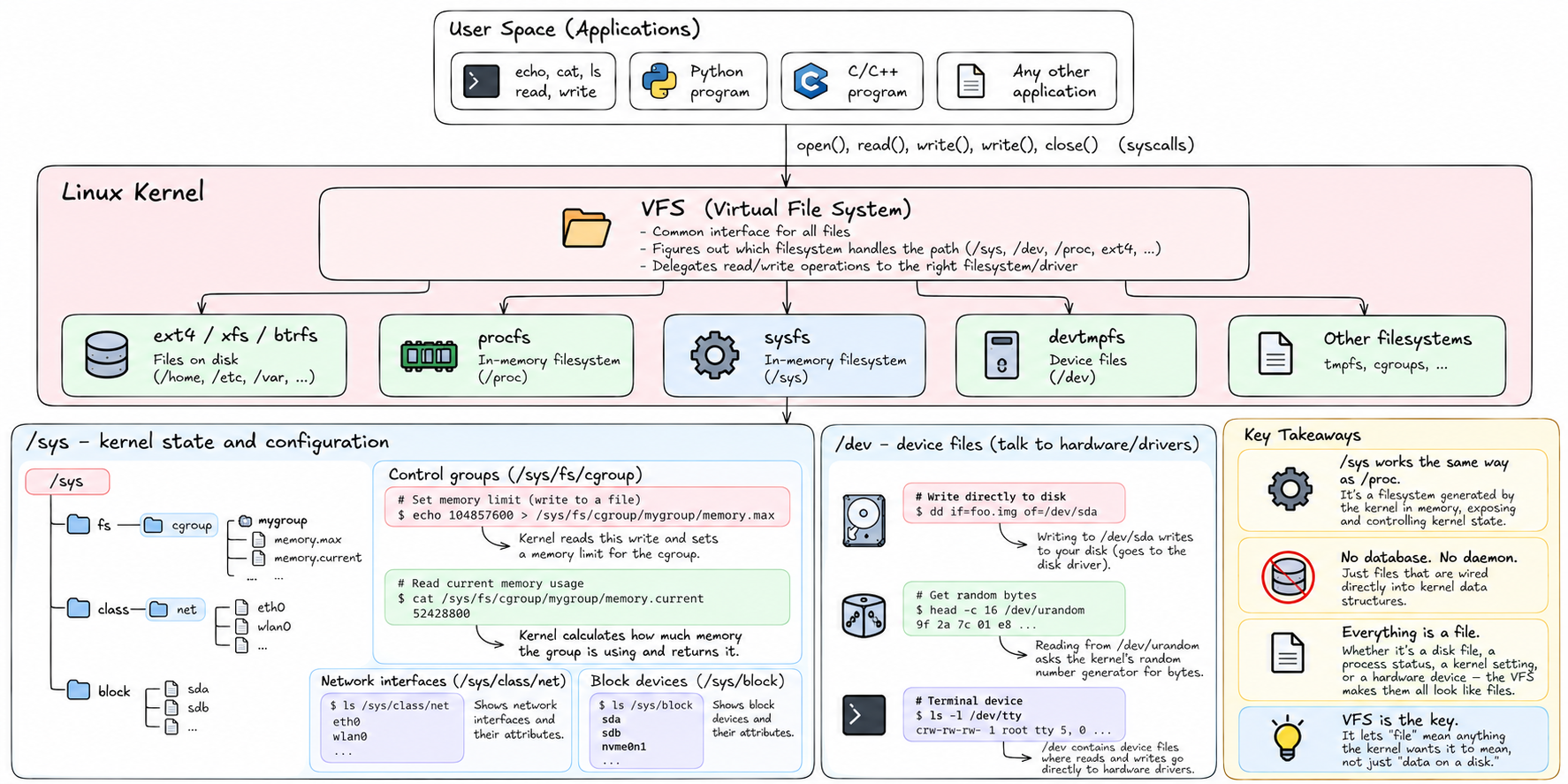
/sys/fs/cgroup is where the kernel exposes control group management. Write a number to /sys/fs/cgroup/mygroup/memory.max and the kernel reads that write and sets a memory limit. Read /sys/fs/cgroup/mygroup/memory.current and the kernel calculates how much memory that group is currently using and returns it.
No database. No daemon. Just files that happen to be wired directly into kernel data structures.
/sys/class/net shows you network interfaces. /sys/block shows you block devices. /dev contains device files — special files where reads and writes go directly to hardware drivers. Writing to /dev/sda writes to your disk. Reading from /dev/urandom asks the kernel's random number generator for bytes.
Everything is a file. That's the rule. And the VFS is what makes the rule work — it's the layer that lets "file" mean anything the kernel wants it to mean, not just "data on a disk."
There's one more piece: the inode.
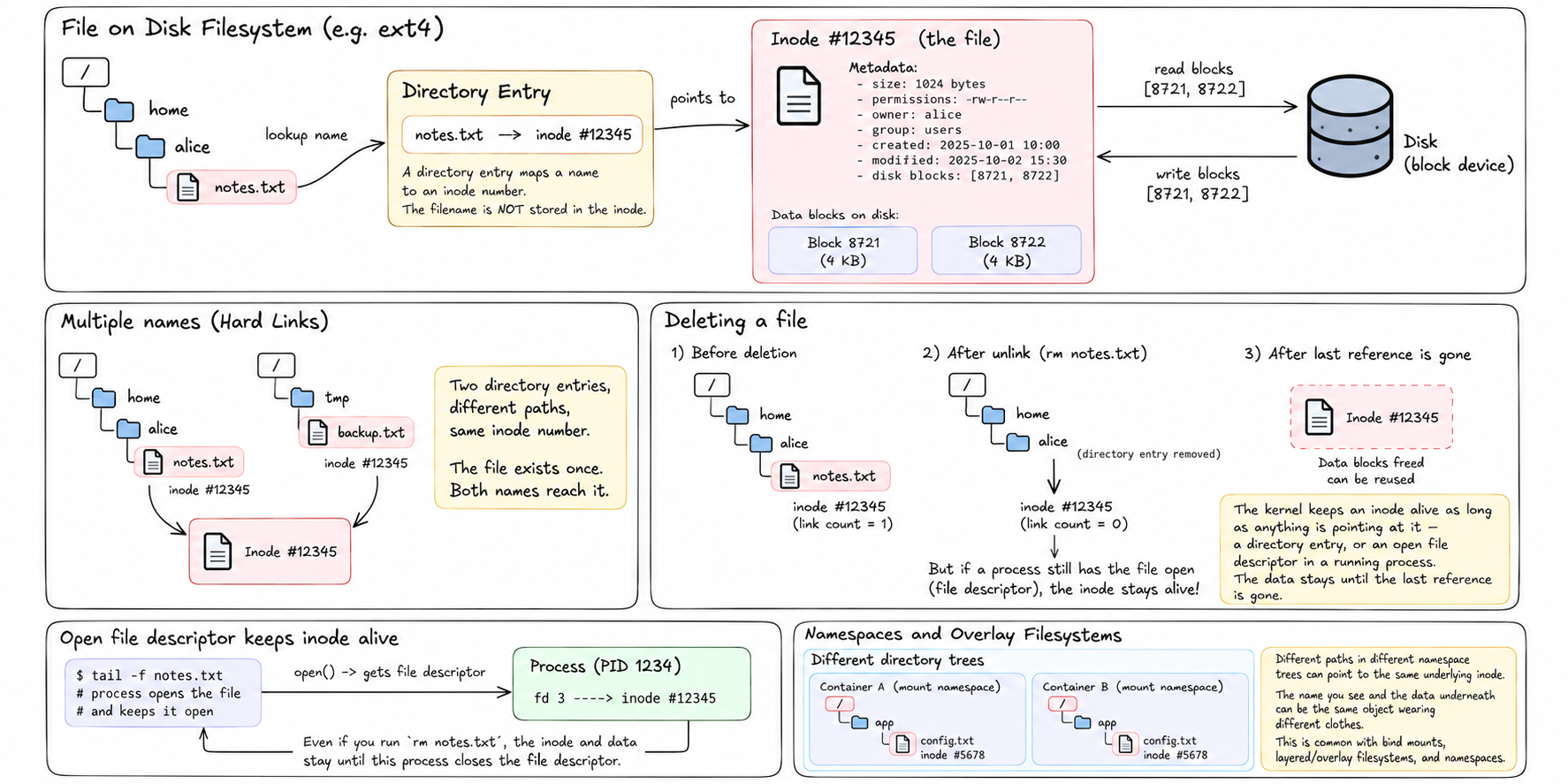
When a file lives on a real disk filesystem, the kernel tracks it with an inode — a data structure that records the file's metadata: its size, its permissions, its owner, the timestamps for when it was created and modified, and the list of disk blocks that contain its data.
The filename you use — /home/alice/notes.txt — is not stored in the inode. It's stored in a directory entry that maps a name to an inode number. The inode is the file. The name is just a label pointing at it.
This is why you can have multiple names for the same file — hard links. Two directory entries, different paths, same inode number. The file exists once. Both names reach it.
It's also why deleting a file doesn't always free space. The kernel keeps an inode alive as long as anything is pointing at it — a directory entry, or an open file descriptor in a running process. The data stays until the last reference is gone.
Understanding inodes matters here because when you start working with namespaces and overlay filesystems, you're working with multiple directory trees that may share underlying inodes. The name you see and the data underneath can be the same object wearing different clothes.
So: the filesystem is an abstraction. The VFS is the abstraction layer. Real filesystems store data on disk. Virtual filesystems like /proc and /sys store nothing — they generate data from kernel state on demand. And files are just names pointing at inodes, which are the kernel's actual record of a piece of data.
When we talk about giving a container its own filesystem, we're not talking about giving it its own disk. We're talking about constructing a view — a particular arrangement of inodes and directory entries — that looks, from inside, like a complete Linux system.
How that view gets constructed is coming. But first we need to understand what happens when a machine starts from scratch.
That's next.